 goetz
goetzWant to help testing #CLAT on Linux and run #networkmanager?
Please tryout:
https://ipv6-pod.info/2026-02/network-manager-clat.html
Testing NetworkManager CLAT support
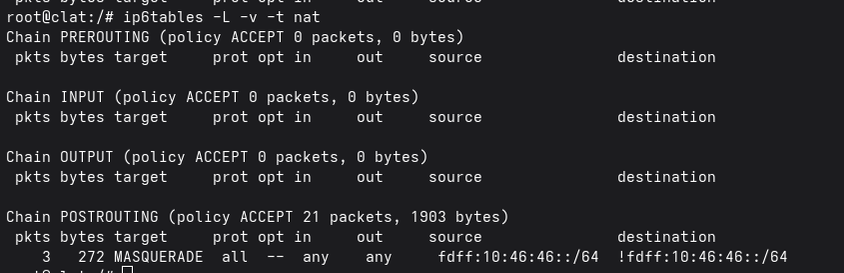
NetworkManager CLAT support has been merged! What is a CLAT? In IPv6-only or IPv6-mostly networks, access to IPv4 resources is often required. The most promising way IPv4 access can be provided is through a 464xlat deployment in the network, which provides IPv4 over the top of an IPv6-only infrastructure infrastructure. A key piece in this deployment is a CLAT (or Client-side Translator), which translates IPv4 traffic to IPv6 so it can be sent to the PLAT (or Provider-side Translator). Operating Systems that include CLATs today iOS macOS Android ChromeOS Windows (on LTE/5G interfaces only) In fact, a major LTE/5G provider in the US has been using 464xlat to provide IPv4-over-IPv6 for well over a decade, allowing them to operate a majority of their mobile network infrastructure as IPv6-only. There has been a concerted effort to bring CLAT functionality to more devices, and NetworkManager has recently merged in initial CLAT support, bringing Linux systems closer to an IPv6-only world. Can I Test It? This feature has not been released yet, but if you're keen to try it out, the NetworkManager nightly RPM builds makes this easy. Note that nightly builds are experimental and can break unexpectedly -- be sure to test on a system you're ok breaking. First you'll need a network with NAT64, PREF64, and DHCPv4 Option 108 enabled. If you don't have these deployed in your network the IPv6 Test Pod Project is here for you! After you have a 464xlat-ready network, you'll need to install the nightly build of NetworkManager, below are some command snippets that will work on Fedora and RHEL-based Linux distributions. nmcli --version # 1.54.3-2.fc43 sudo dnf install -y copr sudo dnf copr enable networkmanager/NetworkManger-main sudo dnf upgrade # Upgrade to nightly build reboot nmcli --version # 1.57.2~dev-34410.fc43 # Enable CLAT and DHCP Option 108 sudo nmcli connection show sudo nmcli connection show "Wired connection 1" | grep -E 'clat|ipv6-only' sudo nmcli connection modify "Wired connection 1" \ ipv4.clat auto \ ipv4.dhcp-ipv6-only-preferred auto sudo nmcli connection up "Wired connection 1" # View CLAT configuration ip -4 addr ip -4 route # Check CLAT functionality curl -6v canhazip.com curl -4v canhazip.com traceroute -4 canhazip.com Note that to enable the CLAT 1) The PREF64 attribute must be present in an IPv6 Router Advertisement and 2) DHCPv4 option 108 must be enabled in the network -or- there DHCPv4 services must be disabled in the network. After enabling and activating the CLAT, you should see something like the following: What happens next? CLAT functionality is slated to be in NetworkManager release 1.58. Until it's more thoroughly tested, the CLAT will be disabled by default. This is a big step forward in readying Linux for an IPv6-only future. Until then, it's worth testing this feature if you have a spare desktop/laptop/vm and 464XLAT available on your network. If you'd like to follow further CLAT improvements in NetworkManager, keep an eye out CLAT related for issues and merge requests And don't wait for this feature to be available everywhere. With the advent of [RFC8925 - IPv6-Only Preferred Option for DHCPv4][5], aka DHCP option 108, aka "IPv6 Mostly", you can gradually deploy IPv6-only networks on your network to devices that support it.
 Justin Thomas
 Anderson Silva
 Vanessa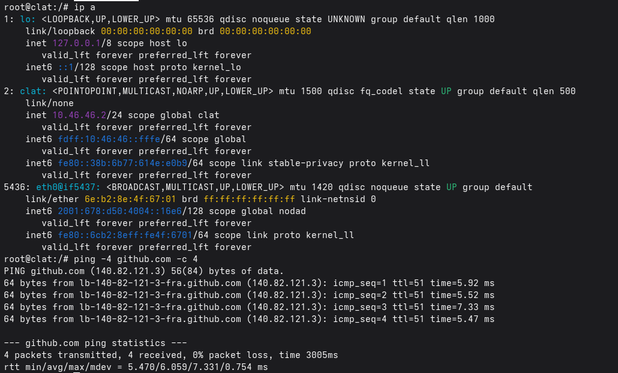
 Thomas Schäfer
 DasSkelett

 Beni HB9HNT