 Andrew Murray
I used Google Sheets as a free VA. Here's how:
Read more 👉 https://lttr.ai/AgtvE


I used Google Sheets as a free VA. Here's how:
Read more 👉 https://lttr.ai/AgtvE
#bookmarklet for listing all links on a page:
javascript: (function() { var a = ''; for (var ln = 0; ln < document.links.length; ln++) { var lk = document.links[ln]; a += ln + ': <a href='+lk+' title='+lk.text+'>' + lk + '</a><br>\n'; } w = window.open('','Links', 'scrollbars,resizable,width=400,height=600'); w.document.write(a); }())
Daily Template with Handwritten notes (Ink): Existing + New
https://github.com/daledesilva/obsidian_ink/issues/117#issuecomment-2673497264
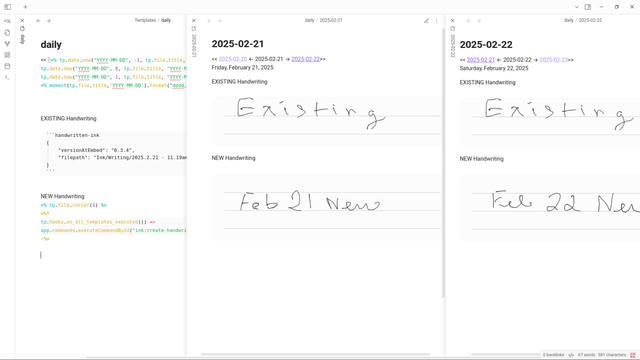

Hi, First of all, thank you for developing this plugin! I have a question regarding its compatibility with Templater and Journals. I use the Templater and the Journals plugin to generate daily entr...
Minder (no Java required)
https://github.com/phase1geo/Minder
https://github.com/phase1geo/Minder/wiki/Table-of-Contents
https://www.linuxlinks.com/minder-mind-mapping-tool/
I installed a flatpak version:
https://9to5linux.com/flatpak-app-of-the-week-minder-powerful-mind-mapping-software-to-visualize-your-ideas
PS:
- I have no in-depth experience with it
- I liked its import/export file types, especially "markdown" to tie in with my Obsidian 'obsidian-markmind' plugin that allows me to switch between outline & mindmap view.
- I also use XMind & XMind AI
https://xmind.ai/share/e5y89Ufe?xid=cijas1M8
- I use Freeplane & increasingly just 'obsidian-markmind'.
@SaltyMonk @rheinze
handwriting in Obsidian ...
I. GBoard handwriting
https://support.google.com/gboard/answer/9108773?hl=en&co=GENIE.Platform%3DAndroid
II. Ink Plugin
for handwriting and drawing
https://github.com/daledesilva/obsidian_ink
https://www.youtube.com/watch?v=qgir8F7ezNM
https://www.youtube.com/watch?v=T7UYJuX4UyY
III. Nebo
https://www.nebo.app/features
published pages
https://app-support.myscript.com/en/support/solutions/articles/16000095733-create-link-for-notes-with-nebo-
embedded or via the Open Gate plugin
https://github.com/nguyenvanduocit/obsidian-open-gate
IV. OnyxBoox
Big Boox Guide Chapter 03 Installing GBoard Virtual Keyboard
https://www.youtube.com/watch?v=ektTErPe9AI
Boox Go 10.3: In-Depth Review
https://www.youtube.com/watch?v=M5tgGr4N7Ms
hi - I think you might find the following free feature of Glasp ...
interesting ...
How to Transcribe Audio to Text Instantly with Glasp
https://www.youtube.com/watch?v=k7Q17nVZMTw
also ...
How to Embed Glasp Highlights in Obsidian
https://www.youtube.com/watch?v=_3404bno3OU
or alternatively ...
https://miro.medium.com/v2/resize:fit:1400/format:webp/0*BM29CI48HxyC8IQz
AI ...
YouTube Summary with ChatGPT & Claude: Updates on Follow-up Prompts & PDF Summary

Im #PKM-System ist die Suche ein essenzielles Werkzeug. Die Suchfunktion von #Obsidian ist nicht nur flexibel, leistungsstark und schnell, sondern auch noch recht flott. Sie kann zudem dazu genutzt werden, um damit in Obsidian produktiv(er) zu arbeiten.
https://www.mathoi.at/2024/10/04/die-suchfunktion-in-obsidian-produktiv-nutzen/

Obsidian verfügt über eine integrierte Suchfunktion, mit der sich der Vault – also das Verzeichnis, in dem die Notizen in Form von Markdown-Dateien abgelegt sind – nach vielfältigen Kriterien durchsuchen lässt. Und natürlich lässt sich diese Suchfunktion auch dazu nutzen, um damit in Obsidian produktiv(er) zu arbeiten. Eine gute Suchfunktion ist ein unerlässlicher Bestandteil eines persönlichen Wissensmanagement- bzw. PKM-Systems. Die Suche ist eine der drei zentralen Methoden, um Informationen in einem PKM-System wiederzufinden. Denn je umfangreicher der Informationsbestand und die Anzahl der Notizen werden, umso wichtiger wird die Suche. Dabei ist es auch völlig unerheblich, wie man die Notizen und sonstigen Inhalte im PKM-System organisiert hat – also ob man lieber Ordner oder Schlagworte verwendet, oder gar beides zusammen bzw. weder noch. Suchfunktion aktivieren Die Suchfunktion in Obsidian ist ein Kernplugin, das mit Obsidian ausgeliefert wird. Falls die Suchfunktion noch nicht aktiviert ist, kann man das in den Einstellungen unter Obsidian Erweiterungen erledigen. Wenn die Suchfunktion aktiviert ist, wird in der linken Seitenleiste oben ein entsprechendes Symbol mit einer kleinen Lupe angezeigt. Suchbegriffe & -operatoren …
Wie ist Perplexity im Vergleich?
https://www.perplexity.ai/search/python-pandas-function-pivot-t-IHVb4TqeSwqFD7nY0oEBaw
 coucou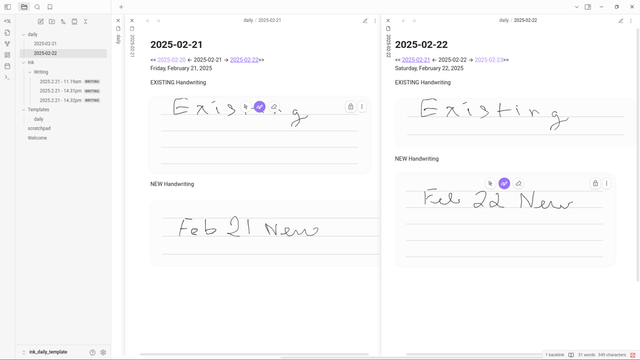


 Vladimir Campos
 Thomas Mathoi