134 Followers
54 Following
94 Posts
Vintage computer lover. Author of some stuff for them, like https://www.macflim.com/macflim2

Also http://www.stark.fr. Oh, and petflix too: https://youtu.be/Qb756Idc9k4
#bloghttp://stark.fr
WTH? Markdown doesn't work on Mastodon posts? Erww...

Maxivmac, a maximized minivmac (in progress). #marchintosh

*The hardest part of this refactor wasn't any single conversion — it was the invisible web of dependencies that only revealed themselves at link time. Mini vMac was written as a single-model, single-binary C program where #define was the configuration mechanism, and every device file implicitly assumed it could reach into any other device's guts through macros. You'd confidently strip a #if EmPMU guard from pmu.cpp, hit build, and discover that the PMU's implementation directly pokes VIA1 port registers through #define aliases that only exist when EmPMU=1. Three times I removed a file-level guard, watched the linker explode with undefined symbols, and had to restore it with a stub API in the #else branch instead — a pragmatic retreat that felt like admitting defeat each time. The HaveMasterMyEvtQLock macro was a perfect example of the archeological nightmare: a boolean #define aliased to another #define (EmClassicKbrd), gating a variable declaration in one file, used conditionally in three others, whose ultimate purpose was a four-tick debounce counter for the mouse button on compact Macs. Understanding that took longer than converting it.* -- Claude Opus 4.6, after a 14 hours session

So? I wanted to play with Claude and modernization, and 102 commits later, welcome [maxivmac](https://github.com/fstark/maxivmac), the port of minivmac to the 21th Century!

```
maxivmac % ./bld/macos-cocoa/maxivmac.app/Contents/MacOS/maxivmac --help
Usage: ./bld/macos-cocoa/maxivmac.app/Contents/MacOS/maxivmac [options] [disk1.img] [disk2.img] ...

Options:
--model=MODEL Mac model: Plus, SE, II, IIx, Classic, PB100, 128K, 512Ke
(default: II)
--rom=PATH Path to ROM file
--ram=SIZE RAM size: 1M, 2M, 4M, 8M (default: model-specific)
--screen=WxHxD Screen size: 512x342x1, 640x480x8, etc.
--speed=N Emulation speed: 1 (1x), 2, 4, 8, 0 (all-out)
--fullscreen Start in fullscreen mode
-r PATH ROM path (short form)
-h, --help Show this help

Examples:
./bld/macos-cocoa/maxivmac.app/Contents/MacOS/maxivmac --model=II --rom=MacII.ROM system7.img
./bld/macos-cocoa/maxivmac.app/Contents/MacOS/maxivmac --model=Plus --rom=vMac.ROM --ram=4M disk.img
maxivmac %
``

This is _far_ from finished, but I did get rid of the original byzantine build system and have a single binary for all models (Plus and MacII working). If you've ever tried to hack ``minivmac`` you know what a milestone this is. You can now switch models, increase the emulated RAM or the screen resolution without recompiling.

Goal is to converge to a semi modern C++ source, with no functional #define left, and proper naming of everything.

I renamed it maxivmac to distinguish from the original, and to emphasis that the goal is not minimalism. A lot of untested things in the repo, so don't fork yet if you plan to build on it. Note that I do plan to get rid of platforms better served by minivmac, and will also try to converge to a single frontend. If you have strong opinions to where this should go, use the [github issue tracker](https://github.com/fstark/maxivmac/issues)!

(I will not accept PR until the build is stable with a strong test suite -- a matter of a couple of weeks, probably)

GitHub - fstark/maxivmac: Let's try to fix minivmac *again*

Let's try to fix minivmac *again*. Contribute to fstark/maxivmac development by creating an account on GitHub.

GitHub

New release of MacFlim, the Vintage Mac Video Player, now in version 2.0.18 ! #macflim

Get it from https://github.com/fstark/macflim (in the releases on the right).

As usual, demos are on the page https://www.macflim.com/macflim2

Changes:

* Now ships both a ``.dsk`` and a ``.sit`` containing the MacOS 1-7 Application.

No need to compile the ``flimmaker`` utility yourself anymore (unless on linux, of course :-) ), as you get:

* Binaries for both Windows x86_64 and arm

* Flimmaker for OSX (both x86 and arm) can be installed with ``brew install fstark/macflim/flimmaker``

* I fixed the ``--duration`` option of ``flimmaker``. Why nobody reported to me that it was broken?! Baaad.

So, for a better support, I created a discord server, that you can join here https://discord.gg/9rVDSw2D4N . Macflim things, discussions, help, suggestions, etc...

* Added support for accelerated macs plus with MicroMac Performer upgrade (and clones).

Last and most important, there is also a new dithering option, 'blue' that is as efficient as ordered dithering in low bandwidth and approaches the 'error' dithering look. Attached is a comparison in low bit rate between 'blue' dithering, 'error' dithering (the classic "mac look"), and ordered dithering.

RE: https://mastodon.social/@paulrickards/115770675186603731

Fantastic! That’s what I have in mind when I made MacFlim.

Cinemagraphs are really nice on lower spec machines, I vaguely intend to release a set of those (actually, an HyperCard stack, to stay in the original Mac feel).

Are the black bars on the left and right an artistic choice/framerate constraint? Encoding for the macxl should default to fullscreen.

Anyway, thx for the Christmas present, and happy MacFliming!

@scottjenson

Hi Scott,

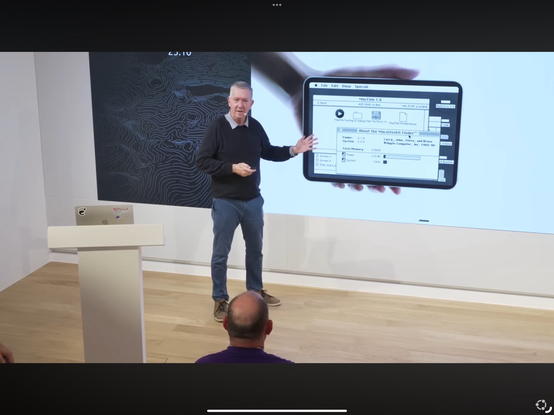
Just watched your talk, awesome. I love UX, I have loved computers for so many years, and I am so disappointed at everything we lost since the original Mac.

I am also the author of MacFlim (https://www.macflim.com/macflim2), and I was stunned when it came on screen when you talked about the original Mac! (screenshot attached).

I don’t know if it is random or on purpose. MacFlim was created as a joke, and as most joke it is about a very serious point, exploring a possible future where we still use those Mac and continued exploring what they could do. MacFlim 1.0 is an hommage at the original Mac user interface, with multiple windows, etc. MacFlim 2.0, which is a couple orders of magnitude more sophisticated and a real movie player, steals from the future by implementing a Netflix-like user interface. I think we regressed. There is so much more we should be doing with the monsters we have under our desk on in our pocket…

Anyway, that made my day, thanks!

Btw, the “the click doesn’t bring the window front because it could be the start of a drag” comes from NeXTstep. It infuriates me that we forgot that in so many desktop UIs. Or the subtle way one should manage the launched of an application to be sure it takes focus if the user waited, but doesn’t steal it if the user interacted with another app..

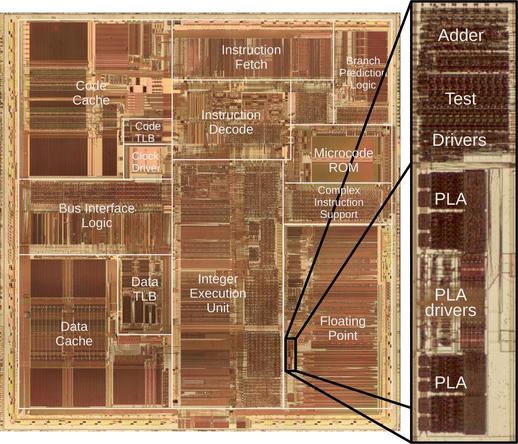
Intel launched the Pentium processor in 1993. Unfortunately, dividing sometimes gave a slightly wrong answer, the famous FDIV bug. Replacing the faulty chips cost Intel $475 million. I reverse-engineered the circuitry and can explain the bug. 1/9

New make !

Laser engraved slate coasters with famous CPU markings...

So, @MuseumJoe told me I absolutely have to showcase this today. So, for you pleasure, a quick preview of PETFLIX, the best Commodore PET movie player!
Enjoy your all your #starwars content, on a big screen, in the confort of your home, like if it was 1978 again, without those modern distractions like color or sound! (and for @altomare, an end bonus).
https://youtu.be/Qb756Idc9k4
#maythe4th #maythe4thbewithyou #commodore #retrocomputing
StarWars on PETFLIX, the very best Commodore PET movie player

YouTube

The intruder: I chose 4 criterias for the machines in the picture:

* Alpha keyboard (sorry hp-16c)
* Programmable (sorry Panasonic hhc)
* LCD screen (sorry mpf-1/88)
* Runs on charge or batteries (sorry apricot portable)

Unfortunately the laser compumate 3 (middle left, below the hx-20) is not programmable. Oops.

The intruder: I chose 4 criterias for the machines in the picture:

* Alpha keyboard (sorry hp-16c)
* Programmable (sorry Panasonic hhc)
* LCD screen (sorry mpf-1/88)
* Runs on charge or batteries (sorry apricot portable)

Unfortunately the laser compumate 3 (middle left, below the hx-20) is not programmable. Oops.