Public service announcement: if you get a reply/message like this, it is fake and a scam. Your posts are worthless.
Please report for spam if you see any!


| Operated by | @nev |
Public service announcement: if you get a reply/message like this, it is fake and a scam. Your posts are worthless.
Please report for spam if you see any!
If you would like to reference another post in your own, there are a few ways:
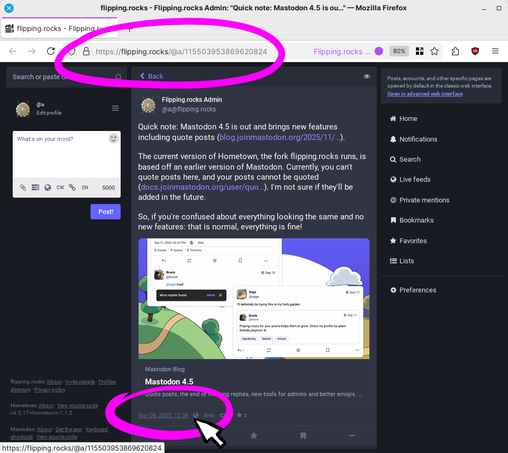
1. in the web client, copy the link to the post. You can right-click on the time/date in the post ("2h", "January 1", etc.) and copy the link. If you are using a different client/app, try the "share" option.
Then paste the link in your own post. When someone clicks on/taps it, it will open in a web browser or in their client, depending on what they're using.
2. Make a reply to the post, but delete the original poster's handle that is automatically inserted. It will look like a normal post in the feed, but when selected, it will show the original post over it, like a regular reply. You will have to boost your own post in order to make it show up in other people's feeds.
News has happened! You may be Over It! So, a quick reminder that you can use keywords to filter out posts you don't want to see. Go to https://flipping.rocks/filters to add a keyword to an existing filter, or https://flipping.rocks/filters/new to make a new filter.
If you want to post about stuff many people are probably sick to death of hearing about, consider using a content warning so people can easily skip them if they want. This is helpful for posts that may not match other people's filters, like vagueposts and satirical takes.

