
๐Ÿงต Thread
1/7 Let's talk about Collections on Mastodon.

You might have heard about this new feature, tried to use it, and wondered "why doesn't this work for me?"

Let's solve that mystery, step by step.

#Mastodon #MastodonTips #Fediverse #Collections #FediTips

2/7 PREREQUISITE #1: Updated Instance

The first reason Collections might not work? Your instance admins haven't updated to Mastodon v4.6.0 or later.

Check with your admins or check your instance's version. No update means no Collections.

3/7 PREREQUISITE #2: The Person You Want to Add

Here's the thing: the person you want to add must enable the setting below.

How?
Settings โ†’ Privacy and Reach โ†’ "Feature me in discovery experiences" โ†’ Save.

โฌ‡๏ธ See it in action: https://video.amassaro.eu/w/fpoWtPb3NkD3HeDqKbeH2x
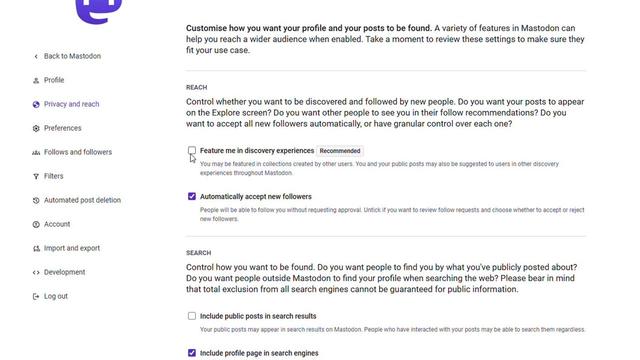
How to be added to a collection on Mastodon

PeerTube

4/7 โœ… Once both prerequisites are met, you're ready!

How to create a Collection:

1) Click Collections โ†’ New Collection

2) Type the account you want to add

3) Continue to Basic Details

5/7 Collection Details:

Name: 40 characters max

Description: 100 characters max (optional)

Topic: Add a hashtag to help others understand the theme (optional)

Language: Select from the dropdown

Visibility: Public or Unlisted

Content Warning: Mark as sensitive if needed

6/7 Then hit "Create Collection"

You can watch the entire process here: https://video.amassaro.eu/w/fDrqZtuKRgeptKxh3MoqMy
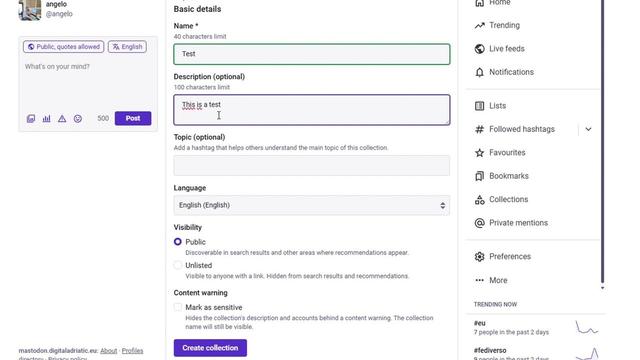
How to create collections on Mastodon

PeerTube

7/7 Pro Tips:

Collections help you curate and organize accounts by topic.

- They're discoverable in search (if public)

- Perfect for creating lists of: journalists, artists, developers, local accounts, etc.

Have you tried Collections yet? What would you use them for?