 Alice Averlong🏳️⚧️
so I've got a game, and it's got ADPCM audio! Fortunately ffmpeg supports that.
all 52 variants. what the fuck
so I've got a game, and it's got ADPCM audio! Fortunately ffmpeg supports that.
all 52 variants. what the fuck
I gave up on ffmpeg and switched to sox_ng and now I've got it decoding, but is the quality perfect? would a slightly different set of options make it sound better?
I DON'T KNOW! I DON'T KNOW HOW TO KNOW
to make this better, I either need to listen to a bunch of WAVs with different ADPCM decoding options, OR learn the internals of the PS2's audio chip AND MIPS assembly.
To give you an idea of how much I hate audio, I am seriously considering the latter
I also can't compare two audio files! how can I tell which is better?
I listen to file 1, then I listen to file 2, but by the time I listen to file 2 I have forgotten file 1.
I can easily visually diff two images or show them side by side but I can't do that with audio
so using sox_ng with -r 24k -c 1 -t ima -e ima-adpcm seems to be "close enough".
Comparing to playing the game in the emulator, it's seems Very similar in shitiness.
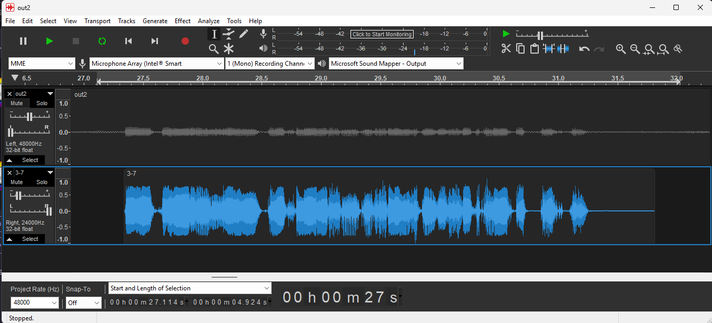
I have this problem at the optometrist when they ask me which one is sharper, A or B?
@foone we have a whole group of people at my job, including myself occasionally, who routinely do this type of testing. There is software designed for don't this type of testing and different methods depending on the goal... E.g. AB vs MUSHRA.
It sounds like you would do well working for Shure. Many of us routinely prefer esoteric assembly languages over audio listening tests I think.
(I'm currently writing error coding in kcpsm3 assembly.)
@foone hm yes I see that is a problem and also possible solutions.
First, concert to a lossless meta format if they are identical audio files in different formats. Now you can diff the waveform from each other per channel.
The second is regular signal analysis f. I. with FFT. Which has more fullbamd scatter/noise?how compare the base band energy signatures. Which file has more bass or more fidelity? More overall spectrum?
Anyhow, audio sure IS a medium to perceive and that is hard to automate 😬
@foone For comparing the audio by listening, I usually use Foobar2000, load both tracks and right click > Utilities > ABX tracks... Really good for blind comparison, allows you to use Replay Gain and DSP if needed.
There's also Utilities > Bit-comparev tracks... That would do a full decode and bit-bit comparison (but not useful if you're comparing different compressions of the same track obviously)
@foone And visually I use Adobe Audition or Audacity;
in Audition once you load the tracks make sure you enable from the menu View > Show Spectral Frequency Display (or Shift+D), you can fine tune things visually from the additional options when you right click the scale in the right side. (not sure if it shows spectro in multi track mode though)
(sorry for the bad photos 💜)

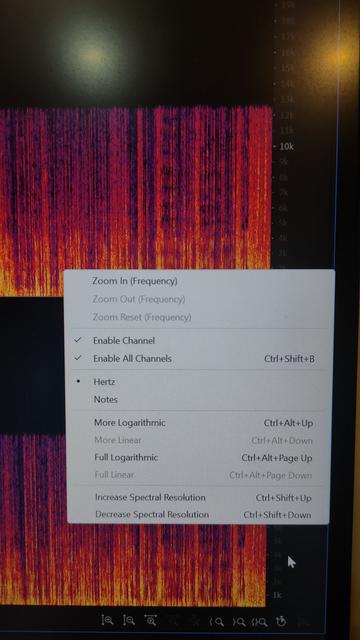
@foone
In Audacity you can open both files automatically in multitrack, right click the white space to the left and choose "spectrogram", then for better visibility of higher frequencies you can right click the frequency scale and choose "Linear" and "Zoom to Fit" as it usually ignores the 18Khz+ view
As you zoom in you may visibly spot the places where frequency cuts, compression, and a lot of the issues of possible hisses, weird tones, or psychoacoustics gone rogue
could've happened.

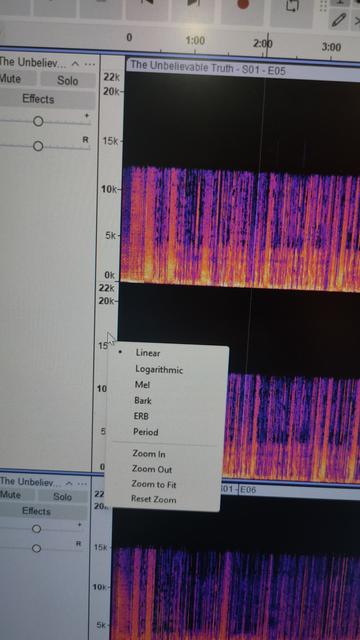
@foone my personal instinct says the "hiss" might be saturation
don't know if they did the recording wrong or if it's a playback issue, but it's present in loud instants and not present in quiet instants (and it doesn't sound like noise gate falloff which would almost certainly be during recording or encoding)
however, this is not my job
 Zayn
Zayn Sebastian Crane 🏳️⚧️
 Andrew
 Dr Robotniks Sean Bean Machine
 gloriouscow
 Matthew Miller
 José Albornoz
 Coral 😷
 downbeatdan
 gunstick
 ❤ plasticpuppy ❤
 Malcolm Herbert
 chilort
 William D. Jones
 tehfishman
 luna the doggie

 Kit Bashir
 poleguy looking for lost tools
 Pxl Phile
 Bloognoo
 The 3rd Crow
 mmu_man
 it/its kitten
 estelle
 Fiona
Fiona
 Mendie


 Daniel Carosone
 Swirly
 Fishy
Fishy Amber
Amber  (kemona_halftau)
 endrift 🏳️⚧️
 Simulacra of a girl
 Noisytoot