 Lukas Petr
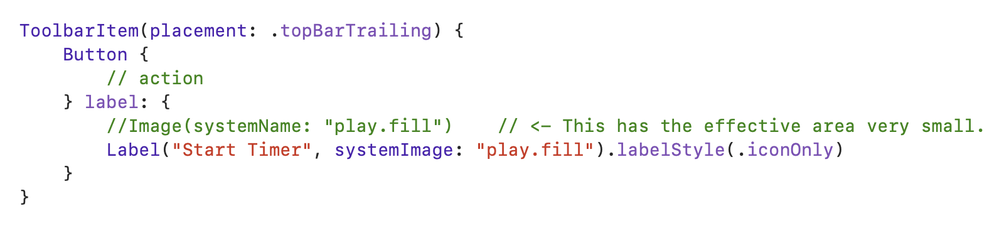
🚨 PSA: In SwiftUI, if you use ToolbarItem that has a Button with Image as its label, you'll end up with a very small tappable area of the button. You need to use a Label to avoid that effect:
Label("Start", systemImage: "play").labelStyle(.iconOnly)
🚨 PSA: In SwiftUI, if you use ToolbarItem that has a Button with Image as its label, you'll end up with a very small tappable area of the button. You need to use a Label to avoid that effect:
Label("Start", systemImage: "play").labelStyle(.iconOnly)
@luksape Yup, I filed FB20213961 for this in Sep 2025. It still hasn't had a response and shows "None" for similar reports.
https://developer.apple.com/forums/thread/800099
I've submitted several toolbar-related bugs, but only one has actually been fixed. Hopefully iOS 27 will be the quality-focused update the rumors suggest. 🤞
 Andrew Mackarous 🇨🇦
 Uhl Albert
 Christian Beer
 Nic Goodman
 Jason Sadler