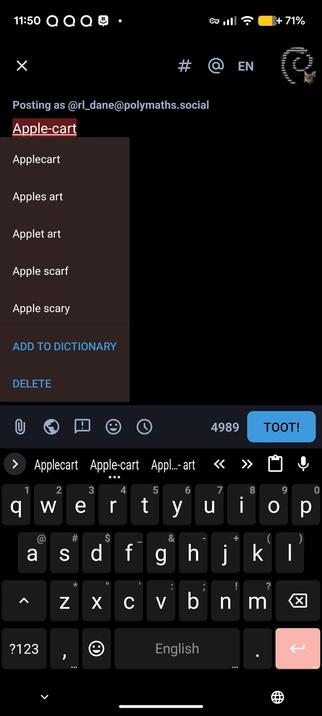
Forgive my kvetching, but it drives me nuts that #AOSP-based #Android OSes always treat hyphenated words as words.

For example, if you type in "apple-cart," you get a red squiggly underline and it tries to recommend replacing it with "apricot" or something. The only way around it is to add every. single. hyphenated. word. you. use. into the dictionary. 😮‍💨

It's been a constant, daily annoyance for the past five and a half years, and the only fix is to install something like GBoard and use its spelling correction engine or whatever you call it, and I'd rather not.

I've experienced it on #CalyxOS and #IodéOS, but I don't recall if #GrapheneOS has the same issue, because I only tried it briefly.
#LineageOS #Iodé #Iode #IodeOS #Graphene #GOS

@rl_dane I think it depends on the keyboard more than the Android flavor. I use Heliboard and it doesn't do that. Its auto-correct isn't great but this is not one of the issues. 😄

@fedops

I'm also using heliboard! 😢

@rl_dane @fedops doesn't heli board at least offer its own spell checker for the system?

@lucascalyx @fedops

It does, but it tries to check the spelling of hyphenated words. :/

@rl_dane @fedops There aren't any other keyboards I think that can also act as the system spellchecker... I've had spotty behavior in that overall, with multiple languages or just spell checking itself. Hopefully one of these keyboard projects comes up with something :P

@lucascalyx @fedops

I've settled for using FUTO keyboard for now, as it doesn't have that issue.

@rl_dane iirc I think I've had office suites tell me to correct compound words into hyphenated words, and then immediately tell me to correct those hyphenated words into separate words :P

@OpenComputeDesign

Heh, reminds me of circa 2001, when I had a coworker named "Grace Teh." MS Word LOVED her last name. XD

Come to think of it, that's probably when I adopted the silly tendency to accentuate things with misspelling, all-caps, and underscores, like TEH_GREATEST. XD

That was actually the first time I ever saw #AutoCorrect. Word didn't just red-squiggly-line her name, it instantly corrected Teh to The, and I had to learn to hit ctrl-z right after typing her name. ;)

@rl_dane By default my phone uses Gboard.

There is a certain convenience to it but still will underline common words from time to time.

@peteorrall

Gboard definitely has a better spelling correction engine.

But #Heliboard is 99% as good*, and totally #FOSS.

*Especially if you install the proprietary glide typing extension, which of course, they're working on a FOSS replacement of, but it will take a while

@rl_dane sister-in-law well-to-do apple-cart able-bodied topsy-turvy. #GOS and FUTO Keyboard didn't complain once.

HTH

@UrbanDjent

FUTO probably adds its own spelling check engine. I'll try installing it and see if I can switch engines without switching keyboards. ;)

I used to just install Gboard, but leave it inactive, and it fixed the problem because it provided a spelling correction engine that worked even when the keyboard itself wasn't active.

@rl_dane Your way sounds very creative. I don't use any G* stuff and am happy with the features from FUTO 😊👍 Good luck!

@UrbanDjent

FUTO Keyboard fixed the problem, but only when using FUTO keyboard.

I guess I'll stick with it a little while. ;)

@UrbanDjent

Yeah, I'm mostly off of the G* stuff on my phone. I do have Google Maps (not logged in, no background battery, no background network, stuck in a private space that's off most of the time), but I rarely use it. "GMaps WV" and #CoMaps cover 95% of my use cases. ;)

@rl_dane I use Graphene, and typing "apple-cart" does show a red squiggly underneath. I don't have any keyboard apps installed (not sure if that makes a difference)

@png

Yeah, it really sounds like it's a bug that's fundamental to AOSP, unless Graphene is also based on LineageOS. Kinda doubt it.