 Kernel Bob
I'm starting a new "build thread" (not building anything except pixels, but they're good pixels).
This is the "Bubble Universe" graphics hack. I'm going to try to have some fun with it. Follow or ignore hashtag #BubbleUniverse for more.
🧵 1/N
I'm starting a new "build thread" (not building anything except pixels, but they're good pixels).
This is the "Bubble Universe" graphics hack. I'm going to try to have some fun with it. Follow or ignore hashtag #BubbleUniverse for more.
🧵 1/N
History. As best I can tell, the bubble universe was invented by Twitter user @yuruyurau in 2020 as a very terse Processing.py sketch and first published in this tweet.
https://xcancel.com/yuruyurau/status/1226846058728177665
Edit: add screen capture of tweet.
🧵 2/N

Paul Dunn ( @zxdunny ) followed a few months later with an even terser BASIC version and a demo on YouTube.
https://www.youtube.com/watch?v=G5aOBh7qQe8
🧵 3/N

@larsbrinkhoff got into the act with Javascript and PDP-10 assembler versions. The sources are on Github, and a video of the PDP-10 is on YouTube.
(Lars, what display are you emulating on the '10?)
https://github.com/larsbrinkhoff/bubble-universe
https://www.youtube.com/watch?v=hIU7iYWZWSY
🧵 4/N
Several others have implemented it; it seems to be popular with the retrocomputing crowd. I found out about it when @PaulaMaddox ported it to her FPGA 6502 simulator a few days ago.
🧵 5/N
And now I've implemented it. But instead of porting it to the slowest most decrepit retromachine I can find, I'm going the other direction: What kind of visual effects can I achieve if I throw a decent GPU at it?
The video above in 🧵 1 is a screen capture from my Javascript + WebGPU implementation. It's running at 20 FPS, using about 5% of the CPU and 3% of the GPU. More to come...
🧵 6/N
I wrote another one! I ported my Javascript + WebGPU implementation to Python + wgpu-py, and now I have a desktop app.
And I pushed it to Github. "Share and enjoy!"
https://github.com/kbob/bubble-universe
🧵 7/N
I finally got my head around WebGPU/wgpu enough to make my own render graph. Now the bubble universe thing is decomposed into a graph of render passes, and I've got some simple parameter animation going.
In this screencap, I'm varying the particle size and transparency and varying the number of particles in two ways in sync with the universe's revolution. The color map is just doing its own thing; that wasn't planned.
🧵 8/N
The problem with programming eye candy tools is that it's easy to get distracted into making pretty pictures and stop working on the tool.
Anyway, here's an interesting spot I found in the universe of bubble universes. If you look at Yuruyurau's original code, there's a parameter, R = τ/200. In this image, I vary R between 0.49 and 0.51.
🧵 9/N
The Bubble Universe tool now can directly record to video, and it's got HDR with tone mapping.
I promised visual effects... Here's one where I made the particles fuzzier at the edges. (I also removed 80% of the particles and enabled HDR/tone mapping.)
🧵 10/N
I don't think I pushed that effect far enough. MPEG compression adds a lot of grit, so here's a still for comparison.
Meanwhile, I've been working on light bloom. That's the next scheduled effect. This dandelion thing wasn't scheduled, though, and neither were 🧵 9 or 🧵 8.
🧵 11/N

I've been working on a light bloom filter for the bubble universe. There's this weird checkerboard pattern in the glow - most visible in the southeast corner where the arrow is.
I finally figured it out. That is, I'm pretty sure, caused by floating point overflow. I'm using f16 because wgpu on my GPU doesn't support blending into an f32 buffer.
Anyway. Light bloom. I'll probably turn it down once it's debugged.
🧵 12/N


Light bloom is done with multipass blurring. First the image is downsampled 5 times and blurred into a new image half as big using a 6x6 filter. Then each downsampled image is blurred again and added back to its parent
using a 3x3 filter. Finally, the half-size image is blurred and mixed with the original image.
It's cheap! About 80 texture read operations per pixel total.
(See alt. text for video explanation. Or see https://learnopengl.com/Guest-Articles/2022/Phys.-Based-Bloom .)
🧵 14/N
I've been working on adding color themes to the bubble universe. Before today (Easter Sunday) is out, I want to preview the work-in-progress Easter theme.
🧵 15/N
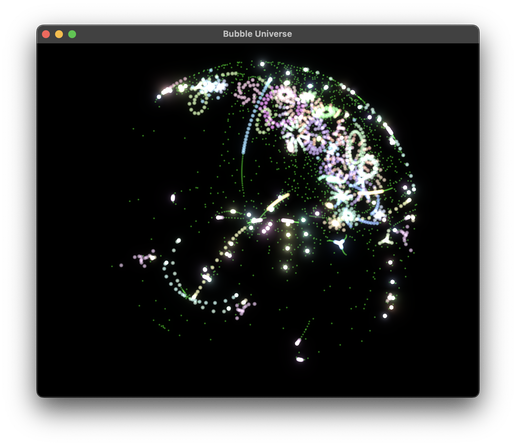
I added particles contrails to the bubble universe. It's not my original idea; @larsbrinkhoff had them in his Javascript implementation.
This should be a better video than usual. I ditched pyAV and saved a PNG file for each frame. EDIT: Nope. My mastodon instance reencoded it.
Coming "soon": I'm thinking about blurring the contrails, and I've also got some new color schemes in the wings.
🧵 16/N
Okay, here's a better diffused trail example. The trick was to make the trails really long (and decimate the particles).
The diffusion blurs each frame with a 5x5 Gaussian and adds it into the next one.
🧵 19/N

Video loop.
🧵 20/N
# BubbleUniverse
Here's another one.
Too much going on here to explain it all, but the new thing (to me) is bunching up the particle sequences. Instead of spreading them uniformly, they're in five distinct bunches. So some parts of the bubble space are much denser than before, and most of it is empty.
🧵 21/N
Demo Reel!
I'm revealing a bunch of new features here.
- color map shaders
- animated color maps
- animated particle opacity
- animated background shaders
- text overlay
- themes
- theme cycling
I put it on MakerTube, as it's a little big for Mastodon.
🧵 22/N
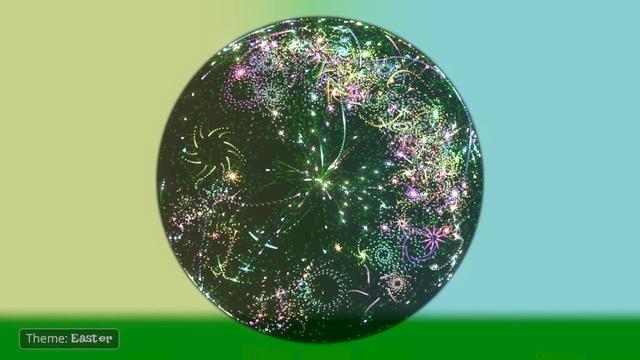
The vaporwave theme was the first one I thought of adding a background to, and the last one to get "finished". Spousey saw an earlier version and asked why the bubble's background was just solid blue. So I started thinking about reflection and refraction.
What you see here is in no way "realistic", but it might be "convincing".
🧵 23/N
Aaaugh. Mastodon's transcoding stamped all over the video quality. Here's a still frame that should retain the quality.
🧵 24/N
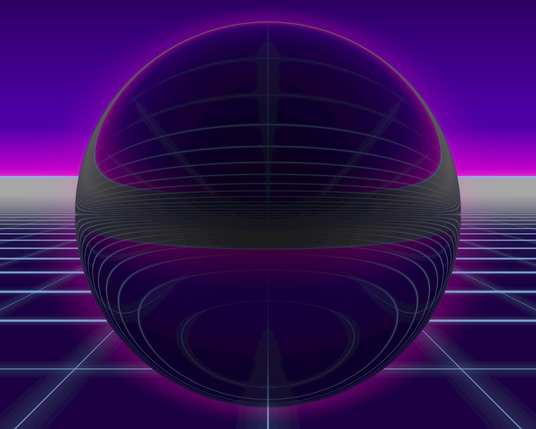
Triad is my newest bubble universe theme and the first to use a dynamic colormap. I want to explain how it works.
Triad is based on triadic colors -- three colors evenly spaced around the hue wheel. But the three colors are actually narrow ranges of hues, and they shift with time.
I like rotating triadic colors. They're bold and colorful, and less stale than the rotating rainbows many LED projects use.
🧵 25/N
Less is more in the Triad theme.
- fewer hues (see previous post).
- fewer particles. Using the alpha channel, the color map turns off 3/4 of the particle sequences.
- particles sometime hidden. Also using alpha, the color map fades each particle in and out over time. That makes the display less busy without reducing complexity.
🧵 26/N
This shows what it's doing graphically. The hue wheel around the bubble shows which hues are active at any moment. On the left, there's a color map. Each particle sequence is a column. Particles early in each sequence are at the bottom of the map, and later, more coherent particles at the top.
🧵 27/N
Bubble universe, what's next? I feel like I've reached a stopping point, at least for now.
Originally, I wanted to make a web page with parameters hooked up to a control panel so anyone with a browser could explore the universe of bubbleverses (bubbleverseiverse?). But I really don't want to translate 4,000 lines of Python into Javascript (I hate JS).
🧵 21 above shows an interesting direction to explore.
🧵 28/N
This idea is also gnawing at me: Suppose you took the particles in one sequence, fed their X, Y coordinates into a DAC, advanced the simulation time and generated those particles' next positions and fed them into the DAC, etc. You'd get a waveform, and it'd have a fundamental frequency of however often you repeated the sequence. That's oscilloscope music, right?
That's what inspired the oscilloscope theme that appeared briefly in 🧵 22.
🧵 29/N
This week's trendy LLM is QWEN3.6. It's small enough to run at home, so I downloaded a copy and asked it about the bubble universe. 13 CPU hours later*, it told me some things. Pretty good analysis for a machine with no eyes.
https://gist.github.com/kbob/4c2da8d0dcd6ad5bfae0fc68b47ab62d
* llama.cpp doesn't use the GPU on Intel Macs.
🧵 30/N
Here's another variation on the bunched particle sequences I showed in 🧵 21. Slight variation on the triad color scheme, number of particles is 80,000 visible out of 200,000 active. Plus maybe 1,000,000 particle afterimages in the trails. (Default is 20,000 particles.)
There's way too much fine detail for video, so I'm showing just one still image. Trust me, it looks cool in motion on a 5K monitor. (Zoom in if you're using a smaller display.)
🧵 31/N

Here's another bubble universe variant. This time it's a 10 minute video with decent quality.
This isn't very bubbly, but that's kind of the point. It seems the algorithm makes all kinds of swirly shapes, and bubbles are just a special case.
🧵 32/N

THIS! This is gonna be awesome!
It's about half implemented, and 99% LLM-generated. Sorry!
But it runs in a browser, and soon it'll run in your browser. Good luck!
🧵 33/N
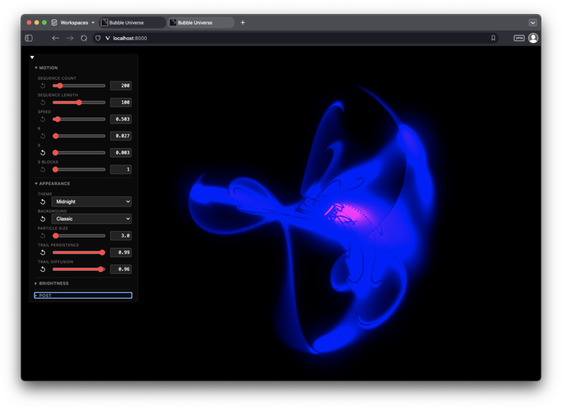
The web app is now functionally complete. 18 knobs, most of the space unexplored.
Building this with the LLM was interesting; I'll write more about that on my LLM thread.
I'll get it up on a public-facing server soon...
🧵 34/N


@clayton The output appeared to be factually correct, somewhat insightful. It mentioned coupled oscillators and orbit traps; I wasn't familiar with those and I don't know yet whether they're related. The suggested tweaks didn't float my boat, but I've tried dumber things in my own exploration. It correctly identified that the system is periodic, not chaotic.
The "thinking" phase seemed a little confused whether the colors are RGB or HSB.
I've not tried the big LLMs (I'm cheap).
@awws Thanks!
I've not looked into how OS/X screen savers work. I know there's an API, but don't know anything about it.
But yeah, the idea is to keep finding ways to make it more interesting.
@larsbrinkhoff Thanks!
My contrails are the same as yours, just a little longer. I think the difference is that my particles have soft edges. Opaque at the centers, slightly transparent at the perimeters.
Edit: I've also got light bloom going, so wherever particles concentrate, there's a glow. That softens the trails too.
I'm thinking I need to get MSAA working too. Someday.


 LAYERED
 Paula Maddox
 clayton
 Lars Brinkhoff
 Metin Seven
 Daryl Manning