My blog on #mastering with #LinuxAudio #LinuxProAudio just got updated with a second part!

German version:
https://kurzelinks.de/LinuxBlog
English version:
https://kurzelinks.de/LinuxBlogEN

After tackling #distro and #DE choices and general theory in the first part, now I'm diving into #benchmark performance comparisons, #audio #plugin tests and developer exchanges, mastering practices with audio examples and much more.
Part 3 is already in the works (Merging Hardware Support, WinBoat, LLM assistance,...)


Ein Profi-Mastering-Engineer steigt um - Linux Content

Dokumentation eines Profi-Mastering-Engineers: Klappt der Umstieg auf Linux mit dem In-The-Box System? Ein Rolling Release Artikel.

Linux Content

@flosillermastering what a nice read. Thank you for sharing your linux journey. It's really interesting to see what you focus on in comparison to myself, where needed DAW and plugin functions are completely different.

Looking much forward to Part 3 and to hearing more about what paid plugins you have started using (if anything new).

@mosgaard Hej Morten, thanks for checking it out and for your kind words! Much appreciated 🙏🏼

Yes, I‘ve learned that every setup is very personal, even within the same line of work.
And ever changing at that. I hoped this might be insightful into the mindset associated with mastering music. Where do you put your focus concerning functions?

Part 3 is not incorporating commercial plugins as of yet, maybe a Mastodon post about that is in order 😊

@flosillermastering concerning functions, I'm in between projects, so I have had time to figure out how to find a DAW that matches the broadest line of work.

On Mac OS I have been used to switching between Studio One for songwriting/mixing and Ableton for sound design/electronic musicproduction. When I found out Studio One still wasn't stable on Linux, I started to test Bitwig for all purposes, which is actually working out fine.

@flosillermastering I have a clear feeling, that if I learn to utilize some of the more unique features of Bitwig, this will later down the line be a bigger win.

Right now it makes me slower, which doesn't really matter since I'm not in a hurry while in between projects, but eventually I will find a new workflow and new ways of working.

@mosgaard Bitwig is a modular beast, capable of multiple workflows v far beyond my creative capabilities.
Having to adjust myself to be able to work on Linux, I also see it as a chance to learn and get better.

@mosgaard yeah, there is a decent choice of native DAWs to cover all the bases. I imagine Bitwig being a close enough relative to Ableton to ease the change. I‘ve been using the #playtime addon for REAPER to give it a Live style workflow if needed.

Do you miss anything from Studio One? I have tested the Linux beta but without DDP support, it is not as usable for mastering for now. Still cool that they are testing the waters though!

@flosillermastering I primarily miss two things.

Ableton: The editing workflow for audio events, with the edit window in the lower screen. Makes it so fast and intuitive to pitch, stretch, change algorithm, pitch automation and more. Bitwig can do the same - but it takes more clicks and getting used to new short cuts.

Studio One: Tools for traditional songwriting, song sections, chord track, lyrics etc…

Turns out I really like Bitwig for mixing, the mixer page is intuitive and easy.

@mosgaard interesting to read how functionality shapes our creativity.
With Harrison #mixbus I am in the process of understanding how the DAW wants to be utilized instead of me forcing it to adhere to my habits. So-called Region FX (now also in #Ardour) are helping, but I‘m still slowly learning the ins and outs (literally).
It‘s fun having a new learning curve after about 10 years on basically the same DAW.

@flosillermastering that is exactly my approach too.

Letting the functionality shape my creativity. If you see a person who is deep into the ins and outs of a DAW, I think it’s quite clear that the DAW becomes an instrument of its own.

I’m trained in live music and only a little in produced music, and the difference is becoming more and more clear to me. So this is also about the musician I am and how my ideas comes out.

@mosgaard would be great to be able to listen to what people like Delia Derbyshire, Xenakis or Stockhausen would have made if born with today's tools.
I guess you can't escape your own musical identity and current taste anyway, no matter the circumstances.
That's why I'm not sure a Linux setup will significantly alter my results, just the way to get there is hopefully inspiring and satisfying.

@flosillermastering I couldn’t agree more.

With the things I have produced already I can easily say, that there will be no difference in quality at all. But I will be able to use an older laptop to get the same results though :)

There is plugins where I have a hard time finding good alternatives for more specialised tasks (Soothe 2 fx), but right now all of the most crucial ones work through Yabridge. So even that argument (missing plugins) doesn’t always hold up.

@mosgaard yeah, although I used Threebody Technology's Speccraft instead of Soothe, I had started a thread on the #LinuxMusicians forum on the topic:
https://linuxmusicians.com/viewtopic.php?t=29258

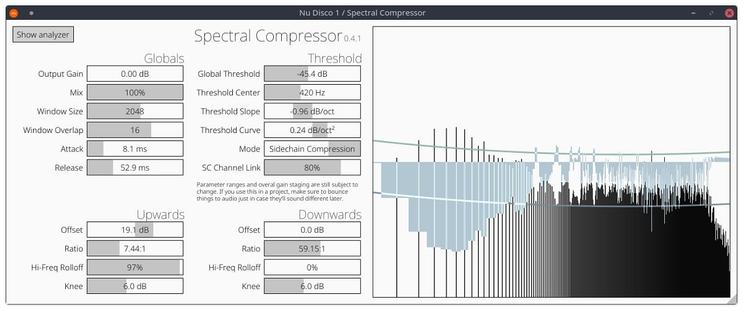
Harrison's Spectral Compressor has been the only native alternative suitable for mastering I have found so far.

Loading...

@flosillermastering that’s a nice thread, perhaps I should keep an eye on the forum :)

I use this, but mostly for sidechain:

https://bedroomproducersblog.com/2024/03/03/nih-plug-spectral-compressor/

Robbert van der Helm Releases FREE Spectral Compressor

Developer Robbert van der Helm has released Spectral Compressor, a FREE compressor for Windows and Mac. I’ll readily admit that I have too many compressors, as I’m sure everyone does at this point. Despite the plethora of dynamics processors in my plugin folder, there is always room for one more. Spectral Compressor is something familiar

Bedroom Producers Blog
@flosillermastering and I know you’re not using Yabridge, but I have both Fabfilter and Soothe running.
@mosgaard Could not get this plugin installled without a Github account, otherwise I would have tried...

@flosillermastering about the multiband saturation: It's very easy to do that kind of thing in Bitwig, since you can just use a multiband-fx device: https://www.youtube.com/watch?v=5l200_QtUms

Could there be something similar in Harrison?

Otherwise you could take a look at ZL Splitter: https://zl-audio.github.io/plugins/zlsplitter/installation/

There is also the Hyperion EQ from Joachip: https://robotplanet.dk/audio_plugins/hyperion_eq/

Don't know if it's Mastering-ready.

Bitwig 4 - Multiband FX 3 (and FX2)

YouTube