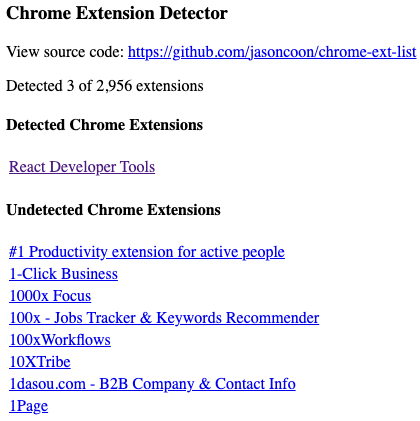
I just read up on "BrowserGate", where LinkedIn is secretly (and illegally) searching users' computers for installed Chrome extensions. So of course I had to create a simple example web page to demonstrate what they're doing.
It uses only client-side javascript and doesn't send your data anywhere: https://jasoncoon.github.io/chrome-ext-list
More info: https://browsergate.eu
I've tested this in Brave, and I think this works in all Chromium browsers (Chrome, Edge, Opera, Brave, Vivaldi, etc) as if you needed another reason to switch to one of the few non Chromium browsers: Waterfox, Firefox, Safari, etc.
Firefox explicitly "prevents websites from fingerprinting a browser by examining the extensions it has installed": https://developer.mozilla.org/en-US/docs/Mozilla/Add-ons/WebExtensions/manifest.json/web_accessible_resources#using_web_accessible_resources
web_accessible_resources - Mozilla | MDN

Sometimes you want to package resources—for example, images, HTML, CSS, or JavaScript—with your extension and make them available to web pages and other extensions.

MDN Web Docs
@jasoncoon didn't read up on it, but: lots of extensions insert bits of HTML or change the current page in some way. For example, ad blockers. This is something that is probably detectable in Firefox?
It would reveal a lot less extensions though, but might still be a problem. It would also be a lot more work to create.
@ayke yeah, the article shows that LinkedIn is also doing exactly that:
"LinkedIn runs a second detection system that walks the entire DOM tree looking for evidence of extension activity."
https://browsergate.eu/how-it-works/#stage-2-passive-dom-scanning-spectroscopy
The Attack: How it works

Every time you open LinkedIn in a Chrome-based browser, LinkedIn’s JavaScript executes a silent scan of your installed browser extensions. The scan probes for thousands of specific extensions by ID, collects the results, encrypts them, and transmits them to LinkedIn’s servers. The entire process happens in the background. There is no consent dialog, no notification, no mention of it in LinkedIn’s privacy policy. This page documents exactly how the system works, with line references and code excerpts from LinkedIn’s production JavaScript bundle.

BrowserGate
@jasoncoon Doesn't seem to detect anything on my ungoogled chromium.
@deshipu oh interesting, I didn't test with Chromium, just with Chrome. I assume you do have extensions installed? It doesn't search for all extensions. I manually added a few for testing, like React Dev Tools.
@jasoncoon I do have extensions installed, but they are installed by downloading the archive and installing it form the disk, perhaps that makes the difference. Then again, I searched that list for the extensions I have (uBlock, Privacy Badger, Instapaper, etc.) and they are not there, so maybe they are just not interested in the kinds of extensions that I use.
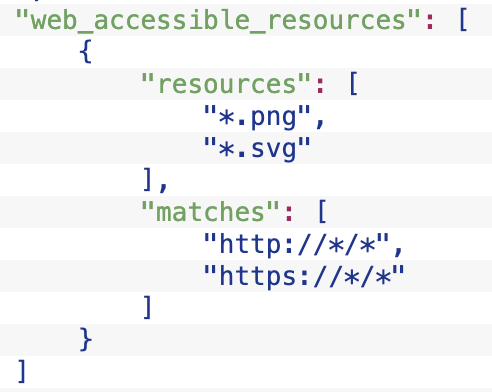
@deshipu I tried manually adding the three extensions you mentioned, but (thankfully) none of them can be detected in the same way as the others. uBlock doesn't have any `web_accessible_resources` listed in its manifest. Privacy Badger and Instapaper don't list any specific files in theirs, just wildcards like `*.png` etc. This seems like a security best practice, for this very reason.
There may still be a way to find a file that can be used to detect them, still digging.
Chrome Extension Detector

@jasoncoon @drajt I'm so glad I use Firefox (especially Firefox focus on my phone as primary browser, it seemed to do reasonably well in the browser fingerprint study I was part of. Hope they publish soon)
@sldrant @jasoncoon been using Firefox for years on the desktop as my primary browser and use an adblock browser on my phone. Will have to check Firefox for Android again...
@drajt @jasoncoon standard Firefox on android supports ad blockers. Firefox focusbis minimalistic, it has limited tabs, no history and clears all cookies often. That plus a resilience to fingerprinting makes it a great daily default