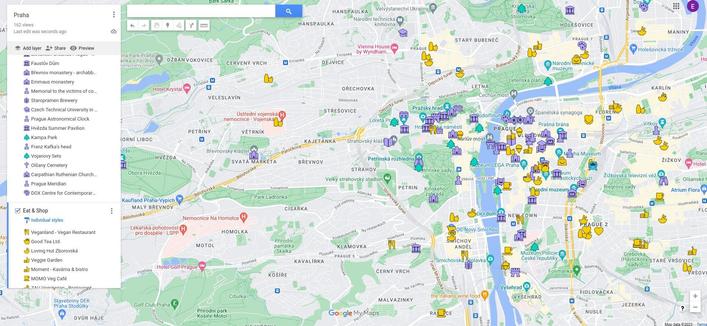
Google Maps alternative needed. I got my export. I have 152 kmz files, maps for certain cities/regions. They look like this, I have continued with the old Google Maps icons. I have OsmAnd and I have imported kml files in the past and I have just tried it with kmz of my next destination, but all the points look the same. I have Marble Virtual Globe and that one displays the Google icons (I do not need them to be Google Icons, can be any set of free icons) but that is a desktop application, I need one on my phone. I do not want to change all the icons manually in OsmAnd. Is there a better Maps app for what I need? Is there an OsmAnd solution?

Edit: Thank you all for your suggestions. I am going to test them in the afternoon.

#degoogle #maps #navigation #danmarkskifter #surveillanceCapitalism
Convert Google Maps saved places to CoMaps

@regendans Thanks! Just tried the app, successfully imported the kmz file, but all my points have the same icon in this one as well... I also tried Organic Maps, same thing.
@rhelune I am not familiar with using these apps but is your problem the same or similar as this one from this comaps issue ? https://codeberg.org/comaps/comaps/issues/3425 The OP has this code https://github.com/dietriro/GeoPro/
Bookmark import - Icon matching

### What problem would this feature help solve? Currently, when bookmarks are imported from, e.g., google maps, even if they match the coordinates of the OSM/CoMaps node exactly, they do not receive the suitable icon/marker in the map. When I export it from the map itself then the item in the km...

Codeberg.org
@regendans Yes it seems to be the problem I have, but no solution so far...

@rhelune I don't know if this is good for you, but it works on smartphones ... (at least, my smartphone has it)

https://www.magiclane.com/web

Magic Lane | The Sovereign Navigation Infrastructure for Europe

Mission-critical navigation and spatial intelligence fully governed by European law. 100% EU data residency. Zero reliance on US Cloud Act.

@lydiaconwell Thanks! Got the app Magic Earth, but it wants my credit card data for the free trial. Can't find kmz file import. If I do not find something free that works I will activate the trial to see if it supports the import.
@rhelune That doesn't sound right that you'd need to put in card details. Is the app by Magic Lane International BV?
Magic Earth Navigation & Maps - Apps on Google Play

GPS Navigation, Offline Maps and Crowd-sourced Traffic.

GitHub - mariush444/gmapIcons2osmand: KML to GPX convertion with icons

KML to GPX convertion with icons. Contribute to mariush444/gmapIcons2osmand development by creating an account on GitHub.

GitHub
@schluff @rhelune this sounds interesting i annote it also myself to check it out
@schluff Thanks! That seems to only work for new Google icons where the style and the colour are defined. I have only style, the colour is default for each style. I get an error when it tries to get the colour. But it must work great for the new Google icons.
@schluff Edited the code, gave it a default colour but now I get a bunch of question marks because the author doesn't use the icons I use. If I don't find something that works out of the box, I might edit the script.
@rhelune I hope something works out for you.
@rhelune @crowbriarhexe use the instructions at https://www.trailvidz.com/gpx-creator/ and then copy into OsmAnd
GPX CREATOR

Use our GPS co-ords in a GPX file with OutdoorActive (free) and GPSVisualizer This process uses the GPS co-ordinates from each TrailVidz pin to create a sequential waypoint list which can be converted to a GPX file using GPSVisualizer and then checked/edited in OutdoorActive ready for use in your

TrailVidz
@rachel @rhelune @crowbriarhexe i think she has no isssue to import the points but for their icon. I don't see this procedure fixes that but i may be wrong. I just ask out of curiosity as I imported too my google mymaps to either #umap or #osmand depending the type of map
@antoniovr @rachel @crowbriarhexe Yeah, it seems like this is not about recognising the icons in kmz files, but thanks anyway.
@rhelune Seeing Praha on your map, have you tried https://mapy.com/ ?
Disclaimer: I haven't actually tried the app for your use case, but since it's one of few well-maintained Google Maps alternatives, I'd give it a try.
Mapy.com

Popular map portal covering whole world by wide range of maps - basic, outdoor (hiking/cycling), traffic, winter. It offers possibility of aerial and 3D view. Extensive amount of travel points of interest. Users are able to search places, plan routes, measure ground and create and share own content. Tourists worldwide use map portal for detailed hiking and cycling maps and extensive tourist guides.

Mapy.com
@ptesarik Thanks! Just tried it now, even created an account, but can't find a way to upload a kmz file 🤷 Is it a paid feature?

@rhelune Like https://github.com/umap-project/umap is good for this, each layer can look different, but it is web thing. Can be also self-hosted + there are ready to use instances.

Good thing about umap is that resources can be served externally (e.g. CI generated nightly) or locally. Multiple people can cooperate etc and it's all based on OSM. We have also local OSM CZ community in case of interest.

GitHub - umap-project/umap: uMap lets you create maps with OpenStreetMap layers in a minute and embed them in your site.

uMap lets you create maps with OpenStreetMap layers in a minute and embed them in your site. - umap-project/umap

GitHub
@mahdi Thanks! Tried the import in the creator on their web, but all the icons are the same 🤷
@rhelune Do you mean within layer or between different layers? This is very simple map we use in Czech for uncategorized recycling left to map, can see distinct colors for container and center - https://umap.openstreetmap.fr/en/map/odpad_bez_urceni_cr_553696 and if I should go to something more complex https://umap.openstreetmap.fr/en/map/mahdi_ruzne_552383 it doesn't have to be only color which changes. But maybe I'm not getting the original requirement fully.
Odpad_bez_urceni_CR

uMap
@mahdi The icons in my google maps differ within layers and between layers. Each of my maps is 3+ layers. This is the closest thing to the solution, but it doesn't work for the icons I use: https://norden.social/@schluff/116308191414734770