 aeva
aevai want to make a little art portfolio site, and I'm stuck between wanting to fuck with scrapists and wanting to not fuck with screen readers. I'm considering chopping up images into tiles which would be assembled into their correct relative locations via css or something. i could even put alt text on it with a transparent image layered on top spanning the full area. downside is real people wouldn't be able to download the images though :/
of course that's all assuming they don't just dump the frame buffer somehow. same problem as anything else, it's unclear to what extent anti scraping measures actually work
also would require javascript, which feels like a personal failure
the worst idea I've had so far which is also my favorite is make it a 3D game like those old edutainment cdrom games where you walk and in a museum etc. idk how i'd make it screen reader compatible though, but i guess it's a page of visual art anyway so idk
wait wait wait what if i make my website a fmv adventure game lol https://mastodon.gamedev.place/@ramon_wilhelm/116290525951324852
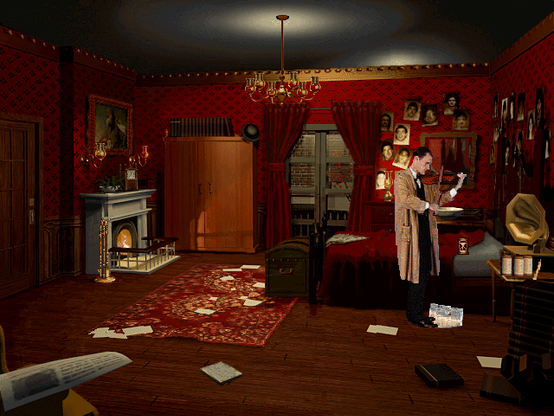
Ramón Wilhelm (@[email protected])
Attached: 1 image Who remembers the classic adventure game The Lost Files of Sherlock Holmes - The Case of the Rose Tattoo (1996)? 🔍 #adventure #game #sherlockholmes
 Celes 🌙
 Ratsnake Games 🔞
 Janek @ IndieDev.site
 Erin
Erin Evie 🏳️⚧️
 Ronflaix
 Clyde (GameTank Guy)
@aeva yes you should make a Sonic'sSchoolhouselike
 anco
anco@aeva
Someone did something like this!
https://jclahoot.com
(I don’t know how accesible it is though)

 Aurora 🏳️🌈 :Dahlia-Unicode-Pink:
@aeva Okay but I've actually been working on the exact same idea. I'm planning to implement it as rendered game engine frames with the interactivity driven by HTML buttons overlaid onto the images.
Like yeah, it's probably a really stupid and inefficient way to build a website but I wanna.
Like yeah, it's probably a really stupid and inefficient way to build a website but I wanna.
 Video Game King
@aeva I had the same idea for a blog - "idea" in this connoting something I have no intention of actually committing myself to.
 ferunando
@aeva 🤔 if you are going to require javascript anyway, give yourself way more work and hook up that WAI-ARIA thingy? or the web-speech one. well, at least, those are the options *i* am considering for remaking my stuff....
* https://developer.mozilla.org/en-US/docs/Learn_web_development/Core/Accessibility/WAI-ARIA_basics
* https://developer.mozilla.org/en-US/docs/Web/API/Web_Speech_API

WAI-ARIA basics - Learn web development | MDN
Following on from the previous article, sometimes making complex UI controls that involve unsemantic HTML and dynamic JavaScript-updated content can be difficult. WAI-ARIA is a technology that can help with such problems by adding in further semantics that browsers and assistive technologies can recognize and use to let users know what is going on. Here we'll show how to use it at a basic level to improve accessibility.
 Simon Richter
@aeva I once built a nice interactive "website" that was a full-page Java applet.