"ZFS with a striped configuration can be more space-efficient compared to other setups like RAIDZ, as it does not require additional space for parity. However, the actual usable space will depend on the number of disks and the specific configuration used."

With this in mind, I started to migrate data from striped #zpool to #Raidz1

There was around 10TB of data to move. But after moving all that data, it took around 20TB on a two-drive raidz1. Some #BlackMagicFuckery

#zfs #nas #homelab

@yehor I didn't even think that a two drive raidz1 was possible! Good to know for when I start migrating, thanks!
@DrHyde yeah, that was a surprise for me as well. But you have no redundancy with two drives.
@yehor if it was traditional raid then that's the case, but is it with a two disk raidz1? You don't really have a data drive and a parity drive, you have two disks with checksums and can always tell which block is buggered because it will fail the checksum.
@DrHyde hm.... I'm not sure. Maybe this is the reason why my 10 TB of data took 20 TB on the raidz1?
@yehor yes, it is. An N disk RAID (whether traditional RAID or raidz) with P disks worth of parity/redundancy will have N-P disks worth of usable space. So with 2 disks, and 1 disk worth of redundancy, you've got 1 disk worth of space.
@yehor At this point I should ask @mwl to check my thinking because I've never actually used a raidz with so few devices :-) His ZFS book is excellent.

@DrHyde @yehor two drive raidz1 has zero redundancy. Are you sure it's not a mirror?

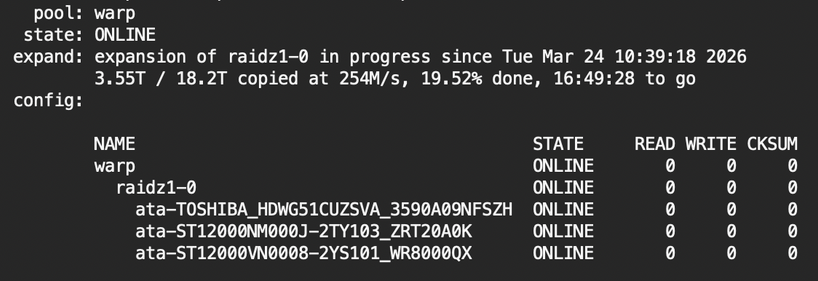
I'd be curious to see "zpool status -v poolname"

@mwl
I'm sure. I also was sure there is no redundancy on a two-drive raidz1 until @DrHyde's comment ))

Here is the output. It is in the process of adding the third drive.

@yehor @DrHyde I'm gonna have to play with this and see what's going on, thanks