One thing I see a lot in game dev discussions is people treating node composition and component architecture as if they are identical.

They overlap, but they are not the same design approach.

I made a video breaking down the distinction, why it matters, and how you can build a lighter component-style setup in Godot instead of defaulting to more behavior nodes.
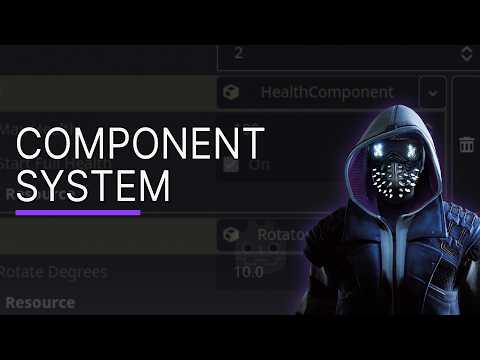
https://www.youtube.com/watch?v=VYWYBgwBFLw

#gamedev #godot #indiedev

Real Component System in Godot Stop Using Nodes for This

YouTube
@GlitchedCode Good information, thanks. If I add a new instance of an entity to a scene, or if I duplicate one in the scene editor, I would have to be sure to make all of the components (and potentially their subresources) unique to scene, right?
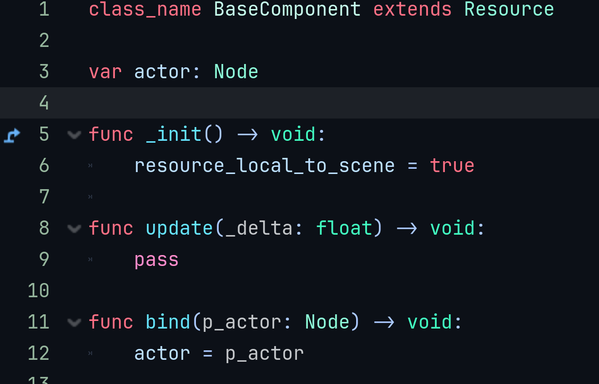
@midnightspire for the component? You can add to the BaseComponent inside an _init function resource_local_to_scene = true and that will keep them unique to each entity/object/player
@GlitchedCode Hm, when I started with Godot I had a lot of trouble getting that to work. I'll look into it again now that I know better what I'm doing.
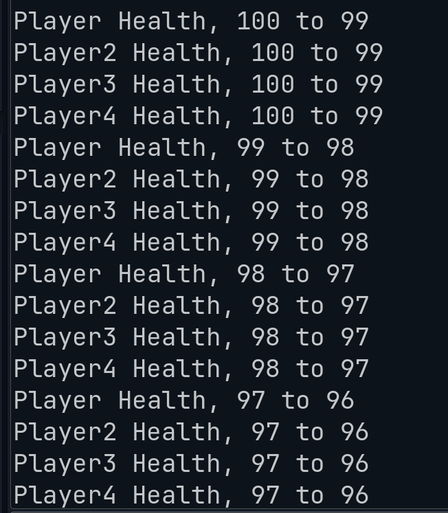
@midnightspire With this as my base component script, and the rest being the same in the video. You can see in the output that Each player has their own health being changed. Without this line or hitting make as unique, they would all show the same player. But with this _init function they all unique automatically.
@GlitchedCode Good to know, thanks. I was also concerned with working with scenes and data in the editor. Continuing your rotation example, if I had a saved entity scene with a rotation component, I might want different instances of that scene to rotate at different speeds. If I drop several of them into the active scene editor, or duplicate an existing one, I need to ensure that I am editing the rotation speeds separately.
@midnightspire Well I just opened it up and was able to edit the data for the rotation and set them to different values for 5 different entities. So you should be all good now :)
@GlitchedCode Hmm, I will try it out. When I migrated my project from Unity to Godot 4.2, this caused me a lot of headaches. Because of that, I ended up converting any pure data classes that I needed to expose in the editor to nodes, and used resources exclusively for read-only reference data.
@GlitchedCode I tried this out for a bit and could not get it to work this way. I need to manually click make unique for each resource on each instance of the scene, and even that feature seems to be buggy. Clicking "local to scene" on the resource in the scene file does not seem to make any difference.
@midnightspire Well if you cant get it to set automatically, just enable local to scene on the resource in your scene file itself. Or use the drop down and set it to another component of the same kind to assign it a new one.
@midnightspire If you mean you click local to scene on say your player, then go back to main scene that has the player in it. Just resetting the component, ie selecting it from the dropdown again should update it so you can make changes. It's a little annoying, and hopefully something changes on that in the future.