Here's one for the icons-in-menus haters on macOS Tahoe:

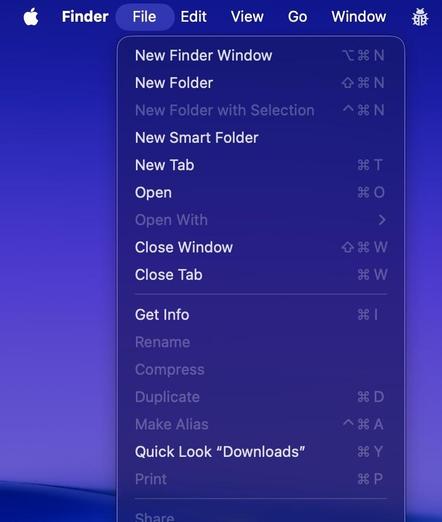
defaults write -g NSMenuEnableActionImages -bool NO

It even preserves the couple of instances you do want icons, like for window zoom/resize

/cc @gruber
@stroughtonsmith @gruber

FINALLY!

Thank you!

That is the only way to use the main menu in #macOS 26 "BrokenGlass"!

What a mess that version is, crazy really.

@stroughtonsmith @gruber Thank you. Still hate Tahoe though but this helps.
@stroughtonsmith Can't thank you enough... 🙇‍♂️
@stroughtonsmith @gruber wonderful. If only they could bring back dock pinning.
@stroughtonsmith @gruber Much less visually overloaded and just plain easier/quicker to scan.
@stroughtonsmith How in the world did this go undiscovered until now?
@gruber @stroughtonsmith Just Finder, though, huh
@lookmark Okay, so it is just for Finder? I thought I was doing something wrong.
@luckie_reubs @lookmark It's unevenly supported. Pages, for example, sheds 95% of them. Messages is unaffected.
@luckie_reubs @lookmark and it *really* cleans up xcode!

@stroughtonsmith @gruber awesome.

PS: Some applications seem to be unimpressed by this, e.g. iTerm.

@stroughtonsmith @gruber Doesn't seem to have an effect on Safari? So far everything else works.
@stroughtonsmith @gruber This is AMAZING. Thank you, thank you, thank you. #dedyefyeverything

@stroughtonsmith @gruber just added a script to Raycast so you can toggle your menu icons at will!
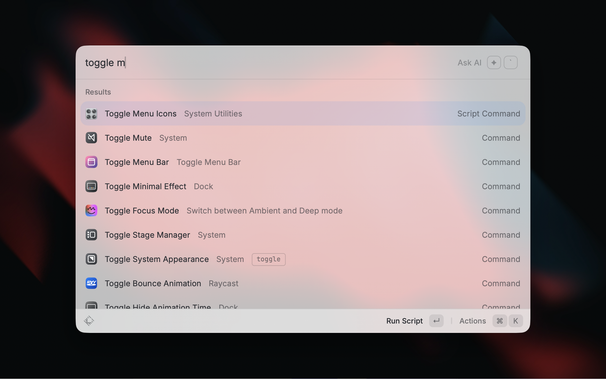
https://github.com/raycast/script-commands/pull/1026

@chrismessina @stroughtonsmith @gruber Here you can also find a LaunchBar action for toggling menu icons. Have fun!

https://obdev.at/blog/evanesco-iconia/

“Evanesco Iconia!”

There’s a lot not to like about the new “every menu item needs an icon” feature in macOS Tahoe. They add visual noise to the menus. They make menus more inefficient to scan. They often result in an inconsistent alignment of menu item titles.…

Objective Development

@stroughtonsmith @gruber heh, another case of Apple engineer rebellion. I like it. The previous one was where you could bring back the sensible (pre-Big Sur) layout of NSAlerts with a defaults write command. They did remove it eventually.

(I myself am staying on Sonoma for now)

@stroughtonsmith do you have a collection of 'fix Tahoe' defaults writes (and things like that)?
@stroughtonsmith @gruber Seems like this only works for Finder? 😭
@toniwonkanobi2 @stroughtonsmith You need to quit and relaunch apps to see it take effect.
@gruber @stroughtonsmith tried it, and it doesn’t work in Safari at least. Will try more when I get back to my Mac
@stroughtonsmith @gruber for someone who doesn't ever use Terminal, do you just copy and paste that into a terminal window and it should work? a "terminal for dummies" How-To would be appreciated!
@jasonjahnkefilms @gruber the quick answer is yes (and then log out or restart your Mac), but the /right/ answer is you should never paste commands into a Terminal unless you know what they're gonna do!
@stroughtonsmith @gruber haha absolutely. thats why I paused and thought I should ask!

@jasonjahnkefilms @stroughtonsmith You can read a good intro to the MacOS `defaults` command here:

https://macos-defaults.com

A list of macOS defaults commands with demos ✨

You've already copied `defaults write` commands. Sometimes you don't know what they do and are not sure they still work. This list of macOS defaults commands is here to help.

macOS defaults
@stroughtonsmith @jasonjahnkefilms With some commands you need to log out/in for them to take effect, but with this one for menu item icons, you just need to quit/relaunch apps for it to take effect.