 Diego
Diego 
 Steve Troughton-Smith
Here's one for the icons-in-menus haters on macOS Tahoe:
defaults write -g NSMenuEnableActionImages -bool NO
It even preserves the couple of instances you do want icons, like for window zoom/resize
/cc @gruber
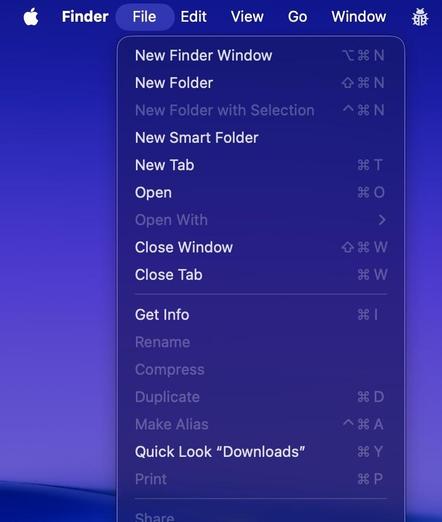
Here's one for the icons-in-menus haters on macOS Tahoe:
defaults write -g NSMenuEnableActionImages -bool NO
It even preserves the couple of instances you do want icons, like for window zoom/resize
/cc @gruber
FINALLY!
Thank you!
That is the only way to use the main menu in #macOS 26 "BrokenGlass"!
What a mess that version is, crazy really.
@stroughtonsmith @gruber awesome.
PS: Some applications seem to be unimpressed by this, e.g. iTerm.
@stroughtonsmith @gruber just added a script to Raycast so you can toggle your menu icons at will!
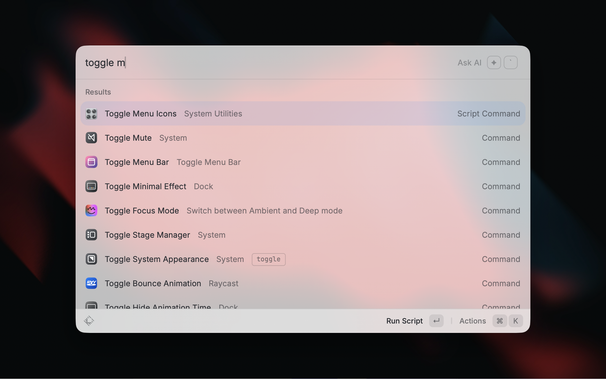
@chrismessina @stroughtonsmith @gruber Here you can also find a LaunchBar action for toggling menu icons. Have fun!
@stroughtonsmith @gruber heh, another case of Apple engineer rebellion. I like it. The previous one was where you could bring back the sensible (pre-Big Sur) layout of NSAlerts with a defaults write command. They did remove it eventually.
(I myself am staying on Sonoma for now)
 Machiel
 NMDoerner
 Captain Salem
 Dmian 🇪🇺
 olof hennig
 QuarterSwede
 John Gruber
 lookmark
 ben
ben hyperjeff
 Patrick Seemann
 gcanyon
 Stefan Hecht
 Chris Messina
 Norbert Heger
 Gregory
 enMTW
enMTW toniwonkanobi2