 Digital Mark λ ☕️ 🕹 👽
New Maccy is here! (Had to call the UPS guy back because I was AFD for 1 minute)
Is currently updating Tahoe. Is too cold from truck to really be on my lap, hopefully this warms it up.
Fucking Settings app is garbage. Search "modifiers" no results. Find it in Keyboard, Shortcuts, bottom of the list, so I can have capslock=ctrl like a sane person.
Haven't named it yet. All my computers are fictional places or ships. Was kinda thinking either very cutesy like "PoohCorner", or dark and ominous, maybe "Demeter" or "Nostromo". I don't know any really iconic ships of late.
Short list for names is now down to:
Revenger (from Alastair Reynolds)
BlackPearl (Pirates)
Arcadia (from Space Captain Harlock)
Revenger (from Alastair Reynolds)
BlackPearl (Pirates)
Arcadia (from Space Captain Harlock)
Have settled on Revenger. It just has that slightly deranged little girl with ghost knives feel.
Finally figured out that the Force Click and Look Up trackpad settings are why I couldn't drag & drop. Got those off and hey, this is a perfectly usable non-mouse!
Got my home dir & bin dir moved, but not recompiled.
Also played some Luanti and it's possible but really scary to do anything on trackpad, I'll have to find a spare mouse, good mouse is staying on the old Mac for now.
Safari no longer has an "Import Bookmarks" command. You can import automatically from another browser, but what you're supposed to do is sync over iCloud. Which I turned off on my old Mac.
… So now I have old bookmarks on new Mac, and I exported a good list, but I'm waiting to see if iCloud figures it out and updates.
If all else fails, I may be able to just replace a file in Library? Or do I have to import into Firefuck or whatever, then let Safari pull from it?
Automation sucks.
Finally solved by: Copy bookmarks.html to new Mac. Install & run Firefox (ew). Import. Quit. Open Safari. Import from Browser.
Now delete a bunch of duplicate dirs. Hope it syncs up from this and doesn't overwrite, who knows with iCloud.
Resolve to avoid installing a shitload of things in MacPorts lasted a day.
I need multimarkdown…
EDIT: do not install wkhtmltopdf from homebrew, it has a broken fucking QT!!!
Now investigating some shit with weasyprint.
But I'm resisting homebrew, that shit can fuck off into a hole.
OK, weasyprint works
https://doc.courtbouillon.org/weasyprint/stable/first_steps.html#
Actual way I installed:
sudo python3 -m pip install weasyprint
sudo port install pango
Works:
python3 -m weasyprint foo.html foo.pdf
Well, sorta, does different layout than I'm used to. So now any book will need relayout? Maybe not too much.
ALSO, latest multimarkdown is being bitchy about
----
## header
Wants an extra newline between. AYFKM?
OK, aside from no table of contents or JS (which I don't use TOO much?), I'm working again, including page numbering in CSS!!!
cat <<CSSEND >"$TMP/md.css"
@page { size: $pageSize; width: $pageWidth; height: $pageHeight;
margin: 0.25in;
margin-bottom: 0.5in;
counter-increment: page 1;
@bottom-center {
content: "— " counter(page) " —";
}
}
CSSEND
python3 -m weasyprint -p -s "$TMP/md.css" "$dir/$outfile.html" "$dir/$outfile.pdf"
Getting ready to move my Code folder over. Found a half-dozen node_modules dirs, a bunch of built binaries for old projects, etc.
A fat Unity dir, which I'm unlikely to use again? Moved to desktop for final triage.
~/Code% du -sck *|sort -nr
5389300 total
906392 CodeJS
797772 CodeTouch
418100 CodeMac
324456 CodePascal
311776 CodeNode
260924 CodeMedley
182240 CodeObjC
171988 CodeRacket
170932 CodeJava
160168 CodeChez
114488 CodeQB64
107080 CodeKawa
53508 CodeGerbil
48520 CodeChicken
…
Watching the archive and oh there's so many old .git and .svn logs, these *may* all be past my p4 or cvs usage? One old project has images that don't exist, it just fails out on collecting them, sigh.
On both old Mac & new, in zsh,
LC_COLLATE=
LANG=en_US.UTF-8
But on old Mac, ls sorts as if LC_COLLATE=C
new Mac, case-insensitive, but not Mac native sort (numbers are 1, 10, 11, etc.)
I DO NOT UNDERSTAND.
Well, all I can figure is it's an unmarked change in Apple's /bin/ls or APFS vs HFS+.
I don't even object, exactly, to having case-insensitive sort, it's how I use Finder. But that has Mac native sort, and I don't see any way to get that.
LC_COLLATE=$LANG ls
doesn't change anything, so it is defaulting normally AFAICT?
I think again of this post:
https://mdhughes.tech/2019/11/22/adult-engineer-over-optimization-as-the-motie-problem/
10+ years in place on a machine means you've optimized every byte of the infospace for your own peculiarities. Then moving to another one is incredibly hard and weird.
I'm at that scene in Mote where Bury is in a spacesuit evacuating, and Watchmakers puppeteering a spacesuit and severed head go past and he's SCREAMING. That's my computers right now. Get out, before the reactors blow. Don't get the Watchmakers in the new ship.
Got mail moved over. It's now going crazy downloading mailboxes, fine.
But to get there, I had to login to gmail (I know. Life is a hard series of horrible compromises.) Which "security locked" my account because I tried to log in, had to do "recovery". Then I was confronted with gmail's site, which is FULL of AI shit.
If you try to hit settings, it slips a "Gemini" icon under it, ha ha sneaky. In settings, you can finally turn off all "smart" shit, with a reload each time. I would stab. STAB.
Tahoe, stop fucking resizing my windows, you maniacal fucking device, I will reach into your brains and pull out wires until you stop.
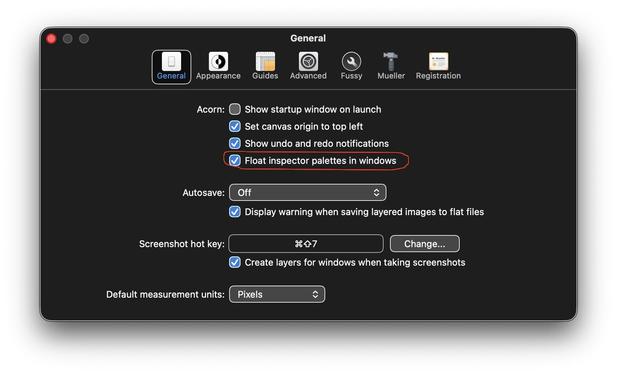
Installed Acorn 8. Turned off everything I could. HOW THE FUCK do I get the floating toolboxes which are ON TOP OF THE FUCKING PIXELS, to float in the corners of my desktop, outside the image windows, like they used to‽
For fuck's sake, am I gonna have to change image editor‽ I can't. I'm 1000 years old, I'm used to what Acorn did. Gus, please quit fucking with the UI.
@flyingmeat Are you there? Help.
Did eventually find the setting so I'm less annoyed, but I've got GraphicConverter downloading as backup anyway.
#acorn
#acorn
Tahoe, in Mission Control space 2 with Safari, Cmd-Tab to Finder which is in space 1, and it goes to space 1 but doesn't activate Finder, it activates iTunes or iTerm2, which are set to All Spaces.
THIS IS NOT WHAT I TOLD YOU TO DO.
That's not how it worked in Big Sur. When was it broken, and how/can I fix it?
#apple #macos #tahoe #fuckTahoe
Also at some point they changed iTunes from "Love" and "Dislike" to "Suggest More" and "Suggest Less", which does not adequately describe my utter loathing of the B**tl*s, the shittiest gay boy pop band in history, fuck it, I'd use the one-use time machine to go back and drive over them at that road crossing, Hitler got taken care of historically, but only one of these cocksuckers got shot.
… anyway how's your music listening day?
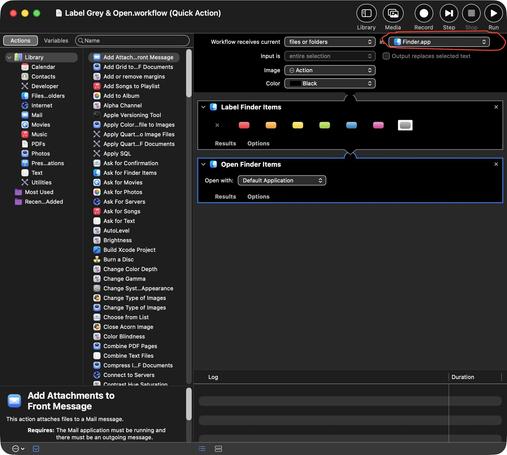
I copy over a Quick Action in Automator, it's saved in ~/Library/Services as one expects.
How the FUCK do I get it to show up in Finder under Tahoe? It's not listed under Settings, Login Items & Extensions.
… OK, figured it out. Change "all applications" to "Finder". Immediately pops up.
If I'd had to fuck with Shortcuts, I'd've stabbed someone. Honestly upset this isn't Script Editor, but I don't *hate* hate Automator.
#apple #tahoe #fuckTahoe #automation
So of course there's no easy way to set keys for these.
System Prefs, Keyboard, Keyboard Shortcuts, Services, find the new action, bind a key (I use ^⌘O)
Then find the menu item in Finder that does that (Open File in Tab or some such), and rebind THAT to a crap key you won't ever type.
NOW, at last, I can ^⌘O to open next file in a series, which should be a system builtin.
How the fuck do normal people use computers?
I'm super bitchy about Tahoe right now. But:
The hardware is fucking amazing. I haven't ever got this thing near limits yet.
The core OS is still fucking amazing.
That there *is* automation that actually works, if very very hard to find and wire together, was amazing and I would like this to be great again.
It's just user experience has been shat on by 2 or 3 "generations" of "designers" who don't know that they're supposed to design for users.
#apple #tahoe #fuckTahoe #userExperience #ux
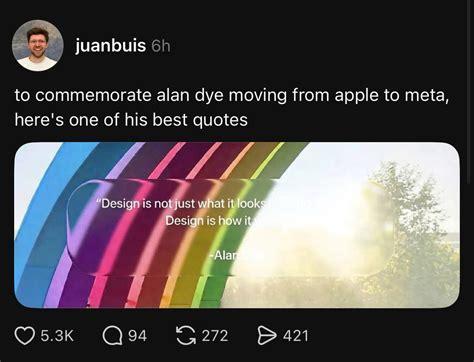
Important usage tip:
https://beamtic.com/disable-preview-controls-mac
https://beamtic.com/disable-preview-controls-mac
Oh, ha ha, I already had that in my bin folder:
% cat bin/finderNoPreview.sh
defaults write com.apple.finder QLInlinePreviewMinimumSupportedSize -int 1000
killall Finder
% cat bin/finderNoPreview.sh
defaults write com.apple.finder QLInlinePreviewMinimumSupportedSize -int 1000
killall Finder
Got my Chez code env set back up. I have to do some funny tricks because I've moved things to non-standard places (macports chezscheme installs "scheme" & "scheme.boot", which every other installer now call "chez" & "chez.boot"). Recompile my native libs.
Immediately found a bug where I haven't been testing first-run, no saved config experience. Oooops.
So much code. So many tools.
More filesystem cleanup & moving, and I'm just… I shouldn't be allowed to have a filesystem. There should be some kind of database, and a treatment program, for people like me. Possibly a supervisor with an electric shock paddle, but I'd probably grow to like that too much.
 DougMerritt (log😅 = 💧log😄)
@mdhughes
Maybe BeOS filesystems would suit you, since as I recall they had database-like functionality of some sort.
Maybe BeOS filesystems would suit you, since as I recall they had database-like functionality of some sort.
 Ambient Sponge
@mdhughes Always nice to see someone have something less than positive to say about them 😂
 🇺🇦 haxadecimal 🚫👑
@mdhughes
I get the impression that you don't like them.
I get the impression that you don't like them.