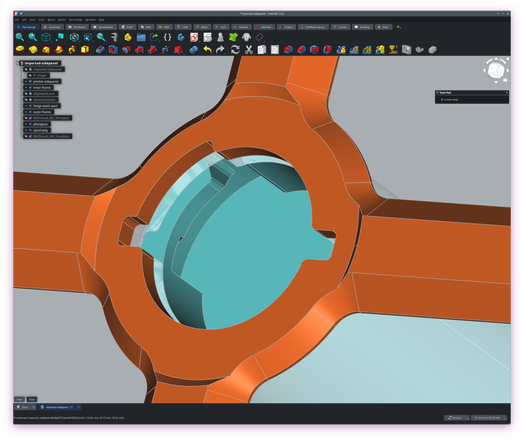
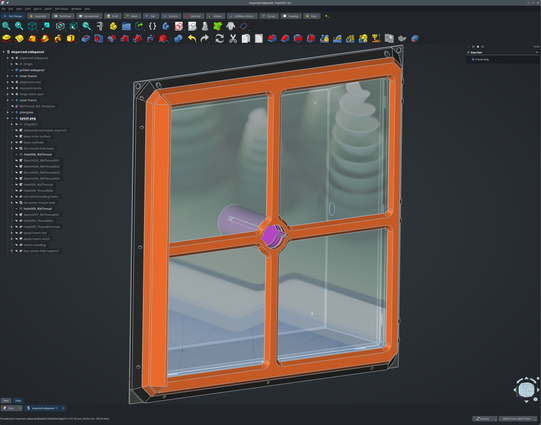
Shoutout to FreeCAD having silly rendering issues around transparency. That's literally my desktop wallpaper (default wallpaper in recent version of kde/plasma) shining through the window.

edit: this might be a kde bug, see https://critter.cafe/@irina/116238645215664128  

edit2: and to make myself clear: this is not intended as criticism of either freecad or kde/plasma. it brought me some joy, especially in this particular instance

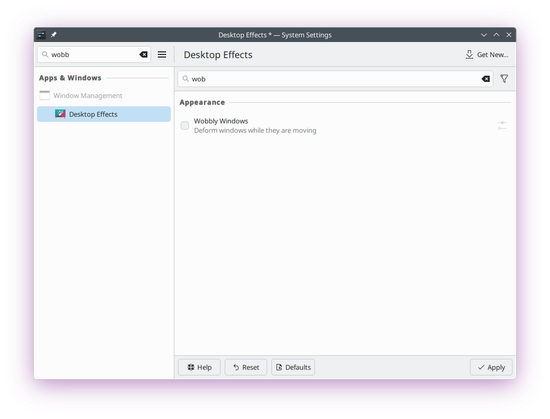
edit3: the issue seems to go away entirely if I disable wobbly windows in desktop effects in kde
#Freecad #kde

So I just noticed another silly thing about this whole screenshot stuff. If you look closely, you'll notice that the screenshot has an alpha layer. WTAF. (your instance may have re-encoded this picture lossily)

bye bye. you will be missed 

edit: or nvm, it happened again.

So, it's a Qt bug? https://github.com/FreeCAD/FreeCAD/commit/cb8c193408b82e208504f22fa75aa0a4609b00cb

(freecad.overrideAttrs (o: {
patches = (o.patches or []) ++ [
# Fix transparency issues; see https://is-a.cat/@ar/116238609907729115
(fetchpatch {
url = "https://github.com/FreeCAD/FreeCAD/commit/cb8c193408b82e208504f22fa75aa0a4609b00cb.patch?full_index=1";
hash = "sha256-e4Ki1zGZveEMXCxXwgwbd9f2KTJi648M9WIc1Vn9YQM=";
})
];
}))
@ar wait was that the cause?
@natty I can't trigger it anymore with it disabled.
@ar How is it overwriting the background instead of compositing over it
@ar Unless that's intentional, which would actually be kinda cool
@natty @ar i would guess it's just rendering out to the window surface buffer with alpha values

and then kwin's compositor is blending the wallpaper with it
@[email protected] @ar yeah that's kinda what I meant

glBlendFunc(GL_SRC_ALPHA, GL_ZERO)
@natty @navi The weird part is, it's intermittent. And sometimes taking a screenshot toggles it.
@ar @natty @navi I saw blender do this once, it was a bug regarding the specific implementation of the opengl pipeline, something about the buffers leaking, not specific to transparency, but to buffer clearing/swapping being done in the wrong order
@efi @ar @[email protected] It could be just that it's expecting a separate surface from X11 days but Wayland gives it a region of the existing surface?
@natty @ar @navi no, it was happening back on x11, it has to do with opengl buffers: you could look it up in the blender github issues 🥴
@ar Sounds like a feature.
@jernej__s maybe it recognizes that this is actually a window 🤔 😆
@ar krita does the same thing if you have semitransparent pixels

@ar https://github.com/FreeCAD/FreeCAD/issues/6177

It's so sad that somehow FreeCAD has both super enthusiastic user base, but at the same time such basic bugs that can't be resolved in over four years.

I personally gave up trying to learn or use FreeCAD, the transparency issues and the to me pretty confusing module system ultimately pushed me to OnShape instead.

UI: Grid is transparent and displaying the background behind it · Issue #6177 · FreeCAD/FreeCAD

Issue imported from https://tracker.freecad.org/view.php?id=4594 Reporter: dudo Date submitted: 3/10/2021 FreeCAD version: 0.2 Category: Bug Status: new Tags: Coin3d Original report text Grid lines...

GitHub
@pl @ar back in 2016 or so FreeCAD was so aggressively hostile to using it (I only give an application one more chance chances after it crashes and corrupts my savefile) that I decided to spend years and thousands of $ out of my own pocket improving another CAD. it was the right decision I think
@whitequark @pl I used that CAD for a long while specifically because FreeCAD was unusable/hostile back then, and the improvements you made to the other CAD helped, but FreeCAD has since become a lot more usable for me (especially around 0.20 and after).
@ar do you remember when video playback acceleration on windows bound to color 0x00FF00 and replaced all green pixels through some funny hw accel? this feels tangentically similar
@domi I do, but I think the last time i saw that was shortly after the release of windows vista.

@ar I've had this happen on sway as well...

one of the funnier bugs for sure

@ar The next step in transparency would be seeing the wall behind your monitor. Maximum immersion
@ar this feels like a puzzle in a game where you're inside the computer. like, you're in the CAD program and you need to get to the desktop, so you go file -> open -> window.whatever and then open the window and climb through