 Sven Peter
 Rebane
did you know that SSH has a little-known secret menu?
i wrote a post about this on cohost a while back, but since that site shut down i'm posting it here too


did you know that SSH has a little-known secret menu?
i wrote a post about this on cohost a while back, but since that site shut down i'm posting it here too
Yes, but did you know that it is basically inaccessible on Keyboard layouts like e.g. de-DE?
Oh and if I recall correctly the keyboard combination is also different on macOS too...
@khrister @phl @bob_zim @rebane2001
Which makes it a different key combination and - well - try googling for it. I've literally never seen this being documented (in a discoverable way) anywhere.
@agowa338 Neither have I. Well, I somehow learned <Enter> ~ ^Z, not sure how. The rest I learned from this toot.
The ~ <space> trick I found out by trial and error, I think.
@phl Huh. I’m not sure I’ve seen a non-exotic (e.g, not for a Corne) layout which entirely lacks tilde as a discrete character. On my German keyboards, it’s on the AltGr layer of the +/* key. Same on Spanish QWERTY keyboards I’ve seen.
Not doubting that such a keyboard exists, I just thought I had seen most of the mass-produced layouts.
But the keyboard sequence becomes different and just trying to press it is annoying to impossible. Esp. if you then also try to do it over e.g an additional IPMI or VMware console in between as well.
It's just one of these things that feel like nobody expected anything but en-US being used as it just sucks. Almost always it is easier to first change your keyboard layout to en-US, press the keyboard shortcut, and switch it back...
@agowa338 @phl It doesn’t become a different sequence, though? Immediately after a new line, send a tilde character to signify the next character is a control character, then send the control character (e.g, ? to get the help and command line). Sure, you may press different keys to cause your keyboard to emit the tilde, but that doesn’t make it a different sequence. For example, nobody specifies Shift-/ in these sequences, they specify ?, and it’s up to you to get your keyboard to emit that character.
Yes, software trying to read scan codes directly and interpret them as US keyboards sucks, but that’s hardly the fault of applications like OpenSSH which do no such thing.
@bob_zim @agowa338 I think Klaus might have meant that depending on the layout the actual keys you have to press changes significantly (often not merely by location too)
I have absolutely no clue what I had to press on Hungarian keyboards for ^] in telnet, come to think of it XD I guess it wasn't what I think it was with my now mostly US-layout mind...
Look, I'm not disagreeing with "the operator should know". However there at least should be some - easily discoverable, or even linked within "man ssh" - kind of documentation for where that combination gets mapped to on STANDARD keyboard layouts. Especially when it changes the entire sequence, not just location...
All I'm complaining about is the lack of documentation and how annoying it was especially when I first learned about that shortcut.
@phl By way of context, I used to work tech support for a vendor which sells Linux-based servers and which supported a bunch of applications which run on those servers on FreeBSD, Solaris, AIX, and a few other systems. I got calls from people all over the world, including people who had never really used a *NIX command line before, and had to walk them through filesystem operations and through using vim.
I remember dealing with at least seven different keyboard layouts more than once. JIS was a “fun” one because there are at least two wildly different layouts which people identify with that code. One has the tilde in the upper left like ANSI/ISO, the other has it two keys left of backspace.
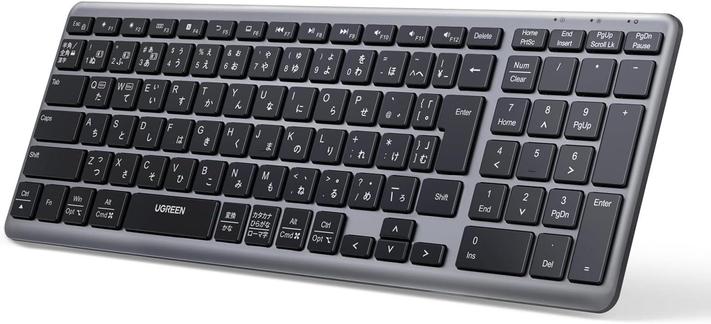
@bob_zim ohh, right, that mode switch key is in the upper left.
I wonder just how many times my ISO trained hands would hit the ろ key instead of right shift if I ever had to use one of those things :D (I guess most other people think the same of the ISO 102nd key and left shift...)
I could do that If I'd only connect from one device to a hand full of other devices. But that just doesn't work when you're doing work for customers.
Configuring that would be even harder than getting the key combination changed within the OpenSSH source code for everyone...
@draeath @rebane2001
See the other post, that'd be possible if I wasn't a consultant jumping hundreds of systems spread out across different customers. Sometimes even just for a few days or weeks in some projects. In my situation getting upstream to accept changing it would even be easier
Changing the binding on all of them or even just trying to find the ~ key itself is way more annoying than closing and reopening the terminal. Or when it is on a TTY switching to another and "killall -9 ssh".
Ooh, useful! Thanks!
@rebane2001 I'm forever annoyed that the command sequence starter is a newline of all things.
Telnet's UX was a lot better in this regard imo.
@rebane2001 Disabled by default on openssh *client* 9.2 and above.
https://github.com/openssh/openssh-portable/commit/f7cebbbf407d772ed71403d314343766782fe540
```
Host *
EnableEscapeCommandline yes
```
In your ssh_config file to re-enable it.
~c). the other escape sequences still work by default.I did not, but I am not surprised. I use ~^Z often, ~. sometimes, am old enough to remember ~ commands from mailx, and the ^] break in telnet.
@rhialto @rebane2001 Could be, `cu` and `rsh` came out at the same time.
`tip` also has similar escapes, and it appeared in 4.2BSD (1983).
@rebane2001, it doesn't even have to be Enter as there's no keycode checking going on; Return, Ctrl-M and (not really all that surprisingly) Ctrl-J all work equally well.
It's not enabled here by default (OpenSSH on Devuan; see ssh_config(5)), but it's trivial to do per-session:
ssh -e'~' USER@HOST
I can even use ^] if I want to (to a small extent) mimic telnet, either as that pair of characters representing Ctrl-] or the actual character itself (inserted as a literal via e.g. the shell's quote key).
@Kurt For me, it's the most often use one. I used ~v today. :D
And I always forget about ~^Z, or use it without noticing what did I do. :D
pkill ssh??
 schrotthaufen
 Ozzelot
 Klaus Frank
 Zimmie
 Henrik Pauli
 Christer B
 gkrnours
 draeath
 Kees N ✅🔻
 정아름
정아름 Walrus 🏴
 Paul Dot X
 the thing
 baloo
baloo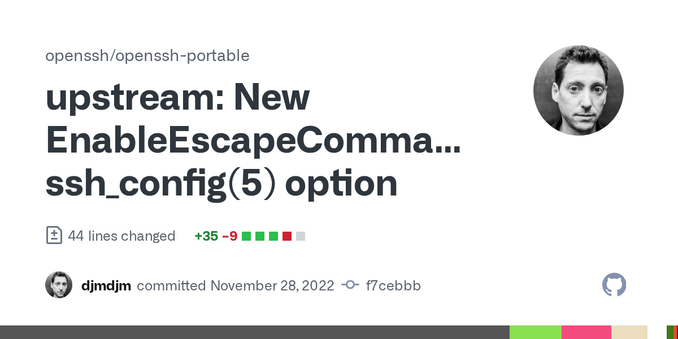
 Mica
Mica 
 Rogan Dawes
 Tobias
 Eli the Bearded
 GD2
GD2 Kirby
Kirby
 avatastic
 MrGrumpyMonkey
 Andrew

 Jay 🆘
Jay 🆘 Kristoffer Lawson
 Stuart Longland (VK4MSL)
 Rhialto
 lp0 on fire
 jfk
jfk advokatt
 Hemera

 Aral Balkan
 Kurt
Kurt
 diffie :3 (bindiff)
 Arjen P. de Vries Timmers 🕊️
 Григорий Клюшников
 walnut 🌱