@hsorlie @tailscale i can take a look at it tomorrow, to see what I figure out. There are some interesting problems to work on here.
VPS can (almost) always be changed with whatever you want to run your software on. It is just a virtual computer somewhere, and you can for the most part view your docker containers as the same. (of course with some caveats)
@hsorlie @tailscale I don't know how fast I'll be able to write a post about it, but you might be able to figure it out from the repo I threw the working config into. My first repo on Codeberg. 🤓
Download the files, and put everything into the root of the directory you want to use for the Project.
Create a .env file from the .env.example.txt, containing your tailscale auth key (like for Immich)
Edit the ts-server.json file, so it points to the subdomain you want(I used owntracks) and your tailnet domain.
Create a new Project and give it a name. Select the path to your chosen directory. It will pick up the existing compose.yaml, so you can just select that, and press next until it start up.
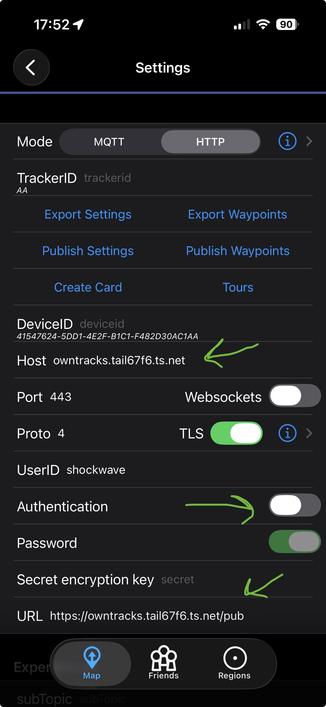
I installed the iOS app to test it. I include a screenshot of the settings for reference. Remember to toggle the authentication off. Tailscale is the "only" guards in this setup, something I find sufficient, since the containers aren't even exposing ports on your local networks. They can only be access via the Tailscale node.
https://codeberg.org/rsletta/owntracks-and-tailscale-in-containers
@hsorlie @tailscale my bad for being imprecise.
The auth key from Tailscale goes in the .env file. It has to be a new key, created the same way as the one for immich. You can put the key directly into the compose file if you want to, replacing ${TS_AUTHKEY}.
Did you put your own tailnet domain in ts-serve.json?
If all the containers are running, and you see the node in the Machine dashboard on Tailscale, you should be able to reach the service. You don’t have to type :443, since that is the standard https port. Since they are green, it might be something with the Tailscale setup. You could try to stop the project, clear the Tailscale/state directory, generate a new auth key, and try re-building it.
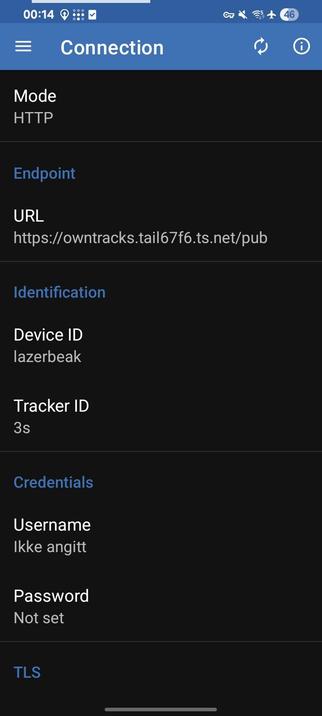
It can be tricky to troubleshoot, and I had my share of issues trying to get it up and running. But if the containers are green, and logs seem fine, I would start by checking the Tailscale dashboard. I have an old Android phone in a drawer, so I’ll install it on it to see how it looks.