Has anyone managed to get #OwnTracks running with container manager on their #synology #nas ? I plan to (try to) use it with @tailscale , if possible. Reading the owntracks quicksetup guide. but it only mentions VPS. Would be sweet if anyone has seen a guide suitable for newbies like me. #selfHosting Seems to be at least some frustration on the matter: https://github.com/owntracks/talk/issues/253
I don't understand: is the Docker Container the quick install? · Issue #253 · owntracks/talk

Hi! I've read your documentation, your git readme, and the readme of the Docker repo, but I still don't understand what the Docker Container does. What is the recorder? Why is Docker not mentioned ...

GitHub

@hsorlie @tailscale i can take a look at it tomorrow, to see what I figure out. There are some interesting problems to work on here.

VPS can (almost) always be changed with whatever you want to run your software on. It is just a virtual computer somewhere, and you can for the most part view your docker containers as the same. (of course with some caveats)

@hsorlie @tailscale I have a working setup now, so I just have to do write a guide for you to follow. It was a bit convoluted. 😊
@rsletta @tailscale This is all kinds of awesome. Thank you! Can't wait to read the guide!

@hsorlie @tailscale I don't know how fast I'll be able to write a post about it, but you might be able to figure it out from the repo I threw the working config into. My first repo on Codeberg. 🤓

Download the files, and put everything into the root of the directory you want to use for the Project.

Create a .env file from the .env.example.txt, containing your tailscale auth key (like for Immich)

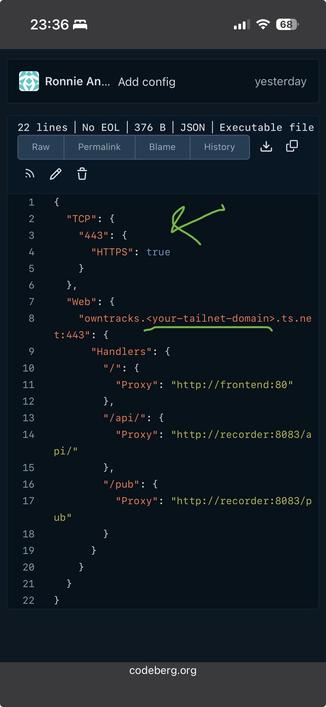
Edit the ts-server.json file, so it points to the subdomain you want(I used owntracks) and your tailnet domain.

Create a new Project and give it a name. Select the path to your chosen directory. It will pick up the existing compose.yaml, so you can just select that, and press next until it start up.

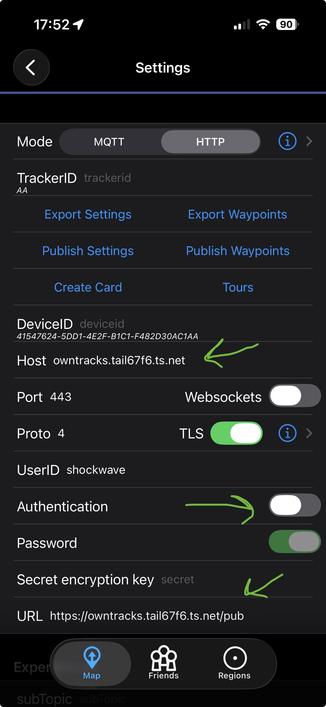
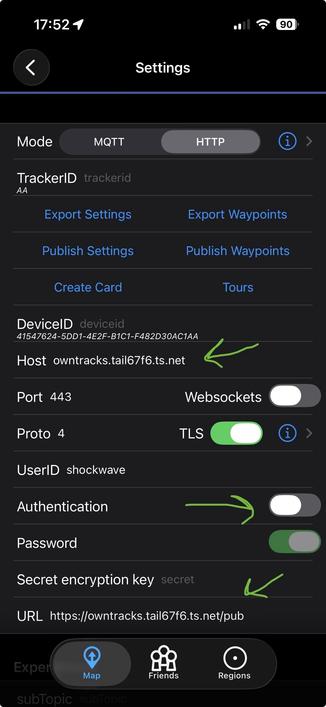
I installed the iOS app to test it. I include a screenshot of the settings for reference. Remember to toggle the authentication off. Tailscale is the "only" guards in this setup, something I find sufficient, since the containers aren't even exposing ports on your local networks. They can only be access via the Tailscale node.

https://codeberg.org/rsletta/owntracks-and-tailscale-in-containers

@rsletta @tailscale Thanks! I'll have a go at this this evening. 🤞
@rsletta @tailscale Tried to follow your instructions to the best of my abilities. I have the project running in container manager, green lights and all. However, the android app won't connect to the recorder. I'm not quite sure what questions to ask in order to begin to track down the errors here, but I'll start with a few things I was not confident about when I set this up: 1 - Does the tailscale authkey only go one place, the .env file? I see what seems to be a placeholder for it in the yaml, so I tried both with and without there as well... 2 - Should I be able to open the web interface on my laptop with just http://owntracks.<ts-domain>.ts.net:443 ? 3 - Does the android app require anything else than the url to connect? I have directed it to http://owntracks.<ts-domain>.ts.net/pub , but I haven't given it anything else. No username, password. Device ID and Tracker ID is preset for me. Under TLS it says Client certificate: not set. Thank you again!

@hsorlie @tailscale my bad for being imprecise.

The auth key from Tailscale goes in the .env file. It has to be a new key, created the same way as the one for immich. You can put the key directly into the compose file if you want to, replacing ${TS_AUTHKEY}.

Did you put your own tailnet domain in ts-serve.json?

If all the containers are running, and you see the node in the Machine dashboard on Tailscale, you should be able to reach the service. You don’t have to type :443, since that is the standard https port. Since they are green, it might be something with the Tailscale setup. You could try to stop the project, clear the Tailscale/state directory, generate a new auth key, and try re-building it.

It can be tricky to troubleshoot, and I had my share of issues trying to get it up and running. But if the containers are green, and logs seem fine, I would start by checking the Tailscale dashboard. I have an old Android phone in a drawer, so I’ll install it on it to see how it looks.

@hsorlie @tailscale oh, one detail I noticed in your post. You mention http://owntracks… that needs to be https. It should redirect, but you never know.
@hsorlie @tailscale regarding the app. I did have to set the host too, and explicitly turn auth off. And select http at the top. I forgot to point to that. It defaults to MQTT, which is another protocol.
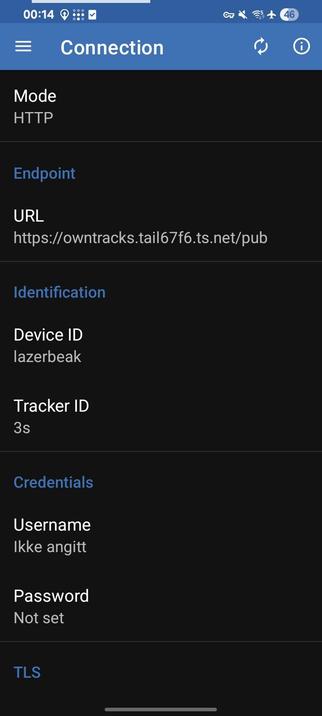
@rsletta @tailscale Copy! Android app looks quite different, with different settings. But I have http mode, the correct URL (I think). There is not an option to turn auth off, but I have no username and no password (and no TLS client certificate).
@hsorlie @tailscale Seems you are on the right track regarding the app. I just plopped in the url and I got an entry in the recorder. However I also noticed that the info icon revealed a nice section, with logs at the bottom. And it seems like I have some issues with the connection timing out I would need to dig into.

@rsletta @tailscale Ok, I've put the authkey in the yaml compose. It started with "tskey-auth-...". That's actually part of the key right, and shouldn't be omitted?

Yes, put the tailnet domain in the ts-serve.json. With or without preceding "https://"? I tried both, for good measure.

Seems to be running fine in the machine dashboard on ts. But still cannot reach http(s)://<ts-domain>.ts.net in the browser. Might try with a new authkey then. Is it void every time I rebuild the project? Also, I never used a ts authkey when setting up Immich. Never needed one? Thanks again!

@hsorlie @tailscale in ts-serve.json you don’t need https:// in the url, since that is declared in its own block. You only need to replace the placeholder for your tailnet.

To rule out one factor, you could start with focusing on reaching the frontend from the browser. If that works without error, we know the stack works, and that issues with the app must be localized to the phone, most likely config.

Yes, tskey-auth- is a part of the key.

If you’re up for it, we could find a suitable afternoon and I could invite you to our offices at Youngstorget, to sit down and do a little crash course in self-hosting related topics.

@rsletta @tailscale Thanks, that sounds really nice! What's your preferred way of contacting you privately? But I just remembered that when setting up immich I opened some ports in the firewall, just following the tutorial really. I checked, and the firewall exception rule for immich is active. When I (temporarily) disabled the firewall entirely just now, I got a different error message on the owntracks android app, which might be something I suppose. It used to be a connection error, now it says "read error", and "failure in SSL library". I dunno.

@hsorlie It might be that we should revisit you Immich setup too, to align it with your new Tailscale strategy. You won't have to do anything about the Immich stack you have running, just the connectivity parts.

Re: the firewall. Is that in DSM, or on your router? I would advise you to close those down again, just to be on the safe side.

I assume Signal might be a channel we have in common?

(I just noticed, by the way, that we have tagged Tailscale this whole conversation. 😅 )

@rsletta DSM Firewall, yes. Just sent you a mail!

@hsorlie @tailscale

I didn't knew OwnTracs b4. But from skimming the docs you would need to install the recorder part as docker on your syno (maybe also the frontend part for admin/convenience).

AFAIK Tailscale is then your reverse proxy part.

Does this make sense to you?

@sihaha @tailscale It does, conceptually. And yes, I'd need to install "the whole package" on my NAS, not just the recorder. What got me was that the only way of installing, that was described as easy enough to follow for a layperson, was to use the quicksetup. And that was described for a setup on a VPS, not container manager on the NAS. But it looks like @rsletta has it working now!