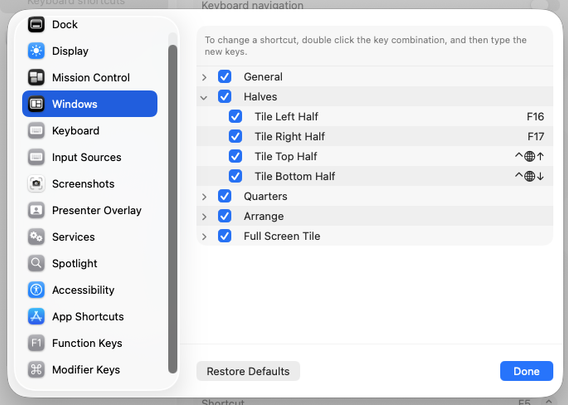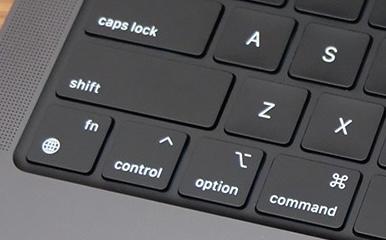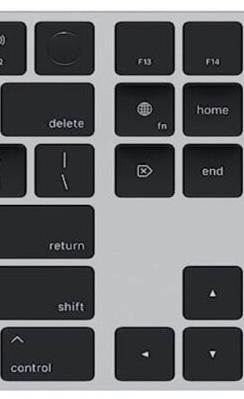
Do we need yet another person crashing out about Apple’s design decisions? Am I doing it only because it’s fashionable to be on Apple Design Hate Train these days? I’ll be honest: I don’t know. But I have been bothered by Apple’s approach to some of its keyboard design for a while.

Even if you don’t care about any of this, it might be a fun visual history of the most tricky of modern modifier keys: the [Fn] key. Hope you like it!


https://aresluna.org/fn

I don’t know what is Apple’s endgame for the Fn/Globe key, and I’m not sure Apple knows either

The origin and the evolution of the most confusing modifier key

@mwichary do people try to hire you as a keyboard design consultant?
@mwichary I mean, if anyone's qualified to complain about keyboards
@noiob THIS TIME IT’S PERSONAL

@mwichary you're right and you should say it

also you just made me realize that the emoji/unicode panel that didn't work for ages on my work macbook somehow fixed itself and I can easily type weird symbols again :>

@noiob That panel has been slow and buggy for a while now, too!

@mwichary well I'd rather have it than not, it's rather convenient when it works

also I think I just stumbled across a joke from the devs (because iPhone autocomplete)

@mwichary Nice overview of function key and modifier history with your post, but you lost me with trying to narrow down existing modifier keys in the end. There's too much legacy and muscle memory to them. As to perhaps explaining Apple's inconsistent history with keyboard design, I think it's because so much of it was emotionally driven as Steve Jobs apparently hated function keys and most likely was the largest champion for the Touch Bar when it was a thing. (see https://trev.com/2016/11/fing-keys/). We still see to this day Apple's desire to reduce key count with the removal of the Esc key on iPadOS keyboards, which I find frustrating.

Apple having an inconsistent specification for Fn and Globe keys is something I work with daily being a Logitech Slim Folio keyboard user. Appreciate you calling this out.

Steve Jobs Hated Function Keys

I can’t wait to get my hands on Apple’s new Touch Bar. Now a dynamic display replaces the function keys on top of MacBook Pro’s keyboard. The last time Apple...

trev.com
@kickingvegas I think it would have to be a decade-long effort (and there would be vocal opponents), but it’s doable; in this way this is nothing different than any big “reduction of complexity” project. Besides, what’s the alternative?

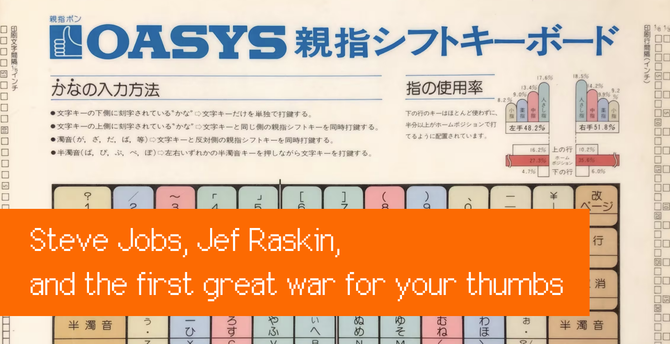
@kickingvegas I really liked the NeXT keyboards as Jobs zigging where Apple was zagging with AEK: https://aresluna.org/steve-jobs-jef-raskin-and-the-first-great-war-for-your-thumbs/

They had some interesting ideas, including ditching (or not including) function keys as you mentioned.

Steve Jobs, Jef Raskin, and the first great war for your thumbs

On some brilliant, idiosyncratic, and often ill-fated gambits to transform computer input.

@mwichary There's a bias to thinking "reduction of complexity" is even desirable. The larger design question I think is this: Is the keyboard an interface to an appliance or a general-purpose computer? Historically, Apple has elided this question in macOS, but has made a stronger opinion for the former with iOS/iPadOS. The conundrum for Cupertino has/is to make both ends of this spectrum happy using the same codebase.
@kickingvegas Well, I’m making that argument explicitly – I don’t think you need 5 modifier keys for anything computers are doing today, even including power users, especially as modifier keys can be combined.
@kickingvegas But maybe an overarching feeling I have is: no one at Apple has a vision here. They’re just floundering around the edges of the problem, and users suffer.

@kickingvegas As an example, if Apple wants to cater to the rare people who use Ctrl in Linux/terminal/etc. – allow them to do whatever they want with Globe, or remap from Caps Lock (both are already possible in stock macOS).

Removing the Ctrl key and relabeling Caps Lock to Caps Lock/Control and some nicer UI atop is a relatively easy step in my opinion. And for those with motor memory expectations – you can make Globe step in for Ctrl.

@mwichary @kickingvegas I’m guessing fewer people use Caps Lock than use Ctrl, but I’d be interested to see actual statistics. Off the top of my head I can’t think of a valid use case for Caps Lock.
@mwichary Again, I suspect it's because of the history of keyboard design decisions being emotionally driven in Cupertino. Also, I find it interesting to observe that a big change like the Touch Bar was later reverted because of Apple's insistence that it replace the row of function keys. I've always wondered why they didn't try to ship a configuration where _both_ the touch bar and function key row were there.
@mwichary @kickingvegas speaking for myself, something like "option-shift-command-v" (Paste in Place in InDesign, I use it frequently) is not preferable to having space cadet modifier keys, because they're hard to type and for the things I use only occasionally, I can never remember which key *isn't* supposed to be pressed (is it command-shift-option? command-shift-control? command-option-control?).
@aaronpriven Yeah, to me any shortcut with three modifier keys or more is already going to be problematic. Although, there is something to be said for the “all modifier keys next to spacebar” as something to design for/memorize.
@mwichary The globe key 🌐 started innocently enough. It was never meant as a modifier key, at least not by me. After the first iPhone shipped in June 2007, I began work on international keyboard layouts to support the conventions for other languages (e.g. AZERTY for French & QWERTZ for German). There was no hope of using two-fingers—a “modifier” key was unworkable. So, like the shift and .?123 key, we added a new key to switch the layout and the autocorrection language. Hence, the globe key.
@kocienda Yeah, I think Globe in the context of the iPhone makes sense because it really is the soft keyboard equivalent to “grab this physical keyboard on your desk and replace it with another one” – something that Macs cannot do owing to limits of time and space of the physical universe.

@kocienda I understand the complexity emoji add to the mixture since there is really no “physical emoji keyboard” to hark back to.

But Apple shepherded three separate CPU architecture upgrades really well. They should be able to handle complex transitions.

@mwichary I’m reasonably sure that the globe key appeared first in iPhone OS 1.1.2 in November 2007. If I'm right, you can revise this footnote to say 2007: “The globe key existed on iPhone’s onscreen keyboard ever since at least 2008, if not earlier.”
@kocienda Okay, thanks! Doing it now. I narrowed it down to 2008 but wasn’t certain about 2007.
@mwichary Amazing writeup.
What a dizzying story.
Is it possible the Finder was showing the C type shortcuts with Apples in dropdown menus way back when?
@Luke No, never on a Mac. That’s what makes it such a self-own imo.
@Luke Apple GS/OS looked like Mac OS/Finder and they had it there, but only on Apple II computers.
@mwichary HA!
Design by committee or administration, then. Every four years it changes, eye-roll.
Love your posts, Marcin.
@Luke story of how the Apple key became command key is here: https://www.folklore.org/Swedish_Campground.html?sort=date
Folklore.org: Swedish Campground

@aaronpriven ah ha! So it wasn’t my brain spinning, it did exist at one time. Thank you. Ah, the early days.

@mwichary

Back when Mac OS used control, alt, and shift in addition to ‘Apple’ as modifier key combos, the drop down menu pathway to the same actions would refer to them only by glyphs. I was lucky I could remember what the symbol for shift was.

Of course they are trying to avoid having to localize keyboards for international markets, but I don’t care for learning hieroglyphics or thinking in emoji.

@mwichary Excellent write-up of Apple keyboard history.
@mwichary I wonder whether the Fn key on the PCjr was influenced by the f key which serves a similar purpose on HP calculators like the HP-41C (1979)?
@mathew Maybe! I don’t know what is the absolutely first key named “Fn” or “Function” – there was one in Wang processors in the 1970s, too – but those don’t have the “pretend you’re another key” component to it, afaik. It’s just a different name of a modifier key.

@mwichary That (slightly) cursed Fn key has very much been mis-used by all and sundry.

As soon as I started reading this, I was reminded of the "Fctn" key on the TI-99/4A. But there it's just another shift key because TI didn't want to add more keys to the keyboard. So that one is more similar to the Commodore key or the Atari key on their respective home computers. Which is probably why the Apple II had an Apple key... (Now I'm wondering why TI didn't put their own logo on it...)

@static Occam’s Razor: Their company name is too complicated?
@mwichary Well, everyone shortened it to "TI". And their logo is basically an outline of Texas. I think the powers-that-be just didn't have the chutzpah that Commodore had!
@static Yeah, but imagine a modifier key that’s spelled “T-I” – that just doesn’t work.
@mwichary Also, I still miss interesting layout variations. Everyone has settled on about half-a-dozen layouts, especially for so-called "tenkey-less" and smaller, and none of them have the innovation of the Happy Hacking Keyboards. Which, amongst other things, are one of the only makers to put Control in a sensible place.
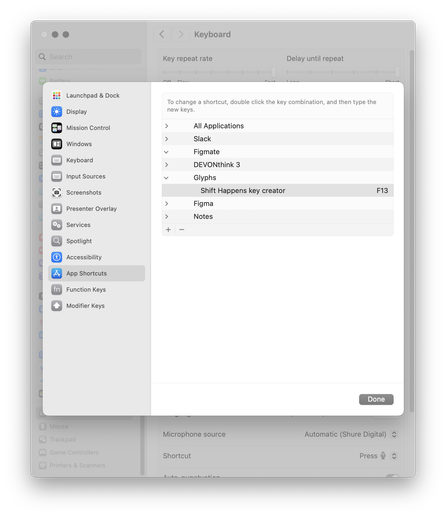
@mwichary still looking for a way to program the useless F13–19 keys on the Apple wireless extended keyboard... there does not seem to be any way to do that, and they do not do anything anyway. Like whoever designed it decided to add useless keys for symmetry or something.
@david Hmmm, from my experience this built-in feature ↓ should work, plus third-party tools like Karabiner Elements or Keyboard Maestro give you options to use them, too.

@mwichary thx, that worked. I kept looking in the Function Keys setting which shows me nothing useful.

Sheesh…

@david Yeah, to be fair this UI and in general most keyboard mapping UI in macOS is generally not great.

@mwichary Understatement…

I don't have issue with the Tahoe UI nearly as much as the many, many, many bugs that still aren't fixed five months later. Worst macOS release in my many years driving these things.

@david @mwichary My new one is that Safari windows’ tabs sometimes lose their close box. You can use menus or right-click but the hover-over the tab doesn’t work. Cycling open windows fixes it. Bah.
@glennf Well it’s Liquid Glass, not stable glass, you know.
@mwichary Oops, I spilled

@glennf @mwichary Snort.

Haven't experienced that one, yet anyway. The Music and Maps apps are big wiggly piles of bugs; bugs that did not exist in Sequoia.

@glennf @david @mwichary The inability to drag and drop onto icons while in list view has nearly driven me to madness. Need to drop on the file name.
@mwichary @david also some of the keyboard remap features in individual apps (from Adobe or Microsoft) will work with some of them, although I could get Excel to recognize only up to F15 and not F16-19.
@mwichary One note - "Control" on Macs are quite useful because of Terminal apps. Command key is already purpused with UI-related stuff and shortcuts, thanks to that it's possible to easily copy/paste text in terminal apps on a Mac which is a struggle on Windows & Linux 😉
@kkolakowski Yes, but 100% of the audience for that is also people who’d very easily be capable of remapping this functionality to something else, like Alt or Globe or even Caps Lock. (If they don’t already.)

@mwichary Ok, but Terminal is a standard system component - it has to support it somehow by default , especially that POSIX conventions specifically mention „ctrl” as the button for those functionality, so it avoids confusion.

And „Control" on Macs at this point is also widely used in shortcuts across the system. I use it all the time.

But for globe/fn confusion - I fully agree 🤓

@kkolakowski There will always be some arguments not to do something that one can fall behind to avoid hard decisions.

@mwichary Sure - but in this case - I'll keep my position 😉

Globe - do not use it for system control, that's awful
Control - keep it, it's useful and used for decades 🙏

Another argument for Control - it allows for better compatibility with other OS'es on the Mac - and some users do use them, in the VMs for example, or via emulation.

@kkolakowski These arguments would land better if not for the fact that all of your examples are very specific things that matter to <0.1% of the userbase, while the downsides are real for 100%.

@mwichary How so? I really wouldn't consider developers as <0.1% of Macs userbase - even if I might be a little bit biased 😉

But even for regular users, what are the downsides, truly? I kind of get it, that with more advanced apps, more shortcuts were needed, and Control key somewhat allows for that.

Control key on the Macs is present on their keyboards since I was born, according to your article (1987) - almost 4 decades - I can only imagine the backlash 😅

(I would be pissed too)

@kkolakowski I covered that in the essay.

@mwichary My biggest frustration with the fn key is that I use two different Macs, and the key is different places on each of them. Although it looks like this problem has since been rectified, on my MacBook Pro and my Magic Keyboard ca. 2023, it is at opposite corners of the keyboard!

The only saving grace is that the thing I use it most for (fn+delete=forward delete) has a dedicated key on the Magic Keyboard, so it doesn’t get much use on that keyboard.

@mwichary Thank You for this amazing post!
@mwichary I really enjoyed reading this!