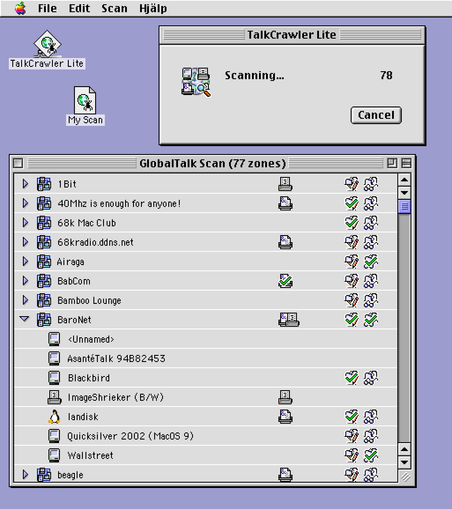
Here's my second #MARCHintosh project for 2026 - TalkCrawler Lite! A little program to keep track of which #GlobalTalk printers and shares you've visited or left a greeting on!

I rushed this one out so I can get to using it, so it's less polished than Chat, and might not work so hot on 68k Macs. I'm not sure why opening files is so damn slow.

Demo video in the first reply. Available on Blackbird or landisk on the BaroNet share.
#VintageApple #RetroComputing #mb

When I say I rushed it… The file creation date on TalkCrawler.c is Mar 4, 11 PM, and I posted the release toot on Mar 8, 10 PM. And on the weekdays I had work!

I planned to release it yesterday so today I could leisurely work on a print/calling card & have fun browsing #GlobalTalk, but stayed up until 2 AM trying to nail down a memory corruption bug and just gave up.

Adding another day worked out well because I had the time to add this animation, making it all worth it!

And while I skimped out on implementing the main functionality (there is no reason this should need 1+ MB of RAM to function) I did make sure to manually implement the important MacOS-ey bits:
• Cmd-period for cancel
• Option-click for expand all
• The AppleEvent for opening a file actually works
• “Do you want to save changes" dialog with all it's edge cases (quitting with multiple windows open…)
• Cmd-D for "Don't Save”
• An actual help window

The original inspiration for making this native version was seeing that using native APIs on MacOS 9, I could scan all of #GlobalTalk in 9 seconds flat. This video is real-time, not edited at all, real PM G4

The AppleTalk APIs have a way to ask how many concurrent requests are supported. Sys7 says 2-4, OS 9 says 10. Exceed that on Sys7, it gives an error. On OS 9... it works?

Problem is, 1/10 times you "cheat" like this on OS 9, you get invalid results - the OS puts machines in the wrong zone!

@kalleboo Long live the Global Applications Menu!!!

(I have to admit I've had an obsession with progress animations ever since this guy battled his way through our family Mac Classic hard disk back in like 1992)

#VintageApple #MARCHintosh

@kalleboo these were so good. Thanks for firing up the memory machine, what a flashback.

Here's a more "modern" one. They kept at it and it was glorious.

(Attaching the screen recording here of the video found on Facebook, which I don't want to impose on you, hence the recording, by Geoffrey Klempner – here's the original link: https://www.facebook.com/watch/?v=566411537637527&vanity=geoffreyklempner)

@kalleboo It’s looking good. Just giving it a spin now.

@kalleboo This is great! So much nicer to work with an app than a plain text file :)

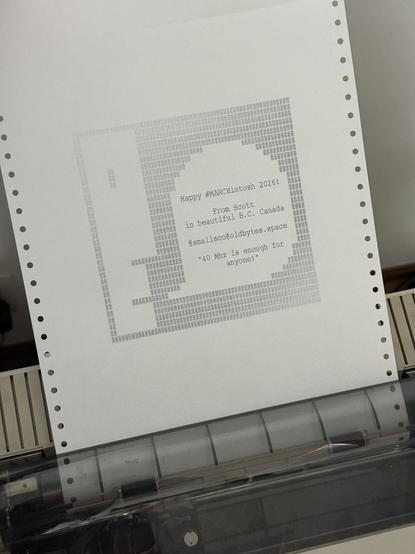
(BTW, sending you my newly ImageWriter-optimized print now, please let me know if it comes through okay!)

@smallsco It came through beautifully!!
@kalleboo AWESOME! This was such a pain but I'm glad it's finally working hahaha 😂
@smallsco “This was such a pain but I'm glad it's finally working" should be the #MARCHintosh motto
@kalleboo Bug report! @billgoats ’s ImageFaker doesn't show up in TalkCrawler (even after a rescan).
@smallsco @kalleboo ImageFaker is a funny one that lives across zones. Is it showing up in syntax error?
@billgoats @kalleboo Ah, you're right, it shows up under "syntax error” in TalkCrawler, but under "billgoats" in the Chooser. Weird. False alarm I guess?
@smallsco @kalleboo should be in both in the chooser :-}

@billgoats @smallsco ooh really interesting edge case

AppleTalk is... uh... fun!

@kalleboo @smallsco Super-extreme edge case. No idea how or why or what, but here we are :D
@billgoats @kalleboo Ah, you’re right, it's showing up there too 🤷‍♂️

@kalleboo Okay, _actual_ bug report this time. After finishing off all my ImageWriter print jobs and marking them off with TalkCrawler, I attempted to save the file, and got a dialog saying that TalkCrawler was out of memory and had to exit, and that I should increase the memory allocation.

So I bumped it up to 4 MB, re-launched TalkCrawler, tried to open my saved file and it froze.

Works fine after a reboot though, and it did appear to save the file correctly.

@smallsco I just released 1.0.1 that fixes a bunch of memory leaks (including where saving leaked, leading to 4 saves -> crash), please give that a go
@kalleboo Much more stable now, thanks!
@kalleboo And a feature request, I'd like to be able to tag a zone or item with a note (i.e. your quicksilver server has the Kaleidoscope scheme archive on it, so I don’t have to go hunting for it again later).
@kalleboo Also, confirming that TalkCrawler Lite happily runs on A/UX (System 7.0.1) without issues. There wasn't any difference in scan performance either between the IIfx and the 6500, unlike in the HyperCard version!
@smallsco Nice, thanks for testing!! I was suffering with so many tiny memory errors until the very end causing compatibility issues with various OS versions…
@smallsco Your BBEdit screenshots were definitely an inspiration to get this finished quicker, imagining how many other people were struggling the same way! (=me, last year)
@kalleboo do you have the source out there for these apps?