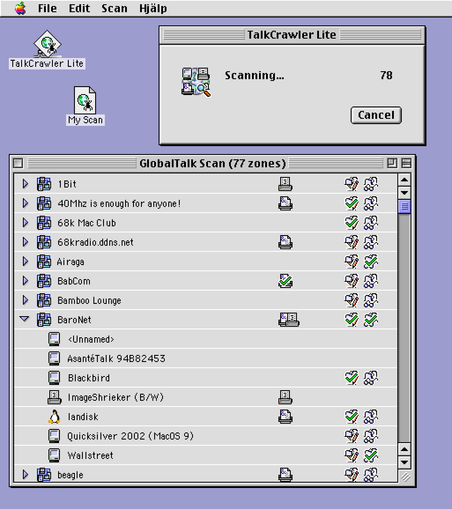
Here's my second #MARCHintosh project for 2026 - TalkCrawler Lite! A little program to keep track of which #GlobalTalk printers and shares you've visited or left a greeting on!

I rushed this one out so I can get to using it, so it's less polished than Chat, and might not work so hot on 68k Macs. I'm not sure why opening files is so damn slow.

Demo video in the first reply. Available on Blackbird or landisk on the BaroNet share.
#VintageApple #RetroComputing #mb

When I say I rushed it… The file creation date on TalkCrawler.c is Mar 4, 11 PM, and I posted the release toot on Mar 8, 10 PM. And on the weekdays I had work!

I planned to release it yesterday so today I could leisurely work on a print/calling card & have fun browsing #GlobalTalk, but stayed up until 2 AM trying to nail down a memory corruption bug and just gave up.

Adding another day worked out well because I had the time to add this animation, making it all worth it!

And while I skimped out on implementing the main functionality (there is no reason this should need 1+ MB of RAM to function) I did make sure to manually implement the important MacOS-ey bits:
• Cmd-period for cancel
• Option-click for expand all
• The AppleEvent for opening a file actually works
• “Do you want to save changes" dialog with all it's edge cases (quitting with multiple windows open…)
• Cmd-D for "Don't Save”
• An actual help window

The original inspiration for making this native version was seeing that using native APIs on MacOS 9, I could scan all of #GlobalTalk in 9 seconds flat. This video is real-time, not edited at all, real PM G4

The AppleTalk APIs have a way to ask how many concurrent requests are supported. Sys7 says 2-4, OS 9 says 10. Exceed that on Sys7, it gives an error. On OS 9... it works?

Problem is, 1/10 times you "cheat" like this on OS 9, you get invalid results - the OS puts machines in the wrong zone!

@kalleboo Long live the Global Applications Menu!!!