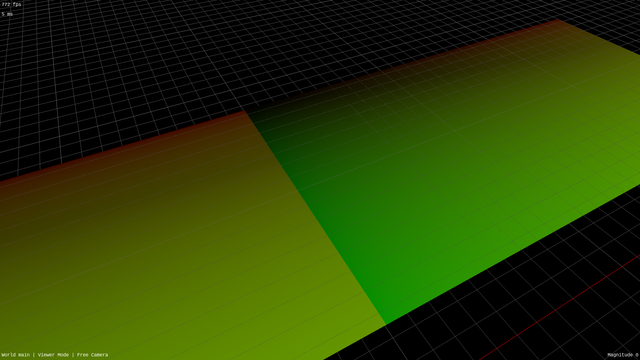
Does anyone recognize this artifact? I'm storing the texture in multiple images to avoid exceeding max image dimensions and I'm getting this weird glitch at the tile boundaries

Even stranger, it isn't reflected in the UVs (second picture) or when reading the same image for both regions (third picture) and the sampler is set to nearest + clamp-to-edge

Boosts appreciated

#vulkan #glsl #gpu #graphics

@AminiAllight Is this a whole mesh or is it two separate meshes? If it's the former and you're selecting the image in the shader, the following can happen: a pixel selects one image, but it's neighbour selects another, and they can't decide on the appropriate mipmap level (which is computed based on uv differences in neighbouring pixels). Though in that case I'd expect 2x2-pixel-sized artifacts, while yours seem to be in some larger pixel tiles.
@AminiAllight Anyway, to rule this out, sample both textures first, and only then select one of the read values based on whatever condition you have.

@lisyarus I think you're onto something here! Reading from both tiles and then selecting makes the artifact disappear

My number of tiles is variable so this isn't a general solution, is there a way to fix it without reading from every tile?

Edit: And yes, it's all one quad

@AminiAllight @lisyarus try using textureGrad(), passing dFdx(uv) and dFdy(uv) as the gradients.
@datamonkey @lisyarus Doesn't seem to effect the artifact
@AminiAllight @datamonkey It's important that you compute both UV sets and their dFdx/dFdy unconditionally (so that each pixel in a 2x2 quad has them) and then conditionally sample one of the two textures using textureGrad

@lisyarus @AminiAllight I think it might be this.

Looking at the code you linked elsewhere, I think you might be running into undefined behavior caused by divergence in your shader because the image you're sampling can vary within a given screen quad (not mesh).

@lisyarus @AminiAllight Does it go away if you use textureLod() and specify a constant mip value (i.e. 0)?

If so, and if all of your tiles are the same resolution, you could use textureQueryLod() on a constant texture (maybe just the first one in the texture array) to compute the correct mip value.

If not, then you'll need to sample all of the possible textures and select which is the correct one afterward (as @lisyarus previously suggested).

@lisyarus @datamonkey Based on a suggestion from Bluesky I tried wrapping the computed tile index in nonuniformEXT() and that made it stop
Thanks for all your help
@AminiAllight @datamonkey Ohhh, interesting! Are you tiles an array of textures or smth?

@lisyarus @datamonkey Yeah

layout(binding = 3) uniform sampler2D colorTexture[maxTextureTileCount];

I've accessed this sort of array using indices that were inconsistent between fragments before, but perhaps never with indices that were inconsistent within the same triangle? I'm unsure what made the difference here