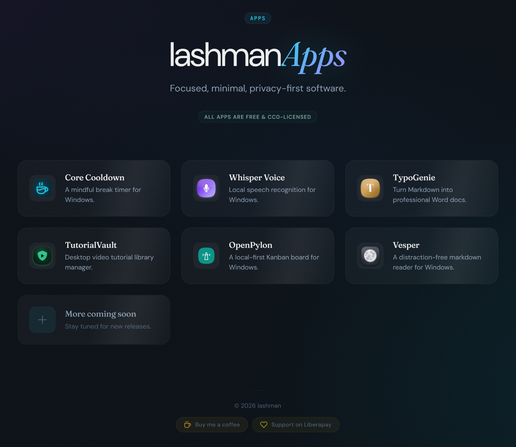
i made some small portable windows apps and put them up for free. CC0 - public domain, do whatever you want with them. No accounts, no telemetry, no installers.

- Core Cooldown - break timer
- Whisper Voice - local speech-to-text
- TypoGenie - Markdown to Word docs
- TutorialVault - video tutorial organizer
- OpenPylon - local Kanban board
- Vesper - distraction-free Markdown reader

Source on my self-hosted Gitea.

https://apps.lashman.live

#OpenSource #CC0 #FOSS #Productivity #PublicDomain

Core Cooldown v0.2.0 is out - and it's still completely free. This update brings the whole UI up to WCAG 2.2 Level AAA accessibility.

7:1 contrast, 44px hit areas, full keyboard nav, WAI-ARIA 1.2 screen reader support, Windows High Contrast, and reduced-motion support. 42 fixes across 18 components.

A break timer meant to prevent RSI should work for everyone. Portable, no installer, CC0 public domain.

https://apps.lashman.live/core_cooldown/

#OpenSource #CC0 #FOSS #Accessibility #A11y

Core Cooldown - A break timer that belongs to you

Portable Windows break timer. No installer, no account, no telemetry, no cost. CC0 public domain.

Whisper Voice also got a big accessibility update! The whole UI now meets WCAG 2.2 Level AAA - 7:1+ contrast, full keyboard nav, screen reader roles on every component, reduced motion support, and I/O marks on toggles so nothing relies on color alone.

Still free, still portable, still completely local. Your voice never leaves your machine.

https://apps.lashman.live/whisper_voice/

#OpenSource #CC0 #FOSS #Accessibility #A11y

Whisper Voice - Your voice stays yours

Local speech recognition. 99 languages, LLM correction, neural translation. WCAG 2.2 AAA accessible. Zero cloud dependency. CC0 public domain.

TypoGenie v1.1.0 is out. The app and its document output now target WCAG 2.2 Level AAA.

Full keyboard nav, screen reader support, native dialog modals, high contrast and reduced motion support. All color pairs across 165+ templates auto-validated for AAA contrast.

The Word docs it generates are also more accessible - tagged table headers, heading structure, document metadata.

Free, portable, CC0.

https://apps.lashman.live/typogenie/

#OpenSource #CC0 #FOSS #Accessibility #A11y

TypoGenie - Turn Markdown into professional Word docs

165+ typography styles. Drag your Markdown, pick a style, export to Word. WCAG 2.2 AAA accessible. No subscription, no cloud. CC0 licensed.

TutorialVault v1.1.0 - completely rewritten from Python to Rust + TypeScript on Tauri v2. Now targets WCAG 2.2 AAA - full keyboard nav, screen reader support, 44px touch targets, 7:1 contrast, reduced motion, and Windows High Contrast support.

It's a local video tutorial library manager with progress tracking, subtitle support, per-video notes, and drag-and-drop playlists. Free, portable, CC0.

https://apps.lashman.live/tutorialvault/

#OpenSource #CC0 #FOSS #Accessibility #A11y

TutorialVault - Your tutorials, your library

WCAG 2.2 AAA accessible desktop video tutorial library manager with progress tracking, content fingerprinting, subtitles, and notes. Local-only. CC0 licensed.

OpenPylon v1.1.0 - accessibility update. The whole UI now targets WCAG 2.2 AAA. 7:1 contrast, 3px dual-ring focus indicators, ARIA live regions, dialog focus trapping, skip nav, keyboard-accessible context menus, high contrast mode, and 8-second toasts with pause and dismiss.

It's a local-first Kanban board for Windows with markdown cards, version history, and a command palette. Free, portable, CC0.

https://apps.lashman.live/openpylon/

#OpenSource #CC0 #FOSS #Accessibility #A11y

OpenPylon - A local-first Kanban board for Windows

Portable, WCAG 2.2 AAA accessible Windows Kanban board. No cloud, no account, no telemetry. CC0 public domain.

Vesper v1.1.0 - accessibility and light theme update. Full keyboard nav, ARIA landmarks, focus traps in modals, skip link, aria-live status messages, reduced motion support, and AAA contrast across both the new light and dark themes.

Also added content zoom and width spinners as non-gesture alternatives to scroll shortcuts.

It's a distraction-free Markdown reader for Windows. Free, portable, CC0.

https://apps.lashman.live/vesper/

#OpenSource #CC0 #FOSS #Accessibility #A11y

Vesper - A distraction-free markdown reader

Portable, WCAG 2.2 AAA accessible Windows markdown reader. No installer, no account, no telemetry. CC0 public domain.

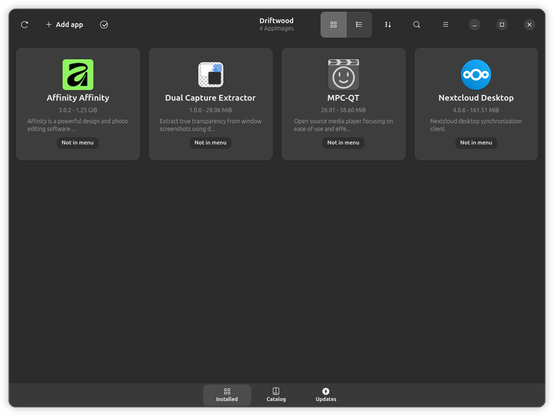
Made a new thing. Driftwood - an AppImage manager for Linux. Browse 2,000+ apps, one-click install, updates, vulnerability scanning, and desktop menu integration. No root, no accounts, no telemetry.

Built with Rust and GTK 4, runs in userspace, ships as an AppImage itself. Free, CC0 public domain, WCAG 2.2 AAA accessible.

If you use AppImages and want something nicer than the terminal for managing them, give it a look.

https://apps.lashman.live/driftwood/

#Linux #OpenSource #FOSS #AppImage #CC0

Driftwood - Friendly AppImage manager for Linux desktops

Modern AppImage manager for Linux. Discover 2,000+ apps, manage updates, scan for vulnerabilities - all from one place. No root needed. CC0 public domain.

@lashman out of curiosity, why did you choose CC0 license for these projects? the Creative Commons family of licenses are more targeted at "content" and not code.

CC0-1.0 specifically is not considered "Free and Open Source" by some lawyers due to some of its limitations (for example, it is not an allowed license for "code" in Fedora Linux, it is only allowed for "content")

@decathorpe it's what i've always been using for pretty much everything i do

@lashman @decathorpe Check The Unlicense. It’s like CC0 (public domain) but for code. It’s what the popular yt-dlp (and youtube-dl before it) uses.

https://en.wikipedia.org/wiki/Unlicense

Check the β€œSee also” at the bottom for other popular alternatives.

Unlicense - Wikipedia

@vitor @decathorpe ohhh, nice! i will check it out, thank you! :D
@lashman
Sounds nice but what is that website doing?! It cranks my CPU way up, uses 200MB ram, and makes my fan run like crazy. So I didn't keep the site open long enough to read it. If the website is like that what would the app do to my computer, Not going to install it to find out.
@leadore ah dang, sorry :( must be the CSS, apologies
@lashman Just feels kind of sus, "here's a great app, CC0 license" and the website acts like it's running a ton of code behind the scenes.

@leadore no, not at all, just a tonne of CSS

but you can check out the gitea page for it directly - should probably fare better: https://git.lashman.live/lashman/driftwood

sorry again

driftwood

A modern GTK4/libadwaita AppImage manager for GNOME desktops

Gitea: Git with a cup of tea
@lashman
Thanks, that's better! And it has all the info right there--very nice documentation there! So much easier to read than the website.

@lashman @leadore It seems to be the JS, not the CSS directly? If I load the site with NoScript or uBO in strict mode which blocks all JS scripts, the page is fluid and uses 63MB of RAM, but with JS enabled it does make things worse

I'm not sure what causes that, probably the 3D animated panes when you hover over them. But I found a different issue:

Consider modifying the HERO - orchestrated entrance section in /driftwood/script.js for the page, because if I have esm.sh blocked, it'll set everything to opacity 0, add a listener to whatever framer-motion or motion includes

I think it's the !animate or some other check you've put in place, because with esm.sh blocked it still logs to the console that motion.dev was loaded successfully, despite it being blocked. It's loading motion/*esm from JSdelivr, but there are other components that appear to be loaded via esm.sh, like framer-motion, motion-utils and motion-dom.

It also loads motion/index.mjs from unpkg as a fallback if esm.sh and jsdeliver are blocked πŸ˜„

@lashman Thank you for posting this! Did you consider accessibility when developing those apps? Such small portable apps could benefit several communities requiring accessibility, like blind people for example.
@menelion i did, actually! :) some of them are fully-accessible, and some are partially, but i'm working on making those fully accessibly too
@lashman wow, then thank you ten times more!
@menelion absolutely no problem! :)
@lashman you seem to have some problems with URLs. this, for example: https://apps.lashman.live/core_cooldown/core_cooldown/core_cooldown/vesper/vesper/vesper/vesper/index.html. Also, where could I see the repos, if they are available? Thanks!
@menelion huh, that's so weird, where did you get this link from? i just checked the page, and they all link correctly for me :( and repos are all linked on each app page, there's a view source button
@lashman Interesting. I see those in inspect view but can't get to it with my screen reader and keyboard. Okay, will grab direct URLs from Chrome dev tools. I have an ad blocker, but I don't think it's the reason though...
@menelion yeah, i wouldn't think so - i have like 5 ad blockers installed, haha :) (also there are no ads on there), but that IS very weird, will have to investigate, thank you for letting me know!
@menelion ok, i *think* it's fixed now, or at least i hope it is 🀞
@lashman Yepp, now I can at least see the app inside a frame.
@menelion woohoo! :) sorry about that, glad at least it works now! :D
@menelion @lashman Hmm? I have a similar problem. FireFox, click on the apps heading/open context menu and copy the link from there: https://apps.lashman.live/whisper_voice/whisper_voice/index.html this gives a 404.
@jonathan859 ok, something's definitely wrong then! i'm looking into it right now, will let you know if i find out what's going on, apologies! :(
@lashman Oh no worrys dude, take your time. Looking forward to try these out.
@jonathan859 found the bugger! :) i think it should be fixed now (or at least i hope), sorry about that again
@lashman Yup, works now. Thanks.
@jonathan859 woooooo! :) i'm so glad, haha, thank you too! :D now i have to go back to updating all the apps with full 2.2 AAA compatibility :)
@lashman Oh interesting: Firefox Can’t Open This Page
To protect your security, git.lashman.live will not allow Firefox to display the page if another site has embedded it. To see this page, you need to open it in a new window.
@jonathan859 yeah, it does that, hmmm, i guess i have to to tag it as _blank
@lashman btw this happens when I click download, downloading https://git.lashman.live/lashman/whisper_voice/releases/download/v1.1.0/whisper-voice.exe says not found. I found the download myself though.
@jonathan859 crap, you're right, i should just update all links to go straight to the releases page instead of a specific .exe file, i'm on it!
@jonathan859 ok, it should all be fixed now
@lashman (what did you use for the speech recognition in Whisper Voice if I may ask ? I need a good local python lib for that)
@tomtrottel same as everyone else really - the whisper model, but it IS running on a python backend, yes
@lashman yeah I saw that, cool, will use it, wasn't sure. doing a small python app where you can use language to enter data via voice with a predefined set of commands and then its saved in cvs.
@tomtrottel ooooh, that sounds really cool! :D
@lashman yeah I got like tons of stuff to enter and I made a really crazy table for it in Libre Calc (wiht drop down menus and stuff), but I think I will be faster with voice, after knowing exactly how the data is structured now.
@tomtrottel oh yeah, absolutely! voice is SO MUCH faster
@lashman
Nice, but Linux?
I finally abandoned Windows in Jan 2017 after using NT since 1994 and DOS/Win from 1991.
Abandoned MS Office in 2012 after using Win Word since 2.0a.
Never used Internet Explorer or Outlook except to test them.
Mainly Mosaic (1994) -> Netscape -> Firefox.
@raymaccarthy oh, i would LOVE to! and i imagine it wouldn't be *too* difficult to do linux versions :( but until there are some decent graphics editing apps on linux (gimp is DEFINITELY not that) i'm stuck on windows :( and trust me - i hate it as much as you do 
@lashman
I used Aldus Photostyle, Adobe Photoshop and PaintShop Pro (versions 4 to 8). Also lesser packages.
I used GIMP on Windows. You need to change default theme, dock, tool settings. Now The GIMP on Linux. A bit of a learning curve, but GIMP is actually easier to use than Photoshop or PSP7 and more powerful than PSP. Had to convert PSP7 images to Photoshop in PSP7 to import to The GIMP.
I do have a no longer used XP & 10 laptops & 7 PC. Also all 3 on VMs, not used. Cloned XP laptop to VM.

@raymaccarthy @lashman Hi! GIMP does have PSP support, so I'm curious what you needed to convert to get it to work in GIMP?

For instance, are there missing features when you straight imported the file into GIMP? If so, we can look into adding support for them.

@CmykStudent @lashman
There seems to be different PSP formats. Earlier The Gimp had a plug-in and later maybe built in. Certainly my PSP7 files from XP wouldn't import at all, on Windows XP or on Linux Mint.
No issue saving in PS format from PSP7 on XP and opening that in The Gimp. Nothing was lost.
Text editing and layers is SO much better on The Gimp.
I imagine the last time I had to go back and convert was maybe 2018 or so for some files missed in 2016.
No PSP7 on Win7 or Win10.
@raymaccarthy @lashman Hmm. If you have a file you're willing to share, I'd be happy to work on it and try to improve our support. If not, no worries!
@lashman
On plain Text:
Notepad -> Textpad ->Notepad++.
Notepad++ on WINE in 2016 & part 2017, then KATE on Linux.
Other
Wordstar (CP/M), NewWord (CP/M & DOS), WinWord, StarOffice, OpenOffice, LibreOffice.
Visicalc (Apple II), Supercalc, Cracker (CP/M * DOS), Excel. Then on Linux Gnumeric & LibreCalc, GnuOctave & Scilab.
Schematic/PCB: FutureNet, OrCad, (some others), Eagle (Win, WINE & Linux), KiCad.
@raymaccarthy impressive! :) and yes, i've been using both n++ and onlyoffice for like a decade now! :D