 Marc Edwards
I am not into the macOS 26 brightness and volume overlays changing position. Normally they’re top right, but that moves to top center if you’re in full screen mode.
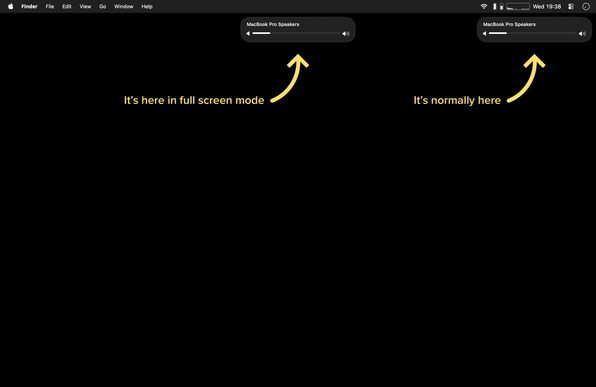
@marcedwards @fabienmarry That’s weird “optimization”.
And BTW I don’t see the full screen centering on 26.0.1. So either it is newer development, or it’s laptop-only (or maybe notch-only?).
@marcedwards In 10+ years of using a Mac full time, the volume or brightness overlay has never gotten in my way…until now.
Since installing Tahoe, I’ve had several cases where it blocked something I needed to click. You can’t just click through it—you either wait or hit the on-hover close button.
I get what they were trying to do (associate it with its menu bar item), but IMO it makes it harder to notice and more likely to get in the way since the upper-right corner is already busy.
 Fabien
 Mindaugas Rudokas
 Uhl Albert