heyyyyyy. check this out

i bought one of those chinese motherboards which get the UEFI package from American Megatrends and then enable options with the guiding principle of "YES."

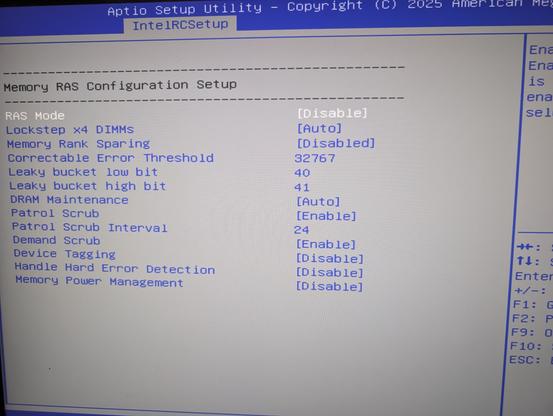
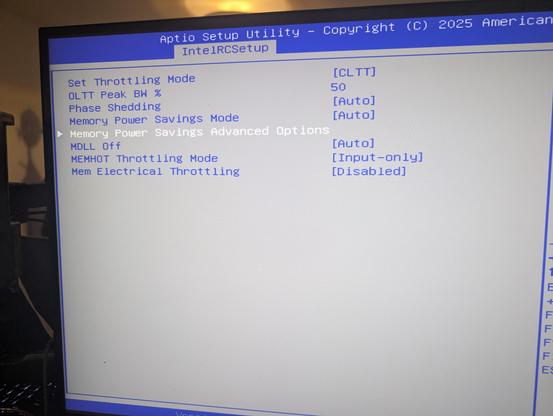
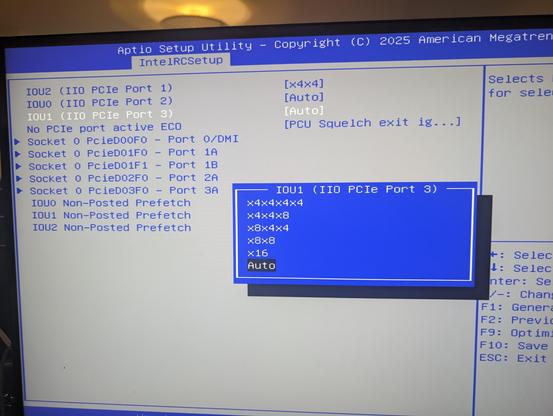
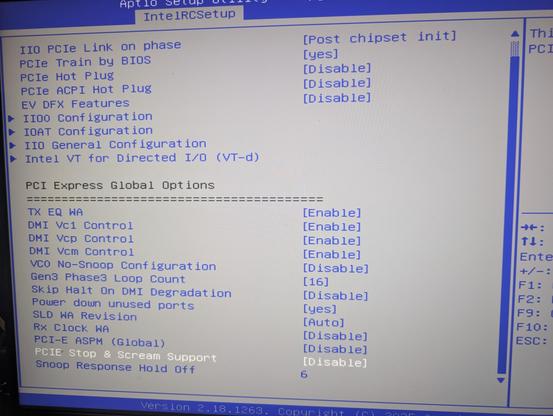
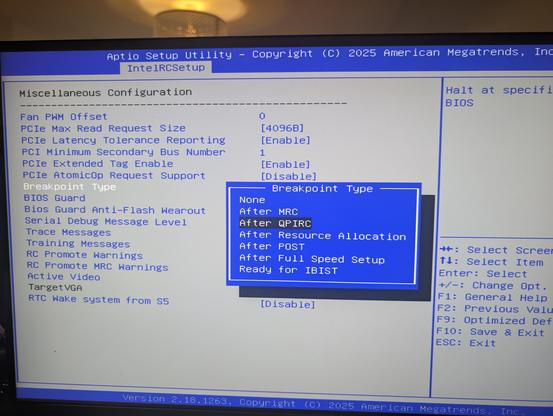
check out how many juicy bits it has

you can turn the memory scrambler on and off! it even tells you the seed it has on, i think, this specific boot?

it has soooo many PCIe configuration options. port bifurcation is just the start of it. there's probably an option for every power related register

you can enable "PCIe Stop & Scream", whatever the hell that is

you can disable GPIO lockdown!
there's a function that prevents malicious UEFI Flash wearout, a type of attack I have not considered before. also you can turn it off
you can set UEFI boot stage breakpoints!

I think my favorite one is just

PCIe Stop & Scream Support [Disable]

when you open the IntelRCSetup (what's RC?) the setup utility tells you "if you change some of these settings the system may malfunction"

that's an understatement of the year

it also lets you unlock these specific MSRs that are completely undocumented and have no search hits besides some hackintosh person poking at them. no idea what they do or why there's a toggle

if you want this motherboard, it is unbelievably easy. it's on sale for 30€, including the Xeon CPU it needs: https://www.aliexpress.com/item/1005008826220177.html

note that it is made to a price point and it is barebones: it has no USB3, for example. but on the flipside, you can split its PCIe x16 graphics port four ways and connect six PCIe Gen3 NVMe drives to it (plus some SATA)

SOYO X99 Motherboard-Set mit LGA2011-3 Xeon E5 2630 V4 CPU, DDR4 8GB (1*8GB) 2133MHz RAM, NVME M.2 SATA Computerzubehör - AliExpress

Smarter Shopping, Better Living! Aliexpress.com

aliexpress.

i found an explanation (or what passes for an explanation) for the PCIe Stop & Scream option

what the fuck does this mean? ask someone smarter than I am

please also enjoy this beautiful enumeration

  • Smart Auto
  • Auto
  • Enabled
  • Disabled
  • Manual

i don't know where to begin. would "Enabled" or "Disabled" not imply "Manual"? what the fuck is the difference between "Auto" and "Smart Auto"??

💭 why do they call it PCIe Stop & Scream when you enabled DS packet on DMI in with the EP bit set of out in their UT bit set
✧✦Catherine✦✧ (@[email protected])

Attached: 1 image i found an explanation (or what passes for an explanation) for the PCIe Stop & Scream option what the fuck does this mean? ask someone smarter than I am

Treehouse Mastodon
@whitequark yeah i found this after and tbh it doesn't clear much up lol
@whitequark this motherboard is a piece of modern art

@whitequark my speculation would be auto is auto per spec and smart auto is some manufacturer BS that tries to outdo the spec and probably breaks things in subtle and cursed ways.

for the other three, i got nothing. this bios is art (pejorative).

@whitequark Isn't that this song by OneRepublic?
@whitequark you know what *sets your UT bit*
@whitequark Isn't the RAM worth more than the price of the bundle these days?
@david_chisnall @whitequark the (sold out) ram version adds 65€ ;)
@david_chisnall a 2x8GB bundle cost me like 3 times the motherboard lol
@whitequark In Shenzhen, early Xeon CPUs are perhaps the least valuable PC parts in the entire electronics market (especially the low-end spectrum). If I give a Xeon to someone for free, they may see it as an insult or hoax if they're impatient (as they're notorious among gamers for the low IPC). They're something that PC fans are willing to get for making a cool keychain by punching a hole on the interposer. It's truly cyberpunk, the Blade Runner world where a random guy in a slum does biotech and DNA design. So, of course, you get one or two Xeon for free if you buy an X99 mobo. ​
@niconiconi @whitequark but that's Broadwell, just one generation before Skylake, surely its IPC is not _that_ low?
And the one they're giving out isn't even low-end, but 10-core.
@IngaLovinde @whitequark 1. Sure, the IPC is low but not that low, but when combined with the 2 GHz-ish base clock, it's more or less a killer for single-thread desktop performance from a PC gamer's perspective. Haswell is actually more popular than Broadwell, because people found an overclock exploit. 2. By the standard of Xeon E5 v3/v4, 8-core and 10-core are the low-end. Used Xeon E5-2630 v4 CPUs are priced at 10-20 CNY on Taobao, which is around $3. The power cable of your PC costs more than this Xeon CPU! If you want overnight shipping, the shipping fee also costs more than the Xeon CPU! Serious builders would replace them with high core count parts, or start with a more recent generation (which are sold at "normal" prices)

@niconiconi @whitequark meanwhile me with C3958 I paid $700 for (including the motherboard) :/

Although I guess it might be a bit faster than E5-2630 v4 in multi-threading scenarios, and its TDP is also much lower...

@niconiconi @whitequark But also, where do you have so many xeons from? It's not like Intel produced billions of them?
@IngaLovinde @whitequark No idea, but probably from scrapped datacenter servers from the whole country, and perhaps also from imported e-waste globally.
@niconiconi @whitequark but that's _a lot_ of them.
@IngaLovinde @whitequark Shenzhen market buyers also formed an iron law of the universe, which is known as the "the price conservation of Mobo plus CPU": price(Mobo) + price(CPU) = constant. When refurbished motherboards are becoming less common, the Mobo price goes up, discouraging sales, and vice versa. For the "costly Mobo" case, CPU vendors are forced to drop prices to an artificially-low level to compensate, but it's still a hard sale as the total demand is limited by both. The Xeon CPUs are the worst victim of this conservation law, the CPU unit price dropped to $5, because a decent X99 Mobo is still priced at $100, making the CPU's $5 price tag no longer supernatural.
@niconiconi @whitequark How early? There might be some big keychain fobs out there.
@shelldozer @whitequark A 10-core Broadwell Xeon costs less than $5 at Shenzhen markets, and they're ideal for the keychain fobs.
@niconiconi @shelldozer @whitequark meanwhile you can't find even 1 Merced there.
@whitequark i was going to ask "how" regarding the splitting, but the AliExpress search results for "pcie riser x4x4x4x4" speak for themselves
@whitequark i have never pressed "buy now" faster

@whitequark does it have 4 x SATA(2) connectors (as per labelled pictures) or 2 x SATA(2) connectors (as per text specifications)?

(I guess it’s possible there are 4 connectors, but only 2 of them can work? 🤔 Anyway it’d be much more useful to me with 4 working SATA connectors, even if only SATA 2.)

@ewenmcneill there are four connectors and four entries in the BIOS I am quite sure; if you really want me to, I can probably procure a SATA something to test it

@whitequark thank you! “Connectors exist on main board and in BIOS” is enough to make it worth “buy and try out” at that price.

No need to track down SATA devices to test. But thanks for the offer!

@ewenmcneill the SATA configuration is really funny. you can tell the firmware the internal ports are eSATA if you want. or configure link training and power management

@whitequark being able to tell the firmware they’re eSATA could be useful if using internal SATA to eSATA adapter cables (basically just adds a backplane plate with a suitable connector).

Thanks for checking!

@ewenmcneill @whitequark I use one of those adapter cables... it works, but I had to downgrade the link to SATA 2.0 speeds to get rid of transient errors every few days (my cable length is a _little_ of out spec for SATA).

Still, definitely works for adding a third drive to a case with two drive bays :D!

@cr1901 yup I’ve used some of those SATA to eSATA adapter cables for years (although only on SATA 1). As you say I’d expect it helps to keep everything as short as possible.
@cr1901 @ewenmcneill with this firmware maybe you could tune the equalizer or pre-emphasis to fix that :D