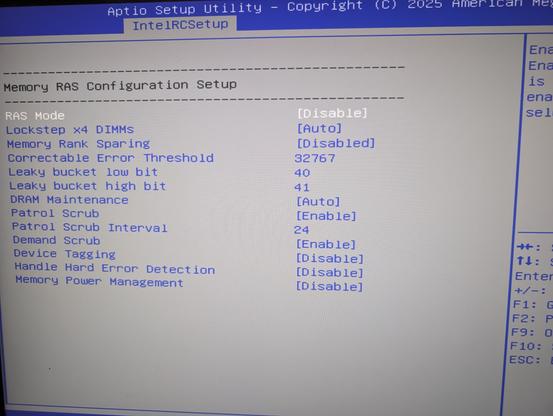
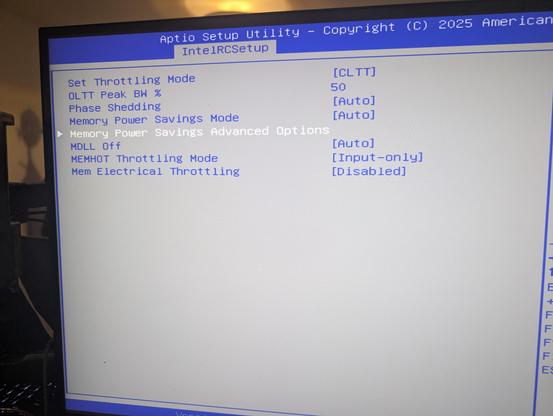
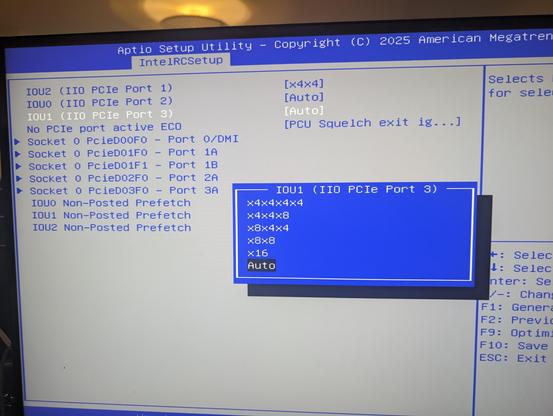
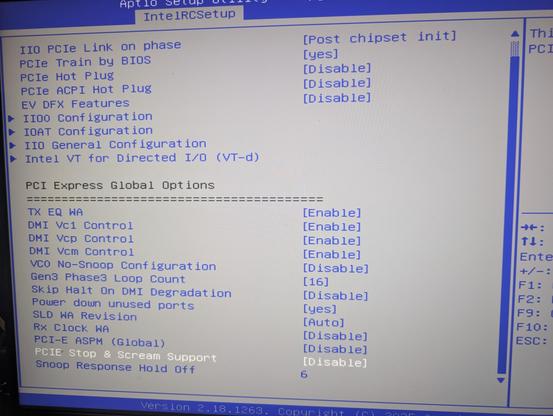
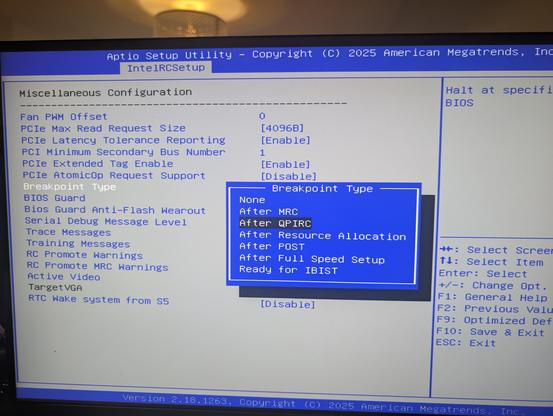
heyyyyyy. check this out

i bought one of those chinese motherboards which get the UEFI package from American Megatrends and then enable options with the guiding principle of "YES."

check out how many juicy bits it has

you can turn the memory scrambler on and off! it even tells you the seed it has on, i think, this specific boot?

it has soooo many PCIe configuration options. port bifurcation is just the start of it. there's probably an option for every power related register

you can enable "PCIe Stop & Scream", whatever the hell that is

you can disable GPIO lockdown!
there's a function that prevents malicious UEFI Flash wearout, a type of attack I have not considered before. also you can turn it off
you can set UEFI boot stage breakpoints!

I think my favorite one is just

PCIe Stop & Scream Support [Disable]

when you open the IntelRCSetup (what's RC?) the setup utility tells you "if you change some of these settings the system may malfunction"

that's an understatement of the year

it also lets you unlock these specific MSRs that are completely undocumented and have no search hits besides some hackintosh person poking at them. no idea what they do or why there's a toggle

if you want this motherboard, it is unbelievably easy. it's on sale for 30€, including the Xeon CPU it needs: https://www.aliexpress.com/item/1005008826220177.html

note that it is made to a price point and it is barebones: it has no USB3, for example. but on the flipside, you can split its PCIe x16 graphics port four ways and connect six PCIe Gen3 NVMe drives to it (plus some SATA)

SOYO X99 Motherboard-Set mit LGA2011-3 Xeon E5 2630 V4 CPU, DDR4 8GB (1*8GB) 2133MHz RAM, NVME M.2 SATA Computerzubehör - AliExpress

Smarter Shopping, Better Living! Aliexpress.com

aliexpress.

@whitequark does it have 4 x SATA(2) connectors (as per labelled pictures) or 2 x SATA(2) connectors (as per text specifications)?

(I guess it’s possible there are 4 connectors, but only 2 of them can work? 🤔 Anyway it’d be much more useful to me with 4 working SATA connectors, even if only SATA 2.)

@ewenmcneill there are four connectors and four entries in the BIOS I am quite sure; if you really want me to, I can probably procure a SATA something to test it

@whitequark thank you! “Connectors exist on main board and in BIOS” is enough to make it worth “buy and try out” at that price.

No need to track down SATA devices to test. But thanks for the offer!

@ewenmcneill the SATA configuration is really funny. you can tell the firmware the internal ports are eSATA if you want. or configure link training and power management

@whitequark being able to tell the firmware they’re eSATA could be useful if using internal SATA to eSATA adapter cables (basically just adds a backplane plate with a suitable connector).

Thanks for checking!

@ewenmcneill @whitequark I use one of those adapter cables... it works, but I had to downgrade the link to SATA 2.0 speeds to get rid of transient errors every few days (my cable length is a _little_ of out spec for SATA).

Still, definitely works for adding a third drive to a case with two drive bays :D!

@cr1901 yup I’ve used some of those SATA to eSATA adapter cables for years (although only on SATA 1). As you say I’d expect it helps to keep everything as short as possible.
@cr1901 @ewenmcneill with this firmware maybe you could tune the equalizer or pre-emphasis to fix that :D