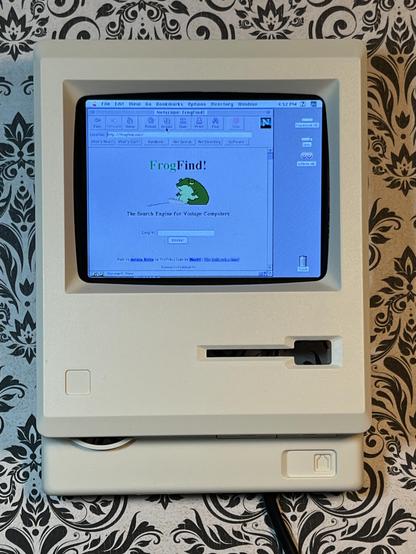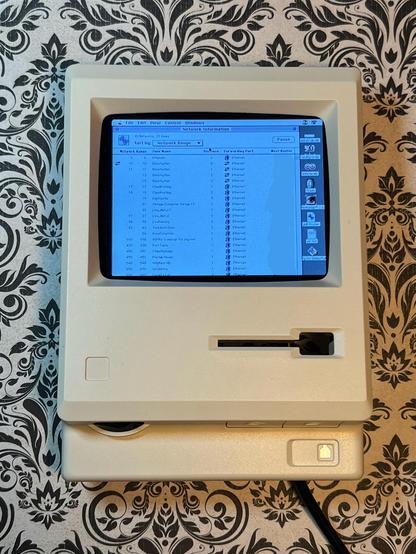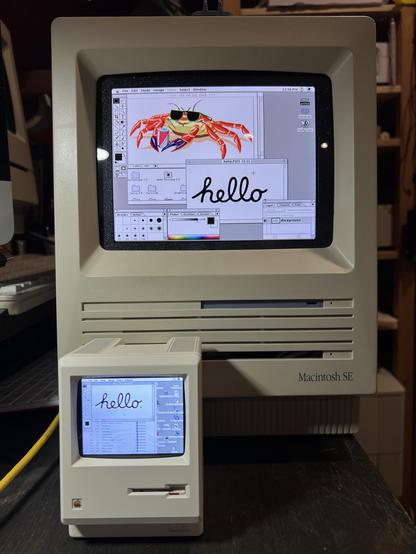
A while back I bought two of those Maclocks with the intention of modding one into a tiny Mac. After seeing the success of @WiteWulf I decided to give it a go.

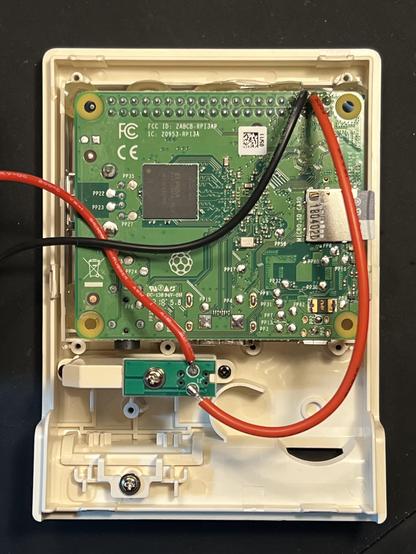
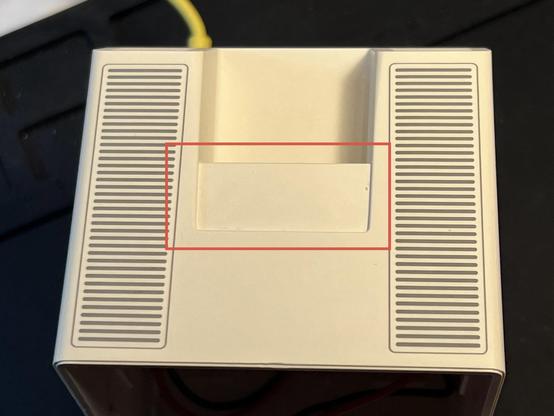
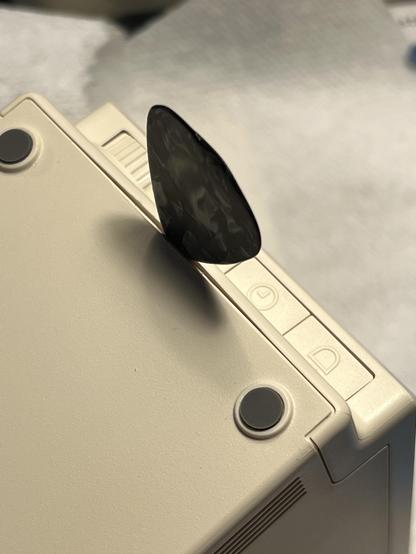
Opening the case is definitely the hardest part. Gary said to use guitar picks to start, so I began on the bottom and opened a gap to get a stronger metal spudger inside to lift up the rear case to release the six clips (circled in third pic) from the front. We're inside!
#VintageApple #VintageMac #RetroComputing #Maclock

To make a Mac, I'm using a Pi Zero 2 W, a Waveshare 2.8" DPI LCD, and the MacintoshPi image which includes Basillisk II and SheepShaver already installed, and they work without X11 running, perfect for the thin-resourced Pi Zero.

https://jm.iq.pl/macintoshpi-mac-os-7-8-9-for-raspberry-pi/

One thing that was missing was AppleTalk support but I solved that by installing sheep_net from these instructions. And works over WiFi!

https://www.ecliptik.com/blog/2025/Live-Laugh-Localtalk-with-Basilisk-II/

#VintageApple #VintageMac #RetroComputing

So sheep_net seems to work great for AppleTalk traffic but struggles with TCP/IP. It'll work for a few seconds then stop.

Curiously, running tcpdump on the machine causes it work, presumably because it puts the interface into promiscuous mode. And enabling promiscuous mode manually also works.

No mention of that on the project page, but that was 10 years ago.

#RetroComputing #VintageApple #VintageMac

https://github.com/cebix/macemu/tree/master/BasiliskII/src/Unix/Linux/NetDriver

Hey maybe the #TinyMac works well enough to be a #GlobalTalk router? Certainly uses a lot less power (avg. about 400mA with screen on).

#VintageApple #VintageMac #RetroComputing

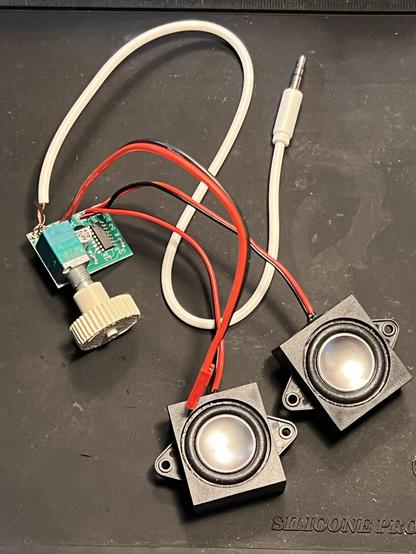
More #TinyMac progress. Wired up some smol speakers to a smol audio amp.

Designed and printed a volume knob in the style of the original to fit the B50K pot. Biggest issue is how to mount it inside (the amp board has no mounting holes).

The amp turns out to be too noisy, I can hear WiFi and BT traffic. Also draws about 300mA even when the volume knob is switched off.

I think I'll leave it out.

#RetroComputing #VintageApple #VintageMac

More #TinyMac:

- Swapped in a Raspberry Pi 3A+ for the Pi Zero 2 W. Slightly faster and has 5GHz WiFi which is so much better.

- Mounted the LCD/Pi to the back of the front case with some hot glue.

- Kept the front floppy switch as a power switch when floppy is inserted.

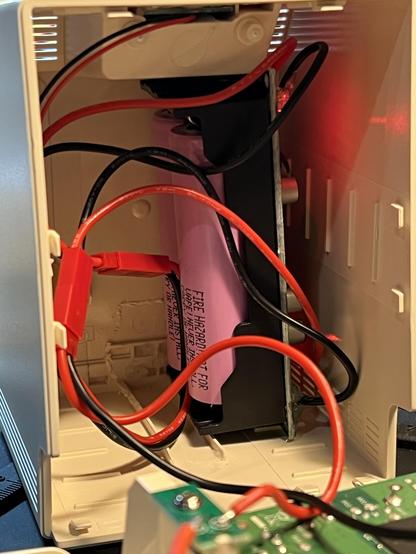
- Installed a LX-2BUPS (2x18650 UPS) inside for power, exposed a USB-C port on the back for charging.

#RetroComputing #VintageApple #VintageMac

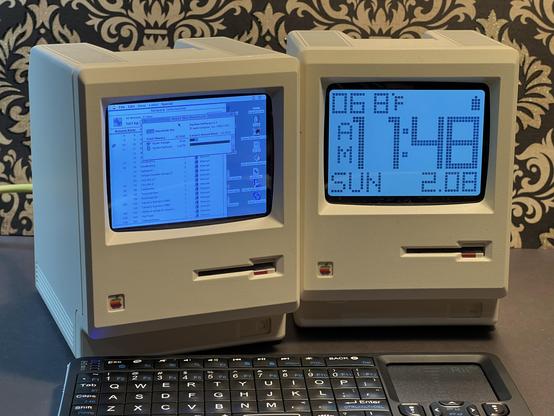
Two tiny Macs, my converted one and an unmodified Maclock.

#VintageApple #VintageMac #RetroComputing #TinyMac

The top of the Maclock includes a touch sensitive area that would turn the backlight on and off, this area marked in red. It doesn’t move, it’s just plastic.

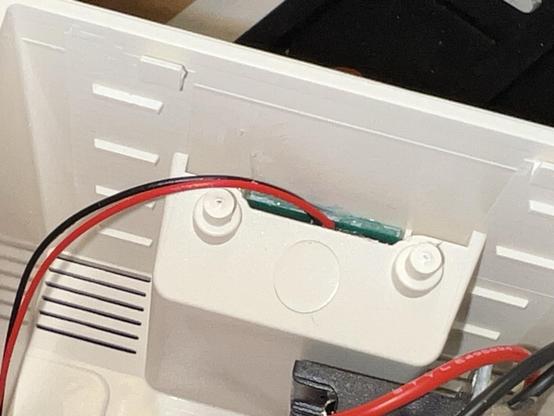
Underneath is a board that is likely difficult to remove, embedded with glue. It has two leads coming off of it.

Without seeing the board, can you theorize how it works and how it could be utilized with a Raspberry Pi GPIO?

#RetroComputing #VintageApple #VintageMac

@paulrickards "Don't talk to me or my son ever again."

@paulrickards I really hoped this was Mac and Massive Mac.

Coming soon?

@anthony All depends on your perspective 😆
@paulrickards the little one was from that clock mac right?
@paulrickards so what’s inside the regular sized Mac, then? Another Pi with a bigger screen?

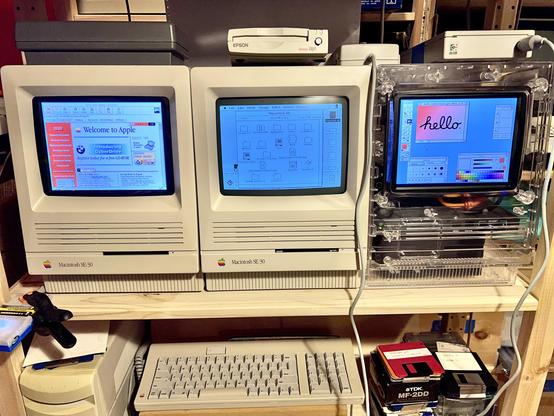
@WiteWulf Yeah, a Pi 4 with a 8" LCD and curved acrylic front from this store. I got mine a few years ago, looks like the current ones are 1024x768 and right side up (mine is fixed resolution 1536x2048 and rotated 90 CCW).

I have a history of sticking LCDs in side Mac cases like my SE/30 triple display rig 😄

https://www.etsy.com/shop/AustrianMegaTech

@paulrickards wow that’s really cool! Is it possible to buy a tinymac complete?
@thomas_klopf Not that I know of. Just the parts to DIY.
@paulrickards thanks! Yeah no time these days for that, but very cool 😎
@paulrickards Where'd you get that TinyMac? Never seen that before. ​
@starlight Made it! See the top of this thread.
@paulrickards That's super cool! ​
@paulrickards Hey, I’m about to start restoring the Mac Plus. I hate CRTs so I’m thinking about replacing it and the analog board by a new PSU and an LCD screen. How did you install an LCD on yours, specifically, how did you make the round glass mimicking the CRT?

@arroz I bought a ready built LCD with curved acrylic front from here

https://www.etsy.com/shop/AustrianMegaTech

@paulrickards Nice! Is it easy to replace the LCD? I was thinking about 1024x768 to make it (double) pixel perfect.
@arroz It came as one unit and I’ve not explored separating the LCD from the acrylic front. Mine is an older one that has a weird resolution and fixed rotation. Looks like current models for sale are 1024x768 so you should be set there.
@paulrickards Perfect, thank you! All this assuming the board is still usable. Hope so!
@arroz If you’re using it with a real Mac, you need some way to get to HDMI for that LCD. I’m using a Pi in my case.
@paulrickards Yeah, there’s the RGB to HDMI hat that uses an RPI with a bare metal software that works on these Macs. I’ll get one of those as well.
@arroz @paulrickards I’ve got a pi & lcd mounted in the corpse of an SE/30. Ended up making a laser cutting template for a piece of black acrylic that lines up with the holes the CRT screws into. Nothing fancy or curved, so the illusion can be spoiled if you’re too close, but it’s generally not so bad. I can send over pics/model numbers/templores a bit later if you like.
@billgoats @paulrickards Thanks! Let me open it first and see if the board has not been destroyed by leaky things, and then I’ll start deciding on what to do.
@arroz Here you go, it’s the EJ080NA 8” 800x600 screen with an HDMI controller board, but you can get a VGA one too. I’ve been super happy with it. The black acrylic makes a pretty decent surround and screws into where the same holes as the CRT.
@arroz There’s no CRT-style bulge outwards, and if you stick your face right up to the case you can see down inside of it. So the illusion does a pretty good job even if it isn’t complete. And who knows, there may well be a creative solution you could come up with!
@billgoats Thank you! Hope I can restore this Mac! 😁
@arroz Oh, you'll definitely get there! @DosFox built a Plus clone from scratch, after all ;) https://tech.lgbt/@DosFox/112837949290317767
DosFox (@[email protected])

Attached: 2 images WE NOW HAVE WORKING MACINTOSH PLUS CLONES.

LGBTQIA+ and Tech

@billgoats @arroz the Plus is one of the most salvageable Macintoshes!

I would say it's worthwhile trying to recap the analogue board (logic board is fine) and then clean the inevitably gunky floppy drive

@DosFox @billgoats The floppy drive definitely needs cleaning, it’s jammed! The analog board and CRT are the things I’m not truly enthusiastic about. I don’t know enough to feel safe working on a CRT Mac (I don’t like CRT screens in general). I was thinking about replacing the whole thing with a modern PSU (there are some nice ones that supply +/-12 and 5V, I just need to make sure the current is enough, if you know the current requirements for each rail I would appreciate!) and the LCD.

@arroz @billgoats the only thing to remember is that it's perfectly safe if it's been left off for more than 24 hours.

Black and White CRTs are "safer" to work on, but there's still risks.

There are recap kits as well

@DosFox @arroz @billgoats I don’t have a Plus anymore, but did upgrade my SE/30 to a color LCD screen last year and it’s glorious. If Apple had shipped an all-in-one color Mac in 1989 for not a trillion dollars, I can’t even imagine what the uptake would have been.
@chrisgervais I mean they did try it in '93 😅
@DosFox Yeah, but those Color Classics don’t hold a candle to the SE/30. I just wish Apple had led with color across the board instead of dragging B&W machines into the 90s for no reason other than margin.
@paulrickards Touch sensitive and "two wires" to me smells like it's literally just a bare capacitive sensor, with all the sensing smarts being on whatever it's connected to. (one wire being GND and the other being 'sense')
@paulrickards Capacitive touch sensor ?
@penguin42 @paulrickards That'd be my guess. Passive tho, so no active components (transistors or IC's) on the board. Possibly just two pads on the board, and bringing your finger near them changes the capacitance. Could run a clocked signal in one side and out the other and measure the difference in skew to tell when something is near it or not?
@penguin42 @paulrickards Given the size of the board, I'd say that there's probably enough latch/debounce logic on that thing that you can take the red and black at face value and just try doing reads off of GPIO pins.
@spacehobo @paulrickards but with only two wires to the board that's tricky if it's anything other than just a pair of pads for a touch sensor.
@penguin42 @paulrickards yeah, and given what was in there before, that's probably exactly what it is.
@penguin42 @paulrickards I mean, I'd hook it up to a scope and play around.
@paulrickards does it just function like a momentary switch, by chance?
@paulrickards if not touch capacitive, could be an IR led & photoresistor in series. The toucher reflects the IR back, reducing the resistance and increasing the circuit's current flow. Not sure if that could be measured over just two wires going to a Pi's GPIO pins. This method of "touch" sensing probably needs more signal processing than capacitive touch, but it's not the worst way to do it 

@paulrickards

Not in color, not on that mac.

(But a color retromod I'd pay decent money for....)

@paulrickards very cute. Almost therapeutic:)
@paulrickards Now you can write a Maclock emulator to run on the emulated one... 😀
@paulrickards oh, using the floppy switch is a nice touch! Does it do clean shutdown when you eject?
@paulrickards love the mounting behind the screen, too. That’s much neater than having it in the case, which I’d been trying to figure out.

@WiteWulf Nothing fancy, it just switches the power to the Pi on and off.

I would love to use the touch sensor on the top of the case for a soft shutdown though! Any ideas what's in the top?

@paulrickards no idea; mine’s held in firmly with hot glue. There are scripts available that trigger a clean shutdown when you put a signal on a GPIO pin. I’m sure you could rig the fdd switch to that.
@paulrickards the power consumption looks quite high. Is there a DC component that is fed to the loudspeakers, by chance?
@davbucci How would I check for that?
@paulrickards try with a multimeter in DC, you should have less than 100mV across the loudspeaker terminals with no sound. Alternatively you can check if the loudspeaker moves and stays in a position different from rest when the circuit is switched on (no sound).
@paulrickards Nice try - shame it didn't work out.