uhm, did you know that waypipe with ssh is fast enough to use blender remotely over wi-fi? what? this works much better/faster than x11 forwarding ever did
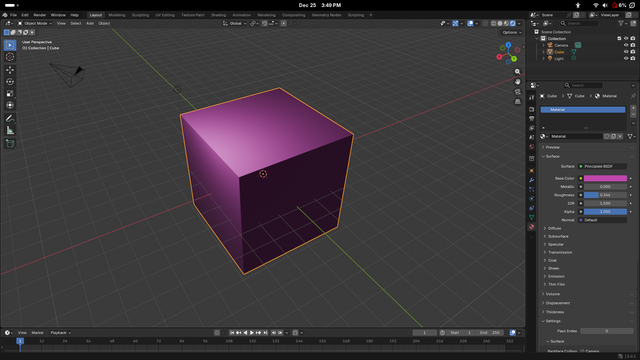
i literally just did: `waypipe ssh minute@minute-i9 Downloads/blender-5.0.1-linux-x64/blender`
@mntmn oooh, that sounds very cool, need to try that sometime.
@mntmn 1st: very cool, that it seems to work so flawlessly. 2nd: I am curious: Why do you use a binary that you downloaded and not install blender on that system?
@momo ah, that's because debian's blender build has severe limitations, like no vulkan support and no wayland support

@mntmn @momo yes, Blender distro builds are very often missing features

I thought the days where this was the case were long gone, but apparently not :/

@k8ie @mntmn @momo Does the same go for the Flatpak build?

@csolisr @mntmn @momo that's a great question and the answer seems to be no. The Flatpak uses the binaries released by Blender so it should match the official builds. I'm guessing that's also the reason why the Flatpak isn't available for ARM.

source: https://github.com/flathub/org.blender.Blender/blob/6a5c01c8fccd233c146aa60b1cb4250398b8d242/org.blender.Blender.json#L181

@mntmn @momo you can get x11 working over waypipe with xwayland-satelite btw. Works really well, but requires more setup
@mntmn @momo I have a whole thing with xdg-desktop-portal and pulse audio forwarding, for seamless VM/remove desktop use and it's great, I should write a blog post about that
@mntmn @momo I just learned that this is now integrated into waypipe! Just pass `--xwls`
@Mae @momo ohh i need to try that
@mntmn that’s the final push I need to try out a Linux on my gaming hardware. I’d love to do blender from my sofa on the pocket.

@mntmn now I need to update some files under ~/.local/share/applications so it does this under the hood when I open an app from the launcher.

It means some apps will only be able to be run from my home LAN (which is fine for me) but it also extends the life of my laptop (which is 11 years old already) if I can run compute heavy stuff on a local server

@mntmn

this works much better/faster than x11 forwarding ever didi think this is cause waypipe uses h264 whereas x11 forwarding forwards the draw instructions which in the modern day is just "draw this 4k 32-bit colour pixmap" which isn't very efficient over the network

@tauon @mntmn It could be though, if toolkits cared enough to use it efficiently, otherwise you could use something such as xpra which I guess is similar to waypipe. But that we are back to such solutions instead of having a proper remote protocol is a bit sad.
@uecker @tauon @mntmn for applications like blender there's neither a toolkit, nor any good way to handle forwarding that isn't streaming.
@dotstdy @uecker @mntmn can't you just forward the opengl instructions? presumably the computer has a gpu too
@dotstdy @uecker @mntmn actually then you'd run into the same problem sending the textures over the network too wouldn't you
@tauon @mntmn @dotstdy Both could work just fine with X in theory. The GLX extension - a long time in the past - could do remote 3D rendering, but pixel shuffling over X could also work fine. X is a very generic and flexible remote buffer handling protocol. The issues with ssh -X are mostly latency related because toolkits (and blender if not using a standard one then has one builtin) use it synchronously instead of asynchronously.
@uecker @tauon @mntmn remote rendering for a program which is heavily reliant on the GPU like blender is the exact opposite of why you'd want remoting though. (Plus none of those virtualization things really work so well in the modern day, it's not gl1.1 anymore, the model just doesn't fit)
@uecker @tauon @mntmn it's not really obvious with the default scene, but a 3d program like blender requires a pretty hefty GPU to run the UI (see also any CAD tool, or a game)
@dotstdy @tauon @mntmn This depends on where the strong GPU is, but as I said, pixel pushing should work also with X. I use medical image viewer over X, the image content updated very quickly. What is slow is the GTK part because it is implemented badly.
@dotstdy @tauon @mntmn But I think even for many 3D applications that render locally, a remote rendering protocol is actually the right thing, because for all intents and purposes a discrete GPU is *not* local to the CPU and whether you stream the commands via PCI or the network is not so different. In fact, Wayland is also a designed for remote rendering in this sense just in a much more limited way.
@uecker @tauon @mntmn Unfortunately that's really not how the GPU works at all in the present day, it made more sense back in OpenGL 1.1 when there were pretty straightforward sets of "commands" and limited amounts of data passing between the GPU and the CPU. Nowadays with things like bindless textures and gpu-driven rendering, and compute, practically every draw call can access practically all the data on the GPU, and the CPU can write arbitrary data directly to GPU VRAM at any time.
@uecker @tauon @mntmn For very simple GPU programs you can make it work, but more advanced programs just do not work under a model with such restricted bandwidth between the GPU and the CPU. Plus, as was mentioned up-thread, you still need to somehow compress and decompress those textures online, which is itself a complex task. Plus you still need the GPU power on the thin client to render it. It's very much easier to render on the host, and then compress and transfer the whole framebuffer.
@dotstdy @tauon @mntmn I use GPUs for high-performance real-time imaging applications. So I think I know a little bit on how this works.
@dotstdy @tauon @mntmn I use GPUs for high-performance computing. So I think I know a little bit on how this works.
@uecker @tauon @mntmn me too, i make aaa video games :)
@dotstdy @tauon @mntmn So you do not keep your game data in GPU memory?
@uecker @tauon @mntmn we keep gigabytes of constantly changing data in GPU memory. so yes, but unless you want to stream 10GB of data before you render your first frame, then no. (obviously blender is less extreme here, but cad applications still deal with tremendous amounts of geometry, to say nothing of the online interactive path tracing and whatnot)
@uecker @tauon @mntmn The PCIe bus lets us move hundreds of megabytes of data between VRAM and RAM every frame. And so we do that. Our engine also relies on CPU read-back of the downsampled depth buffer from the previous frame, so that's a non-starter, however that's not something you'd run into outside of games, probably.
@uecker @tauon @mntmn But like I hinted at before, there's also just issues like applications which just map all the GPU memory into the CPU address space and write it whenever they like (with their own internal synchronization of course). That's *really* hard to deal with, even for tools which trace GPU commands straight to disk. Doing it transparently over the internet is really really really hard.
@dotstdy @tauon @mntmn We found it critically important to treat the GPU as "remote" in the sense that we keep all hot data on the GPU, keep the GPU processing pipelines full, and hide latency of data transfer for the GPU. I am sure it is similar for you. But I can see that in gaming you may want to render closer to the CPU than to the screen. But this does not seem to change the fact that GPU is "remote", or?
@uecker @tauon @mntmn Similar, but likely at a narrower scale of latency tolerance. The issue is just the bandwidth v.s. the size of the working set, the GPU is remote (well, unless it's integrated) but PCIe 4 bandwidth is ~300 times greater than you get with a dedicated gigabit link. and vaguely ~15000 times greater than what you might have used to stream a compressed video.
@dotstdy @tauon @mntmn Yes, this makes sense and I am not disagreeing with any of it. But my point is merely that a display protocol that treats the GPU as remote is not fundamentally flawed as some people claim, because the GPU *is* remote even when local. And I could imagine that for some applications such as CAD, remote rendering might still could make sense. We use remote GPU for real-time processing of imaging data, and the network adds negligible latency.
@uecker @tauon @mntmn The reason it's flawed imo is that while it will work fine in restricted situations, it won't work in many others. Comparatively, streaming the output always works (modulo latency and quality), and you have a nice dial to adjust how bandwidth and CPU heavy you want to be (and thus latency and quality). If you stream the command stream you *must* stream all the data before rendering a frame, and you likely need to stream some of it without any lossy compression at all.
@dotstdy @tauon @mntmn The command stream is streamed anyway (in some sense). I do not understand your comment about the data. You also want this to be in GPU memory at the time it is accessed. Of course, you do not want to serialize your data through a network protocol, but in X when rendering locally, this is also not done. The point is that you need a protocol for manipulating remote buffers without involving the CPU. This works with X and Wayland and is also what we do (manually) in compute

@uecker @dotstdy @mntmn

because the GPU is remote even when localthis is a good point & why i find it so cromulent that plan 9 treats all devices network transparently

@tauon @mntmn waypipe has selectable compression
@tauon @mntmn the problem is that most programs issue too many synchronous calls, that is, they wait until the x server responds before they will send the next request so latency is killing them. I believe it doesn't need to be like this, but if programs haven't been fixed by now they are unlikely to ever be.

I did not know that but it sounds awesome!

@mntmn

@mntmn ohh didn't know there is a new way for xforwarding. i always read that vnc is the new equivalent for that.. but vnc is also pain..

i currently use pikvm (which i already had for my homelab) with my old workstation in my server rack for forward desktop to my pocket, if i need more processing power or newer opengl stuff ^^
@rick @mntmn also great: sunshine/moonlight - I use that heavily for gaming on weak devices with the game running on my PC; even me (and weak device) being in Germany but PC at home in Finland works just great ^^

@rick @mntmn my department at work has been using x2go for years rather than vnc. For those who have never tried it, it is very nice for several reasons: it can be installed with no additional configuration and no daemon. It uses ssh for auth and transport so needs no extra ports opened or local port redirects or extra passwords set. It forwards audio without extra effort.

But It has trouble with Firefox on the latest Ubuntu due to snap and cgroups. The developers all point fingers and wontfix.

@mntmn 6%! Charge, charge!
@wjt ah. battery status is currently not wired up
@mntmn
Okay, I'm curious.
This has been one of my last X11 grumps.
Of course, I've not used X11 forwarding since university, but it's still a grump.
@kianryan not needed because you can _also_ just use x11 forwarding on wayland, because of xwayland

@mntmn

Yes. And the minute I found that out via experimentation I started building some additional machines to test things with, as "use a container" no longer is neccesary when spinning up a VM and running a test is much more comfortable and leaves things in a much cleaner state.

also I dislike containers (:

waypipe is excellent.

@mntmn If one is stuck on X11, one can still do 3D forwarding with VirtualGL. Still maintained today. It replaces the GL libraries with a shim to send pixmaps over the network. The window activities and mouse clicks are still in X11.
@mntmn Waypipe is such a cool tool. I use it to forward windows from a VM to my host and it's genuinely indistinguishable from a native app ...
@mntmn Yes
@mntmn I’ve played one of the later Tomb Raiders, BAR and XPlane over waypipe over wifi
@mntmn Can it work with a whole desktop, like how Windows RDP works? I'm still using Xorgrdp for remote sessions, so I have both plasma-x11 and regular plasma
@woltiv yes, i tried running sway and weston over it