A Linux noob (*) live-toots their Linux PC setup experience!

(*) I have used Linux as my primary OS in... the previous millennium. It was 1998-2000 I think, and was Debian 2.x, on a 486 with 4MB RAM and 80MB hard drive. But I have used Windows since 2001, and also Mac since 2006.

So! Let's try Fedora now, and see what has changed in all these years.

Okay: Fedora site as a downloadable ISO and utility to write this into a USB stick. Then you can boot into actually working Fedora from that, that also functions as an installer. I like! I picked the KDE flavor of Fedora by the way. 1/
Uhh: From the booted USB, I start the installer. Since my Windows partition takes up all the disk space, it seems to only suggest to format it? I was expecting some sort of “ an we shrink your windows partition” option. 2/

Uhh: However! The same live OS I just booted into has a KDE Partition Manager app, so I’m going to use that to resize the windows partition.

That… just took four hours with no progress bar. Disk (fast SSD) was chugging at 20MB/s while resizing 2TB partition down to 1.2TB.

It worked! But four hours with no progress indicator. Not nice. 3/

Nice: the rest of actual install was really fast, several minutes perhaps. Booting into actual installed OS just works, internet (wired) just works. I did not check audio yet lol :) 4/

Very nice: the "search" that happens when you press Start button equivalent (or windows key) feels nicer than on Windows! I did not know how "terminal" is called (turns out: "Konsole"), but typing either "terminal" or "command" or "console" all work and show it as a result.

Windows search most of the time works if you type things exactly, but *sometimes* even when you type app name exactly it goes "nope, never heard of it, want to search the internet?" 5/

Nice: Installing apps via "download" route: 1password works, sourcegit (feels like closest alternative to @fork_dev on Linux - https://github.com/sourcegit-scm/sourcegit) works. So far so good! 6/
GitHub - sourcegit-scm/sourcegit: Windows/macOS/Linux GUI client for GIT users

Windows/macOS/Linux GUI client for GIT users. Contribute to sourcegit-scm/sourcegit development by creating an account on GitHub.

GitHub
Shit: putting computer (this is PC, not a laptop) to sleep then does not wake it up. Had to reboot. After reboot, a dialog pops up asking if I want to report a problem; speaks of "noveau" which I assume is (nvidia) GPU driver something something. Did not test yet if this was one-off or would happen on every sleep; that would suck. Bug report experience next! 7/

Confusing: initial bug report dialog nice, I can see various info. Then it asks me for bugzilla API key (?). Then starts some KDE Wallter Service, which then says "error", and also then error about "DBus Secret Service". Hey maybe no need to call secret service just yet, mkay?

I don't think anyone who's not a coder would get past all that. I'm not sure I did, TBH. 8/

Nice: taking screenshots is same shortcut as on Windows (Win-Shift-S, drag to select region). Nicer magnifier than on Windows. 9/
Oof: installing JetBrains CLion. That went well, including their Toolbox app. However, CLion interface is full of artifacts, which feel like some sort of GPU "tiling" issue? Will have to investigate. (GPU is RTX 3080 Ti, drivers are whatever Fedora 42 has, which I think are open source NVK stuff) 10/

Oof continues: all the replies said "yeah nouveau nvidia driver is not good, get the closed source one", and of course Fedora itself does not tell you that in any way. Googling for it shows up a ton of somewhat conflicting instructions, with *I think* this one being "the most official"? https://rpmfusion.org/Howto/NVIDIA

The instructions are okay for someone who's been using computers for 30 years, but I don't believe any "more casual user" would not give up there. 11/

Howto/NVIDIA - RPM Fusion

Oof: followed instructions, installed "akmod-nvidia", whatever that is, and the instructions for secure boot brouhaha. And it boots! Into a 1024x768 resolution, and claims my display only supports that one. No UI garbage artifacts in CLion! But it is unusable at this resolution of course. So... further digging time now? 12/
Eek: after putzing around with very conflicting info out there for, I dunno, two hours?, turns out the mistake was that I had booted into 6.16.12 boot entry instead of 6.17.4 one. Why there are three of them there? I've no idea. Why I booted into 6.16.12? Because it was the default. Why it is the default? I've no idea. 13/

Oof: turns out, all I needed to do was:
sudo grubby --set-default /boot/vmlinuz-6.17.4-200.fc42.x86_64

Then reboot, then:
sudo dnf install "kernel-devel-$(uname -r)" "kernel-headers-$(uname -r)"
sudo akmods --force --kernels "$(uname -r)"
echo -e "blacklist nouveau\noptions nouveau modeset=0" | sudo tee /etc/modprobe.d/blacklist-nouveau.conf
sudo dracut --force --kver "$(uname -r)"

And then things work! Easy peasy, right? 🤦 14/

Okay: now things are rolling! After guessing that you have to do `sudo dnf install g++ mesa-libGL-devel libXi-devel libXcursor-devel`, I can build some of my smol projects, e.g. https://github.com/aras-p/smol-cube from CLion IDE, and it builds and even runs. Progress! 15/
Very nice: so after this, I have the Fedora OS, with KDE desktop, CLion C++ IDE, and the C++ development toolchain installed, as well as standard things like Firefox, even Libre Office, and whatnot. And the whole thing takes up 15GB of space, which for these times sounds really good! 16/
Just why: Alt-Tab switcher thumbnails look like they scaled down with no filtering; aliasing in your face. Why would you do this, KDE? Sticks out in an otherwise quite nice looking UI. 17/

Nice: happy to report that sound just works! I have headphones plugged into display, and sound travels through display port cable from the GPU. And it all just worked; in OS itself, in Firefox, and in my own (Sokol based) apps like https://github.com/aras-p/playdators

Youtube video hardware acceleration also feels to work; playback of 4K videos uses 4% of CPU and 10-30% of GPU. 18/

Nice: fetching Blender source code, building it from CLion works without issues. Defaults to using "ld" as the linker which feels slow, need to figure out how to convince it to use mold or somesuch https://github.com/rui314/mold

Anyway, yes it does blend! 19/

Not impressed: so in KDE if you have several file browser (Dolphin) windows open, and one of them you have opened in "Administrator" mode, then moving files from one into another proceeds at under 1MB/s. Does it move them three times around the earth in the process?

Why I'd do this? I have downloaded something (e.g. Renderdoc), and want to place it under say `/opt/renderdoc`, for which I need to open as admin. 20/

Meh: Let's try Unity! The website has nice "download for linux" button, which then shows... this page. Instructions work! Unity does not think I'm on 150% display scale and displays tiny UI. Also the menu has strange green dis-coloring on some glyphs. So far first app that does not understand my 150% display scale, it seems. Does it win something? 21/
Okay & meh: Gaussian splats work on Linux, even :P Unity with that tiny UI is a bit unusable; forums are full of "please expose the font scale in preferences like there is one on windows" pleas for 5 years. It also opens all dialogs at top left corner of screen, which is not very usable. Current latest Unity (6000.2.9) by the way. 22/
Nice: just for lulz, tried Godot. This one scales to display scale properly, and dialogs pop up in way more expected places! Nice work, Godot ! 23/
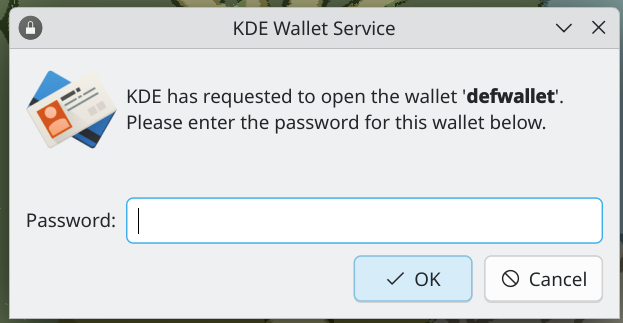
Huh: Starting Slack first shows "KDE has requested to open the wallet defwallet. Please enter the password". No word that Slack would be asking for this, but it only happens when starting Slack. The problem is... I've no idea what "defwallet" is, and certainly don't know the password to it. Pressing Cancel there, Slack actually works fine, but takes about a minute to launch. Quite confusing "UX", I must say. 24/

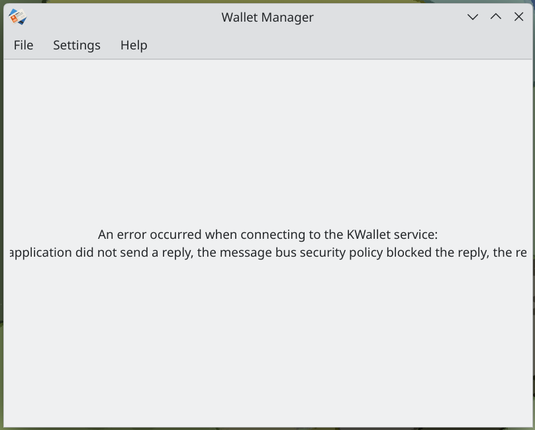
Huh: Thinking maybe I need to configure something related to this KDE Wallet thing - pressing "Launch Wallet Manager" button from KDE Wallet settings gives no indication that anything is happening. Then after 1-2 minutes a dialog pops up saying "error" (with a message that is clipped, lol).

I've still no idea whether I *need* this KDE wallet thing, whatever it is. Only aware of it due to that Slack startup dialog.

25/

@aras KDE Wallet is just a password manager. There should be some way to configure your Wallet password. But I have no idea how (not a KDE user)

@aras KWallet is supposed to be a simple credentials manager. But due to the apparent confusion on what credentials even mean on Linux (some people will tell you it's GPG keys, some people will tell you it's user/pw combos, some people will tell you it's application data)... it ends up being used for everything.

Most apps use it as a "secrets" storage, as far as I can tell: so they can hold your session tokens and what not. But it also manages to work without it soooo 🤷

@aras I've been using KDE for a few years now, never needed it for my apps to run. I hear people who've set it up are happy with it, but I never bothered nor do I need to :)

@aras I've had some trouble with that thing recently on the Kubuntu desktop I've set up for my dad. After system updates, the WIFI manager would start asking about accessing kdewallet for stored credentials.

I do not remember touching anything about it during system setup, so I didn't know any password, and the sudo pw didn't work either.

I only got it to shut up (and make it *not* ask for the WIFI password each reboot) by (re)installing that wallet again.

@aras You need a secrets service to store your SMB (NAS) credentials, WIFI password, some applications data, etc. You would not want to run without this service.

KDE Wallet is not the best in terms of UX unfortunately. To get it working properly you will want to unlock it automatically on login, with PAM. As usual, the best resource for how to do this is the Arch wiki.

https://wiki.archlinux.org/title/KDE_Wallet

KDE Wallet - ArchWiki

@aras Chromium based app sometimes store secrets, I wonder if yours got corrupted (there was an Electron bug with Element some weeks ago, affecting new releases)
@aras My reflex is "Malware attack".
@aras KWallet is the main reason why i stay away from KDE. Its annoying, and on some distros buggy. On notebooks, if just ignored, Wifi wont work anymore.
@aras now make them kiss!!!
@aras My most pointless but lulz KDE+Godot thing: KDE have a message bus and if you happen to have "qdbus" installed you can do things like: "qdbus org.freedesktop.ScreenSaver /ScreenSaver org.freedesktop.ScreenSaver.Lock" to lock the screen.
So ofc I built a "control panel" in my Godot game that can lock the screen or shutdown the computer.
@aras Everyone has their distros and they would swear that everything works on this or that - but fwiw I've been installing Mint on a few machines and it was smooth, including the install of proprietary drivers (Mint comes with a driver manager dedicated to that). Apparently also a good distro for ML, whatever that means
@aras on my homelab server I use ubuntu server, and previously I used a rPI raspbian, so I wanted to keep using a debian-based distro

@c0de517e @aras Mint Nvidia driver select was smooth in principle. But if you don’t do the Secure Boot (‘for codecs’) thing during install it’ll quietly won’t work. Literally quiet since sound-via-monitor won’t work. (Besides being graphically glitchy af.)

Tl;dr: Why no sound? Because Secure Boot.

@aras now try unreal! (There are binaries for Linux that _may_ work without much issues)
@aras as someone who likes O3DE engine I wished it was this easy to test it like that 🥺
@aras we tried so hard and got so far but in the end ;_;
@mdiluz ...one has to fall to lose it all but in the end ;_;
@aras I am wondering how Godot compares visually on Linux.

@aras back in the day™, gtk only supported integer scaling* - it looks like they do now support fractional scaling since 4.14ish, but now somebody needs to implement it in unity 😃 (and I don't know what the backward-compatibility/fallback story is)

* without gnome-specific tomfoolery

@aras I am sorry for the unsolicited advice, but: You can just use Dolphin as normal and once you encounter a folder/file you have no rights to, trying to interact should prompt you to enter Admin mode for this tab. So you can have regular user and root tabs together in one session. :)
@memoriesin8bit sure! but if you copy files from a non-admin tab into the admin-tab, it copies them at floppy speeds. why? I've no idea.
@aras @memoriesin8bit Imagining a Papers, Please thing going on for each byte trying to get into admin land.
@aras yeah I wish I could advise you there. I only rarely encounter this and never with any consistency so not only don't I have a solution, but I can't even say if it's because of root mode. But I never seen it when I use one instance of a file browser so I thought that might help. But it really shouldn't be.
@aras The instance you pasted into should be doing all the work (since under the hood you're pasting URIs or whatever). That's gotta be a silly bug
@aras `sudo cp -r path/to/renderdoc /opt/renderdoc`?
360457 – Taskbar and task switcher window preview thumbnails don't look good (rendered with QSGTexture::Nearest)

@dotstdy close to 10 year old bug, noice noice! also a bit lol at everyone for some reason focusing Lanczos filtering. no one realizes there are other options in between "no filter" and "full on Lanczos"? 🤦
@aras I like the style of bug where it's "we're not going to fix this because we're re-architecting that system" followed by a decade of nobody re-architecting the system. :') (no particular shade on kde there, it's a very common issue)
Bartosz Taudul (@[email protected])

Attached: 2 images Generating a mip chain for a 16k x 16k image: 2 ms. Probably the worst case scenario, with the GPU running in low-power mode, not at its full capacity. Yet, the KDE application thumbnails look like crap, because why do filtering?

Gamedev Mastodon

@aras @dotstdy Do I care about this? Well, yeah. Can I fix it? Probably. Will I bother? Why, just to be ignored yet another time?

It's fucking depressing.

@aras one important thing that sokol-audio currently doesn't handle is when the audio device changes, need to tackle that at some point
@aras never noticed it until I read this toot, and now I can't unsee it. X_X
@aras KDE does some more weird things. My pet peeve: when I want to change my desktop image, I go to the relevant preferences, then click the Add button to add an image to the list (so far so good). BUT: it does not select that image! Now I have to hunt through the list of background images to find the one I just added. Why do they think I added it?
@sybren classic unix philosophy of one thing doing one thing? see, add button only adds the image. you should pipe output of that button into the select button! /s
@aras so... sound now? 🔊 😄
@aras I know that app icon :D
@aras i haven't done sh like that in a long time. think the last big fubar was ppa package confusion after multiple sequential distro upgrades
Linus: Fu_k You! Nvidia #linux #nvidia #technology #computer #tech #windows #linustorvalds

YouTube
@aras Yeah you need to replace noveau with the actual nvidia driver, or you'll have significant problems. It can't bring your gpu out of base clocks either, so as well as broken it's also impossibly slow.
@aras As another has mentioned, this is due to nouveau. There's a really good guide for installing the Nvidia drivers in Fedora 42 on the rpmfusion site. https://rpmfusion.org/Howto/NVIDIA?highlight=%28%5CbCategoryHowto%5Cb%29
@aras As others have said, it's sadly a driver issue. I use CLion (and other Jetbrains stuff) without issues on Nobara (which is mostly fedora with a a few tweaks) on nVidia HW with the proprietary driver.
@aras I don't know where this is going or how long but I will read ALL of it. Hell, I might finally take the plunge and install a Linux distro on my old laptop, myself.