 Jan Batora
 Quinn Nelson
This single-step Apple Shortcut is a GAME CHANGER. No more going to Settings -> Apps -> and then finding the app.
Just swipe from Control Center, run the shortcut, and you’re automatically redirected!
This single-step Apple Shortcut is a GAME CHANGER. No more going to Settings -> Apps -> and then finding the app.
Just swipe from Control Center, run the shortcut, and you’re automatically redirected!
Step 1: install shortcut
Step 2: “Add a control” in Control Center, “Run Shortcut,” and select the newly installed shortcut
Step 3: Profit!
Download here: https://snazzy.fm/eP
Or add manually:
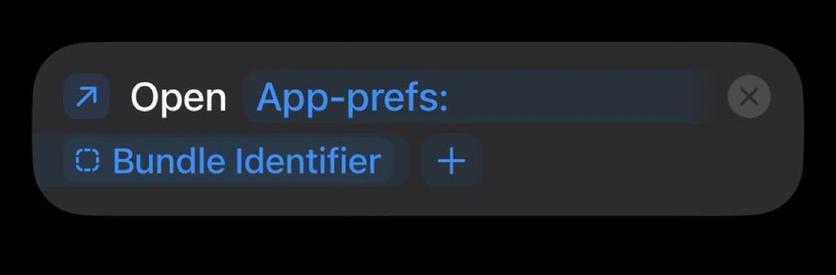
@snazzyq Cool!
Weirdly, mine didn’t work (opened the top-level App Settings) until I opened it in Shortcuts and changed the icon. ¯\_(ツ)_/¯ But it works now!
@snazzyq
Brilliant, thank you. If it’s any help to anyone I’ve add a tweak to make it work in the camera app too
https://www.icloud.com/shortcuts/a3cddcc7d4f9460f8daea762d975f704
@snazzyq Brilliant!
Also, lukewarm take: I hate that they’ve buried so many core OS app settings (Phone, Mail, Safari, etc) with all the rest. I get why they did it, under antitrust pressure etc, but it is maddening.
@kowantures Nochmal länger drüber nachgedacht. Ist hilfreich. Danke für den Hinweis.
https://www.iphoneblog.de/2025/09/21/ein-shortcut-in-die-app-einstellungen/
@iphoneblog gerade für die Kamer-App aber: https://toot.community/@mrplow/115238760099087255
bin auch erst hierüber darauf aufmerksam geworden: https://tchgdns.de/ios-app-einstellungen-blitzschnell-per-kurzbefehl-aufrufen/
@[email protected] Brilliant, thank you. If it’s any help to anyone I’ve add a tweak to make it work in the camera app too https://www.icloud.com/shortcuts/a3cddcc7d4f9460f8daea762d975f704
@snazzyq I’ve made a more complex one but with some nice extras. The #shortcut is in Spanish but it should be easy to understand:
https://www.icloud.com/shortcuts/eca58c94de8248f4ba59bfcaa6610f10
I have added warnings where it doesn’t work:
- Home Screen
- Lock Screen
- Web app
- Settings and Home apps
as well as a special case for the Camera app.
I would appreciate it if anyone lets me know of any other place where it doesn’t work 🙂
P.S. To help the latter, the ID of the app from which it was executed is copied to the clipboard.
Translated, updated, and published in RoutineHub:
https://routinehub.co/shortcut/23606/
What’s new in version 1.0.3 (2025-09-24)
- Fixed an import issue in #iOS 18
- Improved alert messages
- Prevents the #shortcut from ending with the Safari icon
 ytse77
 curtosis
 Fahfoofnik
 Gus
Gus Steven Arenberg
 Von
Von mrplow
 Mieszko Ślusarczyk
 Lee
Lee foxmean
 Edward Munn
 adamrice
 Christopher Griffiths
 Jerrod Hofferth
 David Levine
 Kowantures
 iPhoneBlog
 Sascha Diercks 🇪🇺
 Daron Brewood 🇬🇧
 CocoaHeadsNL Foundation
 Naiyer
 Darren Olivier
 David Jarman
 corvax
 Leon Cowle
 standev
 Antonio Bueno
 Thom Anthony
 N4RSE - Jim