 aeva
aevawhat if I made a little visual programming language for my synthesizer 🤔
I'm considering replacing the register machine I wrote with an evaluator graph as a convenience for polyphony, but this would also open up the possibility of live editing patches. My register machine allows for no flow control, and each operation has at most two inputs and exactly one output. This is geometrically very convenient, so I'm thinking maybe something grid based to hopefully keep it simple.
Another thing that would be nice is being able to make patch-specific touch interfaces.
I'm thinking something like this for the visual language frontend. The nodes are grid aligned with space between for connections to run. Placing a new node in that space would insert a new row or column into the grid. Wire paths will probably be automatic, and the whole thing would ideally have a deterministic textual representation to make revision control easier.
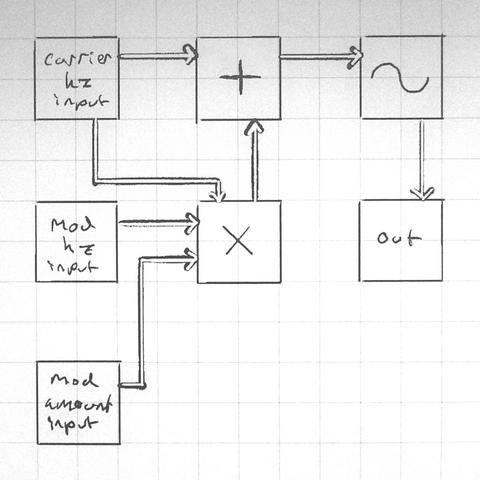
Also important: graph cycles are allowed. If there's a feedback loop, the value is pulled from the previous frame's computation or is zero if there is no previous frame.
Commutative instructions get to be variadic. I'm not sure what to do about non-commutative instructions syntaxwise. I'll probably have it make you select which parameter your connecting when you draw a connection, and then display information about the connection when you touch wires, and draw the name along the wire where possible. Color coding and ordering where the inputs connect also would make sense to supplement that.
I'm really tempted to just not have division or subtraction, and provide rcp and sign flip as instructions instead. Likewise who needs clamp when you've got min(max(v, low_bound), high_bound), right? I think I'd want lerp and some other functions that don't really fit this syntax well though so idk I'll have to think about that.
One of the fun things about designing a visual programming language is "how can I put less work making this" and "what if it wasn't super annoying" can coincide on the same solutions! Like what if instead of trying to drag and drop a noodle between two nodes on opposite sides of the world, what if you just select both and enter noodle mode that temporarily puts them side by side so you can draw the connections you want.
also graph travel mode. zoom in on one thing and just see what's connected to it and travel to neighbors
i have no share holders! no KPIs! no customers! the ux only has to be awesome for meeeee! bweeehehehe!
playing around with the rules for automatic wire placement tonight and i got a marvelous idea. normally i'd want to avoid parallel runs of wires when it improves readability to do so, but the exception to this rule is if the destination is the same then its better to consolidate. here's a mock up
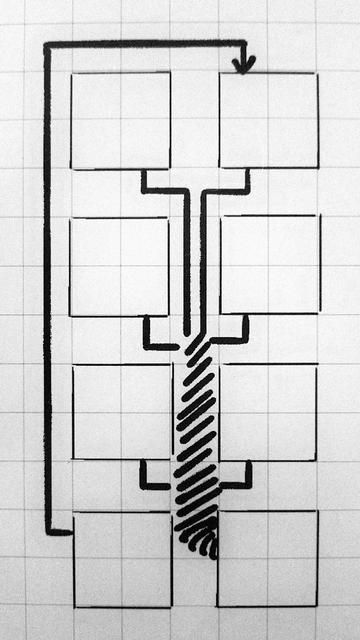
my current wire placement rule set is this:
1. groups of wires that all connect to the same parameter on one node are evaluated to see if a wire wrap path makes sense. if so, these are placed first, and the cost of the path is raised arbitrarily high for other wires.
2. wires that travel the farthest go second and search for the shortest path with the fewest bends
3. wires that have the shortest path go last, avoid parallel runs, but favor perpendicular crossings
ideally things will be color coded by destination and wires will have different colors and textures to make it easier to tell them apart, as well as UV animation. Also highlighting / isolating connections when you select things.
another thing I want is a mode for isolating parts of the patch. stuff like selecting a node and having it highlight it's connections is common place, but I'd also like to have a mode for isolating the entire expression tree that roots on that node. dunno if anything does that.
I figure the eagle eye view of a patch can be a little obtuse if I have reasonable tools for examining, navigating, and organizing what I have.
also I am delighted that people keep thinking of examples of games instead of other visual programming languages in response to this thread. it's one of the ways I know I'm on the golden path.
I put it to the test by translating my test patch from my python fronted to a hypothetical equivalent node based representation without regard for wire placement and then stepped through my wire placement rules by hand. I'm very pleased with the results, it's a lot clearer to me what it does than the python version is at a glance.
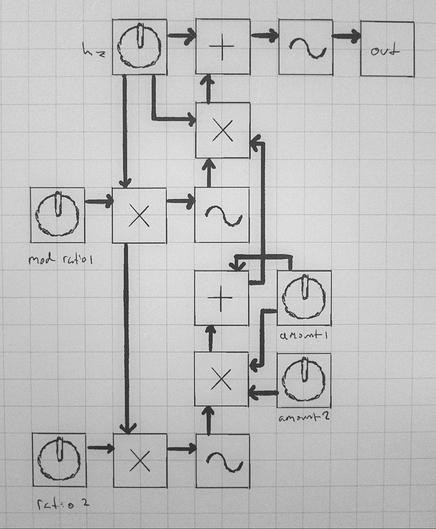
I want this to be real so bad XD
Test grid background and placeholder tiles. I wasn't quite aiming for windows 9x buttons but it sorta veered that way. dunno if I'll keep them
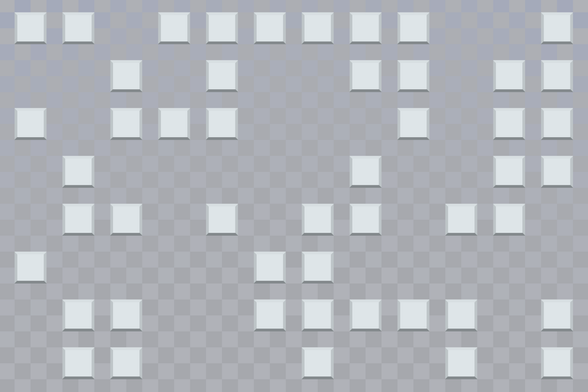
now, this may seem like I'm just fussing around on trivial details, but i assure you this is all going according to plan
I made some forward progress on my visual programming language project. Mind you, not any progress on the actual language yet, but I've established a makeshift gui quasi-framework that will hopefully make it easier to write the editor gui
I believe this was a worthwhile yak shaving detour because I was able to write the select mode in less than an hour.
The "framework" works such that there's some global state for the working data and theme elements, and there's a set of "screens" which are responsible for implementing drawing the gui and processing input events. Similar screens (as demonstrated here) share a base class to reduce code duplication. Each screen has its own event loop, and so the call stack essentially becomes an implicit stack of UI mode changes that can be unwound.
The side bar consists of "targets" which are just hyper link boxes that trigger screen changes on mouse-down. There's no mouse-over logic anymore since this meant for a touch screen anyway, and removing mouse-over button appearance changes simplifies things a bit. Each screen just define what it wants in the sidebar.
Select mode tests to see if a mouse-down happened on any boxes in the graph bay, and toggles their select state. The toggle function implements all the select and deselect logic. When select mode is active, the graph bay tiles check their select state to see which sprite they should use. When a toggle is issued, the select mode also rewrites its sidebar based on what you have selected. The "magic" button that appears will eventually go to the wire connection mode, but that doesn't exist yet.
I don't think the connection mode will take long to write, but I need to wander away to do other things now.
connection mode update: connection mode indeed did not take long to write
This version of connection mode is just a short term solution for managing parameter connections. I'm going to have it work such that the different sides of the screen correspond to one of the two selected nodes, but I think later on when I get all the other parts in place I'll probably rip it out and replace it with something else.
ok I'm at the point where I need to establish a base class representing the synthesizer instructions, which in this thread I've been calling "nodes" but I want to stop calling them "nodes" because the word "node" makes me think of pimples but they're full of javascript instead which is worse. I don't want to call them "instructions" because I'm going to be writing that word over and over and also because the nodes can represent registers and constants too. (there is no js in this project)
 d@nny disc@ mc²
@aeva wait AHHH i missed this entire thread somehow this is so fucking cool!!!
 Viraptor
 ideaPDish
@aeva
brilliant... It's like removing all the 'then's from If..then.
you mean that you are pushing all of the logic to the next screen down? which makes the screen more modular and infinately upgradable by just adding a page.
@ipd yup! and when the active screen's main loop terminates, control returns to the screen under it. since screens are objects, screens can read temporary data from other screens which makes things like dialog boxes super easy to implement
By 'screen under it' do you mean the calling screen?
Can a screen call itself?
Can screen data be persistant once a screen is called, returned then called again?
@ipd yeah "screen under it" means the calling screen.
There is nothing to prevent a screen from calling itself, though it would probably be more useful to have such a screen call additional instances of its class to keep the working data separate.
When a screen's main loop returns, the screen's object persists for as long as you want it to, and it can be called again.
 Efi (nap pet) 🦊💤
@aeva I don't understand, but I believe in u 🐾🐾🐾💕💕💕
 Celes 🌙
@aeva looks cool!
what library sorcery are you using to arrange the pixels?
 ferunando
@aeva well. i do love the texture.
@aeva as a placeholder it's fine, keep going
 Ronflaix
 Asta [AMP]
@aeva ME TOO. I already wanna hack on it.
@aeva embrace the homies and make it real! 
it looks really cool, I love visual programming languages and I never thought about making a grid-based one :3
 DNA schedule
@aeva this is one of those threads that has me saying to myself "how is Aeva so smart and correct" and I'm not sarcastic or kidding
 Irenes (many)
@aeva you probably should not imitate the Rocky's Boots / Robot Odyssey UI, but you are for sure bringing it to mind
 Evie 🏳️⚧️
@aeva factorio does this thing with multi line colors so you can have multiple parallel lines on the same cell but going to different places
@pupxel yeah I'm gonna have something like that too, but I really love the visual emphasis the wire wrap has. like imagine that's six oscillators funneling into a sum at the bottom right. it looks different than everything else in the patch that isn't six oscillators funneling into a sum.
@aeva clever merging in that scenario is something that would be really useful, but doesn't exist in almost any software. Even things used specifically for diagramming like draw.io don't understand the concept. I want to see this basically everywhere...
@viraptor seriously! personally I think the designers of those programs could stand to go off the deep end with procgen stuff. they should stop trying to copy the same stale ideas from eachother and start trying to copy townscaper and that other one that came out recently
 nex
nex@aeva oh but you do! future you is a share holder!
 Glyph
Glyph@aeva living the dream
 >>>>>>>
@aeva making your own music software rules so hard
 Heals
Heals 
@aeva honestly the best UIs out there were made that way..
 snowyfox
@snowyfox I don't get it
 Carl C
@aeva This is true freedom.
@aeva don't forget grouping! like creating a virtual node containing multiple stuff