 aeva
aevawhat if I made a little visual programming language for my synthesizer 🤔
I'm considering replacing the register machine I wrote with an evaluator graph as a convenience for polyphony, but this would also open up the possibility of live editing patches. My register machine allows for no flow control, and each operation has at most two inputs and exactly one output. This is geometrically very convenient, so I'm thinking maybe something grid based to hopefully keep it simple.
Another thing that would be nice is being able to make patch-specific touch interfaces.
I'm thinking something like this for the visual language frontend. The nodes are grid aligned with space between for connections to run. Placing a new node in that space would insert a new row or column into the grid. Wire paths will probably be automatic, and the whole thing would ideally have a deterministic textual representation to make revision control easier.
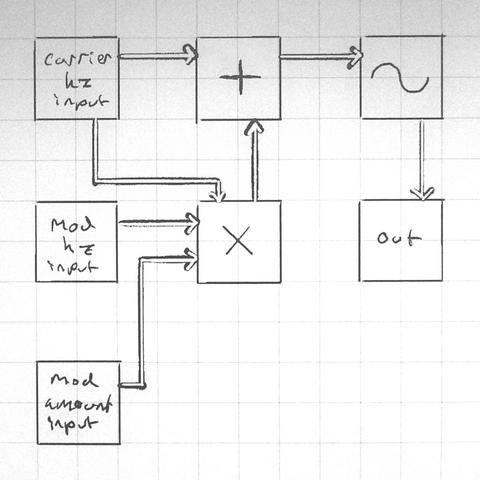
Also important: graph cycles are allowed. If there's a feedback loop, the value is pulled from the previous frame's computation or is zero if there is no previous frame.
Commutative instructions get to be variadic. I'm not sure what to do about non-commutative instructions syntaxwise. I'll probably have it make you select which parameter your connecting when you draw a connection, and then display information about the connection when you touch wires, and draw the name along the wire where possible. Color coding and ordering where the inputs connect also would make sense to supplement that.
I'm really tempted to just not have division or subtraction, and provide rcp and sign flip as instructions instead. Likewise who needs clamp when you've got min(max(v, low_bound), high_bound), right? I think I'd want lerp and some other functions that don't really fit this syntax well though so idk I'll have to think about that.
One of the fun things about designing a visual programming language is "how can I put less work making this" and "what if it wasn't super annoying" can coincide on the same solutions! Like what if instead of trying to drag and drop a noodle between two nodes on opposite sides of the world, what if you just select both and enter noodle mode that temporarily puts them side by side so you can draw the connections you want.
also graph travel mode. zoom in on one thing and just see what's connected to it and travel to neighbors
i have no share holders! no KPIs! no customers! the ux only has to be awesome for meeeee! bweeehehehe!
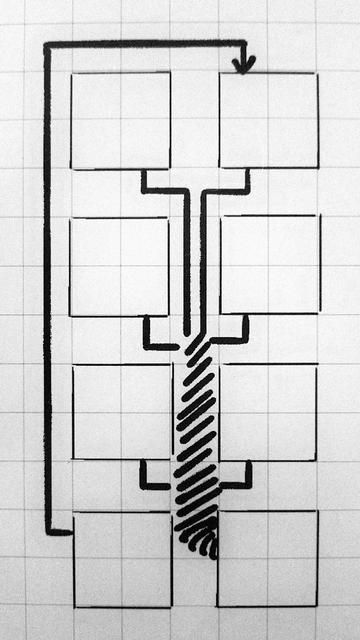
playing around with the rules for automatic wire placement tonight and i got a marvelous idea. normally i'd want to avoid parallel runs of wires when it improves readability to do so, but the exception to this rule is if the destination is the same then its better to consolidate. here's a mock up
 Evie 🏳️⚧️
@aeva factorio does this thing with multi line colors so you can have multiple parallel lines on the same cell but going to different places
@pupxel yeah I'm gonna have something like that too, but I really love the visual emphasis the wire wrap has. like imagine that's six oscillators funneling into a sum at the bottom right. it looks different than everything else in the patch that isn't six oscillators funneling into a sum.