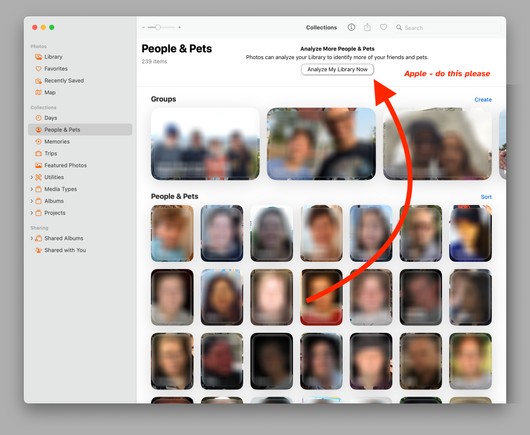
OK, in Apple Photos (Mac) I've labeled the face of someone in a dozen different photos several days ago, and I'm still waiting for Photos to recognize the person who is in probably 100 other photos, and yet it hasn't found ANY additional photos of this person. I *am* quitting Photos after each daily use.

What's the consensus of the best way to kick “photoanalysisd” to find new photos of someone already in People?

[“Review More Photos" comes up with zero new photos.]
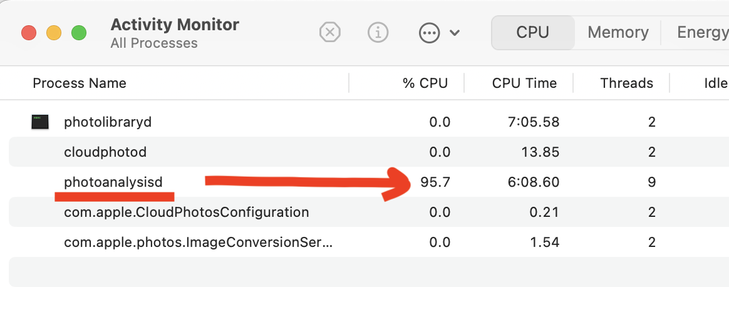
Ok, I think I now have a system to force photoanalysisd to kick in, thanks to help from you fine folks - basically, force the Mac to be as idle as possible and then it kicks in:

Before I leave my Mac for the night:
- quit all Mac apps
- reboot, make sure no apps are running
- open Photos, then quit Photos

Then we play the waiting game, and usually within an hour it seems to kick in. Screenshot is what I saw this morning, and I've already noticed more faces found. Also THIS IS RIDICULOUS.

I don't know how to write software (or make good UI mockups) - that said, it seems like a BUTTON that says something DO THIS NOW would be really useful.

@tvaziri @joesteel

I think they prefer to schedule such cloud analysis on their own server traffic patterns. Their needs not yours.

I do wonder if Apple can see you tooling around in Photos people enough it triggers them to move you up in the cue. There is no direct feedback that anything has been done however. I still do a lot of A/B confirmation of faces, well not sure 18 does that.

I also wonder how many people have iCloud accounts.

@Chancerubbage @joesteel I *get* that they prefer it. But that's user-hostile.

@tvaziri @joesteel

It’s the same philosophy about internal development and maintenance teams for hardware and software- they would rather reassign those resources elsewhere than to keep watch. A bit TOO lean.

It most certainly is user hostile. Would they need to place user limits if they allowed ‘do it now’?

A ‘hey, we just did that thing’ note ~might~ be nice. ‘We’ve found more Faces!’ But I hate notifications too.

@tvaziri @Chancerubbage @joesteel I think Lightroom used to have a button to do the analysis of the library but I haven't opened it in a while.
@Chancerubbage @tvaziri @joesteel Apple’s Photos analysis is entirely local, that’s why the process uses so much CPU and why it only runs when truly idle. Has nothing to do with iCloud.
@rosyna @Chancerubbage @tvaziri @joesteel If Photos is set to optimise storage, then (presumably) it has to download each photo from iCloud before it can analyse it

@Chancerubbage @tvaziri @joesteel this analysis isn’t done in the cloud, otherwise it would be reasonable for them to choose when it runs.

Apple will go a very long way to avoid giving you a button though. I’d love to decide when my phone charges to 100% at night but instead they take weeks trying to learn a pattern and then charge to 100% at 2 in the morning when I only need it at 100% by 7am.

I know how times work. I have to set an alarm and I turn up at meetings on time. It’s highly infuriating to have the phone guess and be wrong.

@tvaziri You're very good at blurring out faces, however.
@marcintosh @tvaziri don’t know what you mean. That’s just how those people look
@sdjmchattie @marcintosh @tvaziri It's possible you need to get your eyeglass prescription updated.
@tvaziri I newer thought about it the other way, but it's just a process, right? Launched by a trigger. Would it be possible to launch it manually? Or will that sucker auto-terminate because it thinks there's too much going on?