
🧡 1/n I'm using #KDE / #KDEneon for two days now - pretty neat - my bitching and moaning since #Gnome2 might finally come to an end. πŸ˜…

I'd like a GUI settings option to make a single stroke of the Super/Meta/Win key show me the "Overview", like in #Ubuntu #Gnome - I haven't found one, yet.

So, i'm trying this: https://develmonk.com/2024/03/23/kde-can-have-meta-super-key-blow-up-the-screen-just-like-gnome/

#Linux #Desktop

Bring Single-Meta-Keypress Overview Behavior to KDE6 (just like Gnome!) – and a bit on KDE configuration files…

I missed KDE… best of both worlds? UPDATE: I tried to implement these instructions on a new installation of KDE, and realized I made some mistakes: The kwin accelerator that should be used is…
Unix Greybeard

🧡 2/n

πŸ‘‰ Meta+Tab does NOT trigger the Overview
πŸ‘‰ accidentally, i've found out that Meta+Esc opens the system monitor
πŸ‘‰ the well-known Ctrl+W wΓΆrks almost no-where - it closes almost everything in #Gnome. I need to change …well, either the KDE shortcuts, or the Logitech mouse's DPI-Button macro
πŸ‘‰ the #NetworkManager GUI supports a "shipload" of nerdy stuff - no need for nmtui setting up bond0 🀩 πŸ‘
πŸ‘‰ there's a Qt variant of Transmission - it also supports seeding at 0bit/s πŸ˜‰πŸ‘

#KDE #KDEneon

🧡 3/n apparently, Meta+W triggers the "Overview"!

*sigh* how lazy do i want to be, today? πŸ˜… Is this "good enough"?

Meta+W is kind of a cumbersome "Affengriff", as we colloquially call it in German - [monkey gesture] - it's a bit inconvenient.

It seems, i can't open the "Start" menu via "hot corners" / "Screen Edges" - WHY? 😱

I might've over-estimated KDE, slightly - it's amazingly configurable, via GUI tools - but not exactly where it counts, yet. πŸ˜‰

#KDE #KDEneon #Linux #Desktop

🧡 4/n
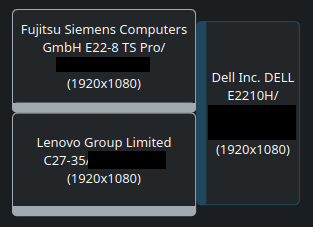
I haven't quite figured out how to move windows to another monitor, yet - multi-monitor setup, here.

Meta+Shift+Arrow_Right/Left works, for the portrait sidecar monitor …but not much else.

Tips are appreciated!
I'm noob-ish - just switched from #Ubuntu #Gnome.

Also, how friggen fancy is that; i can adjust the brightness of my monitors, by hovering over the "systray" icon and scroll the mouse wheel! πŸ₯° AMAZING! (proportions still need some work, but WOW!)

#KDE #KDEneon #Linux #Desktop

🧡 5/n KDE is just as convenient as #Gnome; i can control / mute the #audio of a single #Firefox tab, then every subsequently opened tab will also be muted, even if the previously muted tab has been closed - that's a very desired behaviour!

πŸ‘‰ multi-tasking / multi-tabbing audio control πŸ‘

edit: scenario - i'm listening to a talk-show/vod-cast, and don't want audio of other tabs, disturbing me. (requires setup - not complicated, mute the 1st, then it's "full-auto")

#KDE #KDEneon #Linux #Desktop