 Christian Selig
Does anyone find Safari on Sequoia will just randomly decide "Nah I don't want to load any new pages for the next like… 30 seconds"? Other browsers will load things fine
 Michael Stanclift
@christianselig I've had this problem since before Sequoia.
 Nefarious Aryq
@vmstan @christianselig Same-before Sequoia, and I've even seen the exact same behavior on my iPad as well.
 Sören
Sören@NefariousAryq @vmstan @christianselig seems like some global lock either in Directory Services or NSURLSession
 The monkey in the corner
@christianselig Haven’t had any issues with it tbh. Do you use Private Relay?
@ombligoelemento I do not :(
 Tom Hickey
@christianselig yes, it will just shit the bed and I take that as a sign I should reboot. I didn't know it only lasted 30 seconds or so.
 Colin Devroe
@christianselig Likely Private Relay issue.
@cdevroe It's off haha
@christianselig I have private relay off, if that makes any difference.
 Joshua Jung
@christianselig This may be this longtime issue which was discussed on @atpfm a few times, most recently here: https://podsearch.david-smith.org/episodes/7474#890
 Casey Liss
Not often, but it's _infuriating_
 RG
RG@caseyliss @christianselig Do you have Private Relay enabled?
 sayrer
@caseyliss @christianselig haha I definitely suspect this is the same bug Siracusa complained about. ERR_NETWORK_CHANGED, but they don’t show an error. I was thinking this during those episodes, but I didn’t write it down, so can’t prove it. (I mostly use Safari)
 castrolem
@christianselig yup, it happens from time to time. My only solution is to quit Safari and open my tabs back. Not great.
 bjoern
@christianselig yup sometimes it feels like a tab just refuses to work. Sometimes it helps to close the tab and enter the url in a new one. Refresh won’t cut it in these situations. 🥲
 Jeff
Jeff@christianselig I've noticed that if the app is quit and launched, it's SUPER SLOW. Like, 30-45 Seconds until I can actually use it to go to a web site. Otherwise, if it's already open, it is slower than it's been in the past but ok.
@christianselig On iOS and iPadOS I've noticed that if I come back to a tab in Safari after it being minimized or maybe the phoen is just locked, when I return to the page it's totally unresponsive. I have to totally reload the page. If I try and scroll, it almost looks like I'm just dragging my finger and selecting things to copy. Very weird.
@christianselig FWIW, I do NOT have Private Relay enabled.
 Steve Troughton-Smith
@christianselig sometimes single tabs crash out like that, and closing the tab is the only way to make things load again. Not seen it browser-wide though
 Arcticulate
@stroughtonsmith @christianselig Well, for me it’s much worse: Safari crashes consistently after 4 to 6 minutes of either activity or idling. MacOS has been annually upgraded since the preinstalled Big Sur (M1 Mac Mini 16 GB, 1 TB). Activity Monitor shows memory usage is insane, with just 3 simple tabs opened 🤪. All since 15.0, fine in Sonoma. I might have installed 15.0 while it was in a late beta. Maybe something didn’t migrate correctly between upgrades.
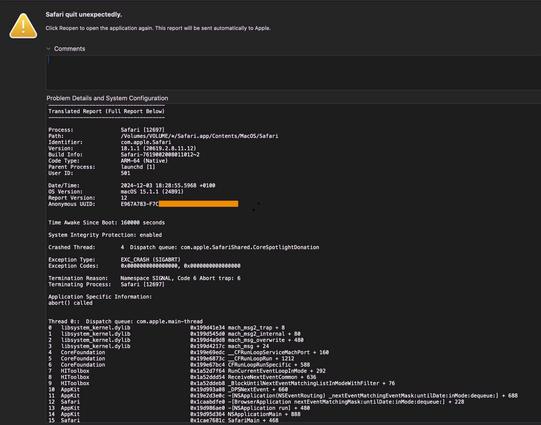
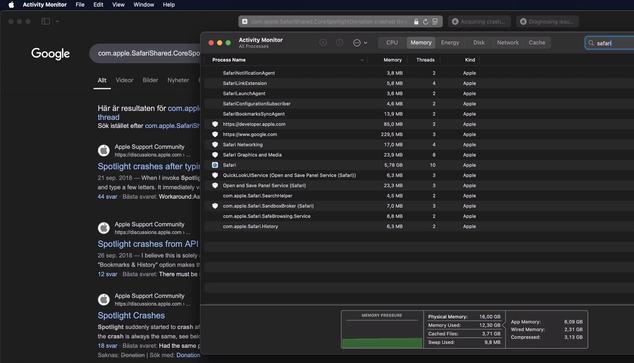
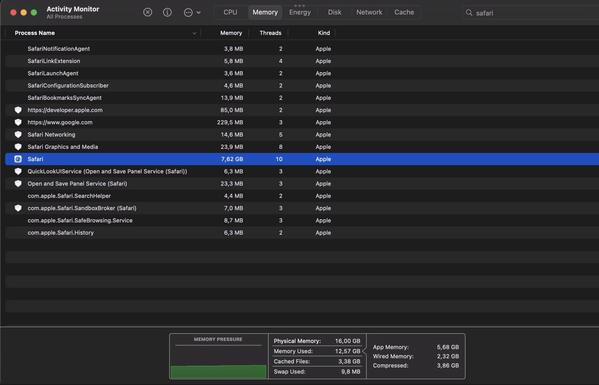
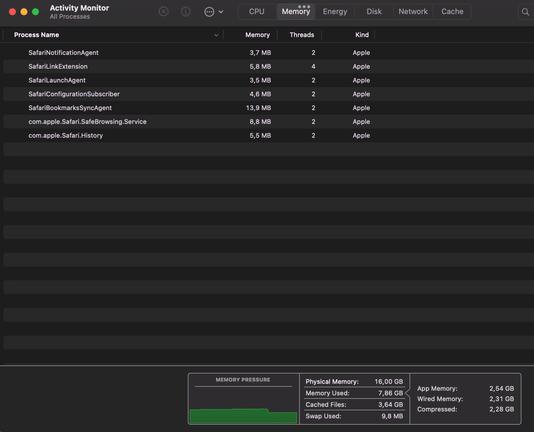
Notice how memory is leaking like crazy. We’re talking maybe 1 minute apart between the screenshots. Even worse, it is the exact same on my M1 iPad Pro 11” (16 GB, 2 TB). Fine in iPadOS 17.x and earlier. Switched to Orion in iPadOS and macOS for now, as several Apple feedback + sysdiag reports have lead nowhere.
Yet, Safari works great on my iPhone 13 with the same iOS version, upgraded from preinstalled iOS. The phone is just 2 weeks old, new in box but of course — a 3 years old iPhone model.
@stroughtonsmith Tab specific would be an upgrade for me, it seems to take down the whole browser weirdly
@stroughtonsmith @christianselig IME it’s definitely a process-wide lock; when one tab is stuck in a network request, *all* of them are
 Rodrigo Escobar
@christianselig I get that with DDG when using bang searches sometimes. I think it’s a DDG issue in that instance
 Scott Frazer
@christianselig @waldoj this is an issue you had, right?
@christianselig @waldoj here’s the thread. DNSSEC maybe?
 Waldo Jaquith
@sfrazer434 @christianselig Yes, it took me weeks to figure out and now, I've…uh...got to think of how I solved it. I tried the 15.2 beta, but that didn't help. After hours of poring over dig and nslookup results, I'm 90% sure my solution was to completely switch DNS providers.
@sfrazer434 @waldoj Hmm I'm on ethernet and seeing it
@christianselig @sfrazer434 It turned out for me that WiFi wasn’t the problem, it was that I somehow had different DNS servers configured for WiFi and Ethernet. It took me a long time to figure that out.
 Peter van Broekhoven
@christianselig On Sonoma too. Sometimes it decides never to come back. I have to force quit Safari a lot these days.
 José María
@christianselig yes, and also the problem when going back after clicking a Google result that makes the screen remain blank without loading anything
 Felix Lapalme
@christianselig a few times every day yes. It's been happening for years tbh. No matter which Internet connection I'm using.
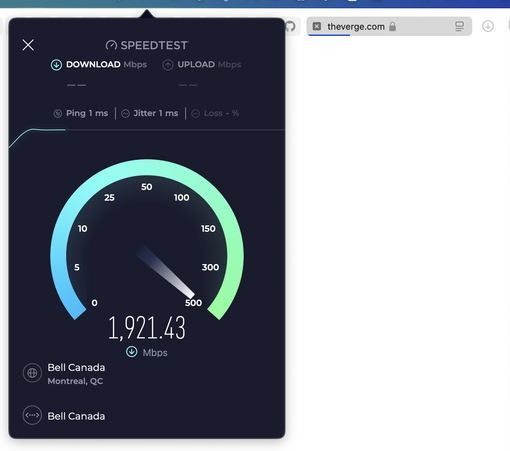
@Lapfelix What a flex :O jealous
@christianselig if Bell salespeople knock on your door, let them in.. they might bring good news
But also it makes the Safari issue even more frustrating as I know every part of my networking stack is on point. It was easier to endure when I could blame it on the previous ISP’s modem
 Kyle Howells
@Lapfelix @christianselig same for me, for years.
CMD+Enter to make the page load in a new tab usually fixes it for me.
Safari is just super unreliable.
CMD+Enter to make the page load in a new tab usually fixes it for me.
Safari is just super unreliable.
@iKyle @christianselig I need a system-wide shortcut to kill Safari Networking and I’d be fine. Also one to kill coreaudiod.
 Josh Austin
@christianselig ok, so it wasn’t just me. 😂😭
 Darkpaw
@christianselig Yes! It will also crash because the Apple Developer Forums website has been open in a tab for 30 mins. Using too much energy? Really? Just sitting there doing nothing is using too much energy?!
Oh, and some websites, when you scroll down, will just go completely blank for no reason.
For me it's the best browser, but it needs to stop being an idiotic little man baby sometimes.
 MacBalance
@christianselig Yes. I’ve heard it’s due to some other process, but not sure of the details. My Studio did not constantly when I first got it but hasn’t in months.
I had a page about it saved with some ideas, but if course it then stopped.
 Douglas Patriarche
@christianselig I can’t tell you how happy I am to hear that it’s not just me. It started happening to me a week ago when I upgraded to a new MBP, and I worried it was caused by a hardware problem. Pings go through fine, but web requests hang. For me it also happened in the Arc browser. When I Force Quit Arc the problem report showed some sort of deadlock in coreaudiod
@christianselig I’ve had this for years, and it seems like some global lock (with a timeout) either for DNS or for HTTP
It’s one of the few things I don’t like about Safari
@christianselig I do believe disabling and re-enabling your network interfaces generally fixes it, but of course that can have other consequences
 James Scariati
@chucker @christianselig yep, I’ve been seeing this bug for years (definitely before Sequoia), and quitting/relaunching Safari doesn’t fix it; you have to toggle wifi off and back on.
 Christopher O’R
@christianselig on iOS 18 for me too. Fairly frequently have to flick to Chrome.
 Jonathan Joelson
@christianselig I’ve been experiencing this bug periodically for many years.
 marc
marc@christianselig
I had the issue with safari and other apps loading nothing but chrome did after wake up from sleep. I recently uninstalled little snitch and now everything works again. (It was driving me nuts)
I had the issue with safari and other apps loading nothing but chrome did after wake up from sleep. I recently uninstalled little snitch and now everything works again. (It was driving me nuts)