Just posted on Six Colors: Putting my solar system in my menu bar

https://sixcolors.com/post/2024/10/putting-my-solar-system-in-my-menu-bar/

Putting my solar system in my menu bar

It was a busy summer at the Snell house. Our roof predated our purchase of our house, and we’ve been in this house 25 years, so… yeah. We needed a new roof. Getting a new roof was an op…

Six Colors
@jsnell oh hey, Jason. That's pretty rad. I also have an #Enphase #PV system so I might have to take you up on fooling around with this. Thanks for sharing!
@threatresearch Please do! The API stuff was super frustrating to figure out, so I hope people with Enphase systems will find it useful
@jsnell This is truly great, I plan to.
@jsnell You got your menu bar in my Solar System!
@blankbaby My solar system is in the Solar System, to be fair
@jsnell Is there a podcast in the Snell Podcastaverse where you talked about all of this, by chance? I keep flirting with solar but it’s hard to learn about it without someone wanting to sell you something. 😂
@graemek not comprehensively
@jsnell @graemek I think the most recent Upgrade plus segment briefly went into this. I share @imyke enthusiasm/novice-ness about this and would love regular forays into weather tech, renewables, etc.
@jsnell Try looking into Home Assistant, it gives you so many more possibilities than HomeBridge :)
@spitfire I try not to kick at random products I dislike but I have tried home assistant a few times and I hate it. Your assumption that I just hadn't tried it is nice but mistaken :)
@jsnell I didn’t assume you didn’t know about it/haven’t tried it, that was just a suggestion. I know HA is complicated (it’s hard to make something so powerful very easy to use), but it has been improved a lot recently - so if you’ve tried it a while back it may still be worth revisiting. (1/3)
I like it a lot, because I’m able to put pretty much anything that has some connectivity option (Wi-Fi, Bluetooth, Zigbee, Thread, and the list goes on) from many different vendors and integrate it in one system (so they can be used as if they were from the same ecosystem). (2/3)
It gives you the same capability of exposing stuff back to Apple Home (even if it wasn’t supported to begin with - as long as the type of device is), and much more - automations (especially useful to me - I’m doing a lot of them related to power/solar), dashboards, custom built devices (that may fill needs otherwise not provided by ready made devices in the market). (3/3)
@jsnell another reminder for me that all this data is there, I just need to connect to it. Add this to my list for my Christmas break to do list.

@jsnell Swiftbar! 🙌

This is a much better use than my plug-in, which tracks Mega Millions and Powerball jackpot sizes. 😬

@jsnell hope to do something similar this winter when our system is in!
@jsnell Love this, thanks for sharing! I’m off to set this up for myself right now

@jsnell I have a battery as well, and this menu bar app has been super useful: https://www.fantasticsprinkles.com/tesla-powerwall-monitor.html

(only works with Powerwalls though)
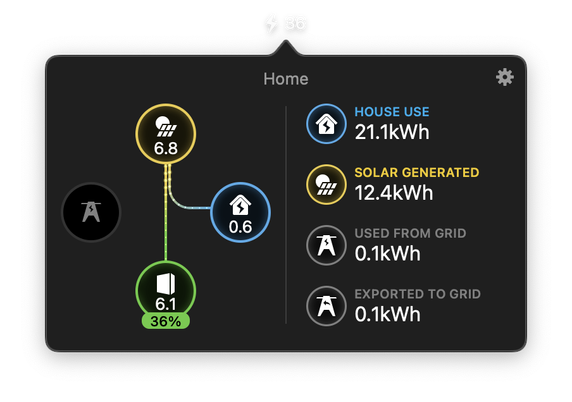
Powerwall Monitor

See what your Tesla Powerwall is doing at any time. Including live and animated power data as well as a daily summary. Available for Apple Watch and macOS.

Powerwall Monitor - Fantastic Sprinkles
@rustyshelf looks very much like the Enphase web interface. Nice!
@rustyshelf can I draw something this pretty in Python? Probably not. But maybe I will try someday.
@jsnell this one is animated as well, but Python can totally do anything right? (plus these are just 45 PNGs in a trench-coat anyway)
@jsnell Thank you Jason, what a timely post! I'm about to get my system upgraded to enphase gateway and my plan for tonight was to figure out all the details of their api. Your code will save me a ton of work 😀
@jsnell Oh, cool! We have an Enphase system, though it’s a few years old. We don’t have consumption metering or batteries yet - maybe in a year or two. Will have to look into this, thanks…
@jsnell It took my way too long to realize this was about your solar ENERGY system, and not THE solar system.
@jsnell Oh hey this is relevant to my interests!
@jsnell hmmm, I have an Enphase system, but when I log into entrez… it won’t give me a token without some system info.
@Schwieb you gotta put in the name of your system
@Schwieb BTW you were one of my inspirations in terms of dreaming on solar, thank you
@Schwieb @jsnell It’s probably going to be easier to pipe this all through HomeAssistant and query it with an API that doesn’t fight you all the time.
@jeffkibuule @Schwieb ha yep when I hear Home Assistant I think "easy" 🙃
@jsnell @Schwieb Easier and more reliable than the EnPhase API. And you get history too.
@jeffkibuule @Schwieb it's a single JSON file. And "you get more" is not an answer to "easier." C'mon. Go sell home assistant to someone else.
@jsnell @Schwieb Alright, I admit I pushed to hard. I am glad it works for you!
@jsnell I got my solar setup a little over a year ago, and I’m very happy with it! I would have gotten a bigger battery if I’d known though.
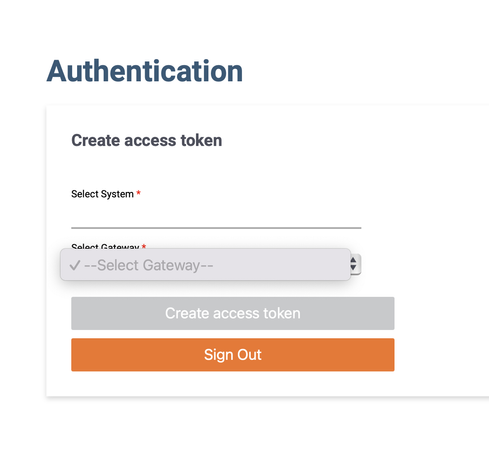
@jsnell How did you get the token? I can't fill anything in here:
@hsl first you have to start typing the name of your system into the top box, it'll then autocomplete, then you can choose from the the bottom - it's bad web UI for sure
@jsnell Thanks, that worked. By the way, did you go for the Enphase IQ batteries?