I've got #CubicSDR running, outputting to the Mac Mini (linux) headphone jack.

Then I've got pavucontrol running a Monitor of Stereo Output, & set the Recording Input to be that same Monitor.

Then #QSSTV is listening to the PulseAudio Sound Server.

Shown, it's on the APRS 2m frequency, just so I can SEE some signal making it all the way through.
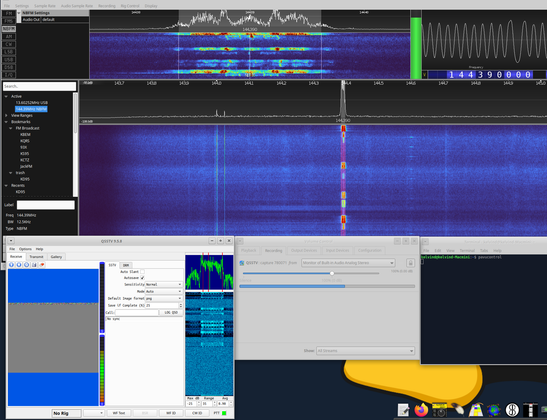
Now I'll QSY it 145.800 for #ARISS #SSTV

I'd never seen #QSSTV decode anything but colorful snow/noise. Figured I'd better test this.

Found an SSTV audio test at https://www.youtube.com/watch?v=SffT9U8scBc to play through my headphones, which sat upon my HT, transmitting lowest possible power at 144.8MHz.

With QSSTV's Mode set to Auto, no joy. But when I forced it to PD120, I got a perfect copy of the image.

Need to test whether "Auto" even works, or find out in advance what mode #ARISS will use.

PD120 SSTV Test Recording

YouTube

Ah... Auto works fine.

I switched the RX Mode to Auto, hit the eraser Delete button to clear anything in the buffer (or whatever), & made sure that the HT was keyed down when the starting tones began.

Then un-keyed and keyed up several times while the YT was playing. As you can see, this behaved as expected.

Now, for when the ISS might be above the horizon here, we use #GoSatWatch app on iOS.

(Edit: Yes, I went into iOS Settings and re-enabled Notifications for GoSatWatch, so it should ping me 1 minute before each pass.)

I got one from the 11:57am pass!

It's not good and clear, but hey, IT'S THE FIRST SSTV IMAGE I'VE EVER RECEIVED OVER THE AIR AND I'M RIDICULOUSLY EXCITED!
#HamRadio #SlowScanTV #ARISS