
I never use Caps Lock, so I disable the Caps Lock key completely with xmodmap, to avoid hitting it by accident.

Occasionally my X server gets into caps-lock state anyway. (Usually some complicated stunt was involved, like attaching x11vnc to the display remotely.) And then I can't turn it off again using the Caps Lock key.

So I wrote a tiny X client that lets me type 'xcapslock off' at a shell prompt …

… and then I had to make an alias to it, called 'XCAPSLOCK OFF'.

@simontatham I modified my keymap so that I have to press shift+capslock (or shift+numlock) to lock/unlock them. So, no accidental triggering anymore, but I can still use it if I really want to
@pulkomandy neat – I don't know how to do that, on any OS. On X11 (which I know best) I'm 75% sure there's no way to do it with plain xmodmap, but maybe the richer XInput API has a way?

@simontatham I have this for numlock but I'm not entirely sure of what it does:

xmodmap -e 'keycode 77 = NoSymbol Num_Lock'

I didn't try caps lock yet, does it not have a keycode, or would it just be confused about shift?

@pulkomandy aha, nice! Generally 'keycode K = a b c d' means that K generates symbol a unshifted, b shifted, and I think c with AltGr and d with both modifiers.

xmodmap -e 'keycode 66 = NoSymbol Caps_Lock' is the Caps Lock equivalent of your Num Lock line. So I was wrong (or perhaps '25% wrong' :-). You _can_ do it with plain xmodmap.

@simontatham @pulkomandy the Japanese keymap has that by default (without Shift it's part of Japanese IME, with Shift it's CapsLock), so that would be a good starting point to see how it's done in different systems.
@simontatham I simply remove the capslock key from every keyboard I ever have to use more than once.
@simontatham Took me a second to fully appreciate that last line. :-)
@simontatham I have mapped it to a weird key combination for that reason, that I have to look up everytime this happens.
@simontatham Caps Lock becomes Escape for me on any machine I spend any time on.
@alexanderdyas since my previous view of Caps Lock was 'that key I used to keep hitting by accident', I never quite felt it would be a good idea to remap it to any actual action, even a more useful one :-)
@simontatham @alexanderdyas it makes using vim great to have caps lock mapped to escape.
@simontatham I've taken to solving this one layer below: you can mess with the event system to remap keys even before X ever sees them. Additional benefit is that they're remapped even on the console.
The downside is that you might have to do this for every keyboard you have on the system, as they don't necessarily agree on the low level key codes. Specifically the built-in laptop keyboard usually doesn't use USB key codes.

@Lalufu I must admit that I also cling to an old-fashioned idea that computers are still multi-user. Even my personal ones: I have been known to give other people accounts on them, and when those people use their accounts, they _don't_ want the effects of bizarre things like this intended for just me.

So I still think it makes more sense to put my preferences in my account, not systemwide. This is also a reason I haven't taken the Caps Lock keycap off.

@simontatham Fair point.

@Lalufu though admittedly one flaw in this concept is the login screen. If I have a preferred keyboard layout that's not the systemwide one, I'd like to use it to type my password – especially since I'll _also_ sometimes need to type my password after logging in, and it's doubly annoying to do it in two different finger shapes!

I don't know if any login-screen software temporarily enables each user's keyboard preferences for their password prompt. Or even if it _could_, securely.

@simontatham @Lalufu I think I’ve seen it done, with a display manager (can’t remember which) maintaining a cache of preferred session type and keyboard layout for each username.

@simontatham @Lalufu I finally gave up on the whole "even my PC is multi-user" on the latest install, and it's such a nice experience. I highly recommend it, if you can. I still have a shortcut to map my keyboard back to querty, for when someone needs to type something, but I'm not setting up any accounts.

MS Windows switches layout for different users. I would be surprised if there aren't one like it available for other OSs too, but I never checked.

@simontatham Just start all your terminals with `stty iuclc`.

(A joke.)

@simontatham I may have some aliases along those lines.

alias nordconnect="nordvpn connect"

@simontatham interesting, I’ve never seen that in over 20 capslockless years… but I don’t attach x11vnc.

If you just need "a" remote seesion but not necessarily attach to th currently running session, I can recommend xrdp+xorgxrdp on the server side, and rdesktop or some other RDP client to connect. It also has keymap issues, but slight (basically, I need to revert to the default US layout without my customisations outside if I want to use similar xmodmap effects inside, and inside it uses the older XFree86 / pre-evdev Xorg keycodes).

@simontatham I think I'd alias it to something like BOY, I SAY, BOY.
@simontatham Maybe you need a "Caps Lock Lock" key. Usually you'll leave Caps Lock disabled, but when you need it, the "Caps Lock Unlock" feature is right there! ;)
@simontatham I use a HHKB that has the Ctrl key where Caps Lock usually is. When I need Caps Lock, I set left shift + right shift combo to Caps Lock.
@metalfabs @simontatham OP's caps lock ... lock scenario happens to me while using my HHKB but infrequently enough that I yank its USB, plug it back in and carry on.
@simontatham I have "x11vnc -display :0 -auth /var/run/lightdm/root/\:0 -R clear_all" in my bash history on soooo many VMs now.

@simontatham I actually use and like to have Caps Lock.

But I believe the Debian installer still contains a change I made when I discovered that the Brazilian Portuguese keyboard layout has 106 keys, and / is on the 106th key - so I had to be able to switch out of it manually without needing to type any absolute paths!

@simontatham I was going to suggest the built-in xkbmap option to turn LShift+RShift into Caps for such situations (as I usually run with -option compose:caps, it goes well with -option shift:both_capslock)...

Something else, vaguely similar, used to happen for me when I was doing nested RDP connections from Linux – FreeRDP into a VM host, then console into a VM – the X server would sometimes get stuck thinking a nonexistent /Shift/ key was pressed, just from watching a VM boot. What really made it weird is that it wasn't in Caps mode, as even holding physical Shift wouldn't return to lowercase (as normally would with Caps + Shift); it was as if I had a third Shift key stuck.

I could never figure out any any way to undo that, short of restarting the entire X server. Perhaps fortunately, Xwayland seems to be more resilient to that (and less impactful to restart anyway).

@simontatham I remapped mine to <compose>, which is occasionally useful and a lot less annoying when you aim for the <a> mid-sentence and miss.
I then mapped both-shift-keys-at-the-same-time to toggle capslock, for the occasional moment when I WANT TO TALK LIKE AN ANTHROPOMORPHIC PERSONIFICATION.

As this is Linux, I've long since forgotten how I achieved either of these things.
@simontatham I always remap Caps Lock -> Control which helps for Emacs key bindings
@simontatham Apparently 1 in every 15200 keys I press on this laptop is capslock. 1 in 30400 of course, because of the toggling. Still higher than I'd expect. Recorder is at https://github.com/ralight/keycounts
GitHub - ralight/keycounts

Contribute to ralight/keycounts development by creating an account on GitHub.

GitHub
@simontatham Interesting. I have the caps lock key bound to compose in my GNOME session and it’s never been an issue for me, not when I used X and not now when I use Wayland.
@simontatham Although I did not manually tinker with any of the X keymap stuff. I just set compose:caps in the xkb options…
@simontatham I've ended up rebinding it to F13 which I then use as push to talk in various voice call applications. Works really well and doesn't clash with anything else.

@simontatham I usually xmodmap Caps Lock to ctrl. Which has way better ergonomics.

Though you will still need a tool like you describe.

@simontatham OMG this made me laugh out loud
@simontatham I do something similar and named my script HELP
@simontatham I set `capswapescape` instead
@simontatham
How about a (soft) link in bin and doing a toLower() on the arguments?
Or no arguments and checking argv[0]s capitalization?
OK, i ges that is more work than an alias.
@simontatham Get a USB foot pedal and map it to caps-lock.
@krh if I had one of those, it would be mapped to 'mute' in voice calling applications! 'Sneeze pedal'.
PC USB Triple Action Foot Switch(Black)

@krh @simontatham I love the "any of your feet" phrasing, just so as to be inclusive of hexapodia.
@ajlanes @simontatham To be fair, pressing all three for ctrl-alt-delete does seem difficult with only two feet.
@simontatham
Funny. I remap capslock to ctrl and doing that with windows powertoys this would be a somewhat frequent occurrence.

@simontatham I map caps lock to escape and escape to caps lock. I'm never hitting the escape key by accident.

It's obviously great for vim, but even better for StarCraft.

@simontatham I once accidentally xmodmapped all the letters to digit 1. Took some clicking to recover from that one.
@simontatham That was worth it. 😄
@simontatham It's a shame such a great spot on the keyboard has such a useless default key mapping. I've found it useful to map capslock to backspace but I have run into similar typing-before-the-rebind-script-runs issues.
@simontatham I tried like step 1 of this path, some app I used ignored it, I foresaw a long lonesome path of trying to get it universally respected and being repeatedly thwarted— I'm not much for X Windows wrangling but I've used linux for too long— so I just pried the caps lock key off.

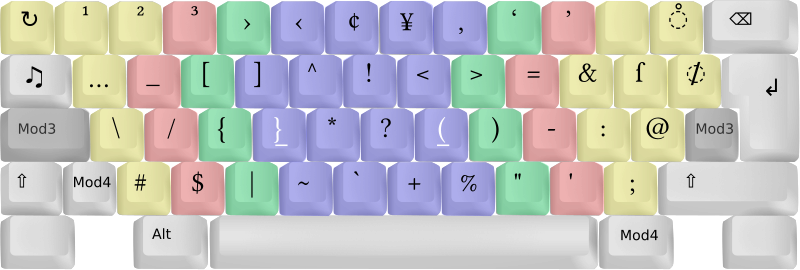
@simontatham My favorite use for caps lock is what the Neo2 keyboard layout uses it for: A modifier key, that when pressed maps “programming characters” like ( [ { to the home row for ergonomic typing.

See Layer 2 here https://en.wikipedia.org/wiki/Neo_(keyboard_layout)

P.S. Might be a bigger deal in German keyboard layout where these characters are very hard to reach 🤷‍♂️

Neo (keyboard layout) - Wikipedia

@simontatham have you tried setxkbmap -option "ctrl:swapcaps"
@simontatham same using capslock as ESC key. Way more convenient