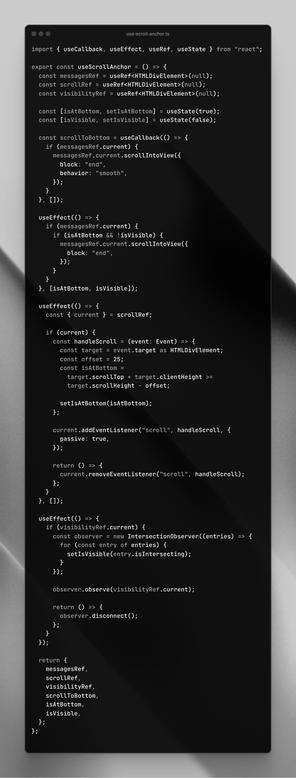
Today I saw this React hook (see photo) get shared on birdsite. It enables one to “automatically scroll down when new messages arrive in a chat”.

While it might work, you could — and should — use this little bit of CSS instead:

```
.log {
scroll-snap-type: y proximity;
align-content: end;
}
.log::after {
display: block;
content: "";
scroll-snap-align: end;
}
```

“… remains snapped to the bottom …unless the user has scrolled away from that edge” — https://drafts.csswg.org/css-scroll-snap/#example-d0a2d86f

CSS Scroll Snap Module Level 1

@bramus whoa. I had no idea this was possible! nice tip!
@bramus I wrote a hook for exactly this purpose and looking decently similar back in 2018 which is still in service. Pretty amazing to see it completely unnecessary now.
@sangster The web always catches up (eventually) 😊
@bramus well technically mine also does data fetching for infinite scroll but it would be significantly simpler without the scroll behavior
@bramus Never do with 4 lines of CSS what you could do with 150 lines of React
@casey I should print and frame that 😅😂

@bramus I had no idea this was possible but was curious how it works, so I made a quick #codepen of this idea: https://codepen.io/mgrubinger/pen/LYKQaQz

I love how simple (and reliable) this #css solution is!

Stay at Bottom of Appending List using CSS Scroll Snapping

...

@grooovinger @bramus </3 this makes swipe scrolling try to end up lining up with every message on iOS safari, it feels really weird
@grooovinger @bramus with and without this scroll snapping. Hoping this is a problem that could be fixed with more CSS?
@h I fixed the width, but I can't reproduce the strange behaviour (no iPhone around at the moment, simulator looks fine). Which iOS/Safari version are you on?

@grooovinger @bramus it doesn't seem to work in Firefox unfortunately.

Based on Can I Use, `scroll-snap-type` and `scroll-snap-align` are supported, but maybe not these values?

@grooovinger
Hhm it seems it does not work with my Android Firefox.
@bramus

#codepen #css

@chfkch @bramus apparently it's not supported by firefox yet.
@grooovinger @chfkch Yeah, noticed that too … filing a bug as that should actually work.

@grooovinger @chfkch Bug Report: https://bugzilla.mozilla.org/show_bug.cgi?id=1914178

Workaround: instead of snapping generated content, you can snap the `:last-child`.

1914178 - scroll-snap not working on generated content

UNCONFIRMED (nobody) in Core - Layout: Scrolling and Overflow. Last updated 2024-08-21.

@grooovinger @bramus as cool as this is, I think this also breaks inertia scroll on iOS. 🤔 Thanks for building it though, I was curious to implement it myself when I tread the original Toot. 😊

I feel like I’ve read about a similar solution using overflow-anchor somewhere, but I might be mistaken, since that property doesn’t do what I thought it did. 😅

@amxmln I tested it today on a real iOS device. Can confirm that inertia is not the same as without snapping, which I guess makes sense but is still a bit disappointing. Hopefully I'll get around to play with the pen a bit more, maybe this can be fixed.
@bramus Ha, I discovered this trick this week-end while attempting to have a scroll container initialised with scroll end without JS, but then I haven’t found a way to “unlock” the scroll without JS.

@bramus There is also `overflow-anchor` as covered at CSS Tricks: https://css-tricks.com/books/greatest-css-tricks/pin-scrolling-to-bottom/

Here is a pen I made combining with another #CSS only trick to start the scroll from bottom with zero JavaScript:

https://codepen.io/Merri/pen/BagrowG

Pin Scrolling To Bottom - CSS-Tricks

In perhaps in the top 5 most annoying things a website can do is this. You're trying to read something (or click something!) and all the sudden the page shift underneath you (or you mis-click!). There is a CSS property that can help fix that. Plus, we can exploit it to do something that was previously exclusively in the realm of JavaScript.

CSS-Tricks

@MerriNet Checked this in detail and while it does work, it doesn’t seem to play nice in situations where the scroller goes from non-overflowing to an overflowing state (which could be considered a bug).

Also a pity that it requires an element (or generated content) that actually takes up space (i.e. `min-height: 1px`).

And finally no Safari support for this, unfortunately :-(

https://codepen.io/bramus/pen/GRbxOPX/f6627102553f568a71fec831498b2d6b

Stay at Bottom of Appending List using CSS Scroll Snapping (overflow-anchor version)

...

@bramus Interesting, my pen works in Safari. So I tested a bit and `display: flex;` is what breaks it in Safari.

I don't have time to check if there is a bug report for Safari on this.

@MerriNet Oh, I think we may be talking about two things here. Was talking about `overflow-anchor` which I used in that last demo I linked to.
@bramus I'm talking about that. It works (stays in bottom also in Safari) once you remove `display: flex;` on the `#list` element.
@bramus how does this compare to using `flex-direction: column-reverse;`?
@KitHenry @bramus Was going to ask the same thing, especially combined with the `reverse` attribute on `ol`.
@Siilwyn @KitHenry This approach can unsnap (when scrolling back up) and re-snap again (when scrolling back to the end). AFAIK the `column-reverse` approach doesn’t allow that.
@bramus Thank you this is amazingly simple.
@bramus My favorite part of the hook is the lack of comments 🙃