Gerardo Rodriguez

47 Followers
73 Following
101 Posts
Chicano • Latino • Front-end Developer @CloudFour • Striving for an inclusive web • Go Blazers! Go Ducks! • he/him • #BlackLivesMatter • Opinions are my own
Cloud Fourhttps://cloudfour.com/is/gerardo/
Twitterhttps://twitter.com/_gerardo
LinkedInhttps://www.linkedin.com/in/rodriguezgerardo/
GitHubhttps://github.com/gerardo-rodriguez

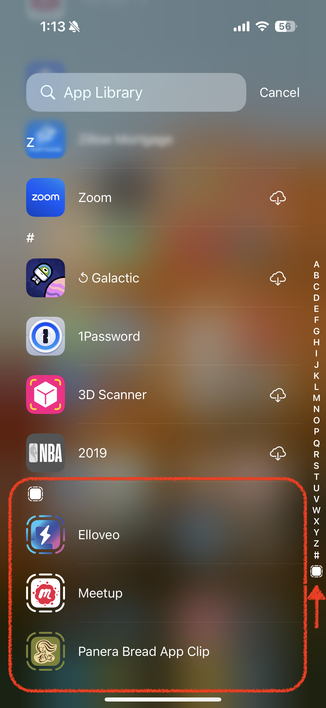
Follow up question about iOS App Clips. Do you have any installed on your phone right now? They are listed at the bottom of your App Library and have dotted lines around the icon.

https://appletoolbox.com/how-to-find-and-remove-app-clips-from-your-iphone-on-ios-15/
It used to be quite challenging to set the precedence of individual #CSS rules without a lot of headaches. (This encouraged the practice of authoring many small utility classes that do very little on their own.)

Thankfully, that’s no longer the case. Here’s a simple example: https://cloudfour.com/thinks/cowardly-defaults-and-courageous-overrides-with-modern-css/

#WebDev #FrontEnd

Cowardly Defaults and Courageous Overrides with Modern CSS

Let’s make a more useful utility class without giving up any versatility.

Cloud Four

I’ve been designing web experiences for 20+ years. While I use and enjoy dedicated design software, I’m pretty sure I design “in the browser” more than most.

Here are just a few reasons why… https://cloudfour.com/thinks/why-i-like-designing-in-the-browser/

#WebDesign #DesignProcess #HTML #CSS

Why I Like Designing in the Browser

It can be surprising for new clients to see just how much of our design process happens in HTML, CSS and (light) JavaScript.

Cloud Four

🌐 If you’re going to build for the web, build *on* the web.

If I was only able to give one bit of advice to any company: iterate quickly on a slow-moving platform.

Hi, @peterwooley! This is a totally random question, but @tylersticka mentioned you might be using a headphone amp in your workspace. I only recently learned they are a thing and am now super curious. If you do use one, I’m curious about your experiences and what you use! 😊

PixelPalooza is a free single-day virtual conference for web developers with a focus on media… images, video, audio, streams, and more.

I’m excited to present “GIFs Are Forever, Let’s Make Them Better!”

November 21! That’s in two weeks! Be there: https://cfe.dev/events/pixelpalooza-2024/

#WebDev #Events

PixelPalooza 2024

PixelPalooza will explore all the ways we, as developers, can leverage media like images, video, audio and documents across our sites and applications.

Hey, everyone! “Design for Real Life” is now available online, in full, for free, at https://dfrlbook.com. It’s all the same content Sara Wachter-Boettcher and I wrote in 2016, but now it’s free for everyone. (If you’d like your own paper or electronic copy, there’s a “Buy the book” page on the site.) Read, share, spread the word—thanks!
Design for Real Life

You can capture CSS selector stats and identify slow selectors in the Performance panel! #chromedevtools #css #webperformance

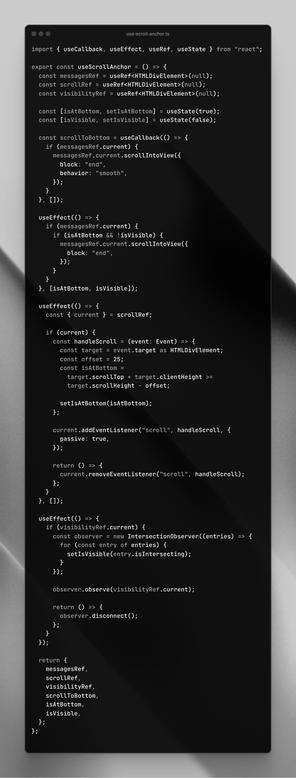
Today I saw this React hook (see photo) get shared on birdsite. It enables one to “automatically scroll down when new messages arrive in a chat”.

While it might work, you could — and should — use this little bit of CSS instead:

```
.log {
scroll-snap-type: y proximity;
align-content: end;
}
.log::after {
display: block;
content: "";
scroll-snap-align: end;
}
```

“… remains snapped to the bottom …unless the user has scrolled away from that edge” — https://drafts.csswg.org/css-scroll-snap/#example-d0a2d86f

CSS Scroll Snap Module Level 1

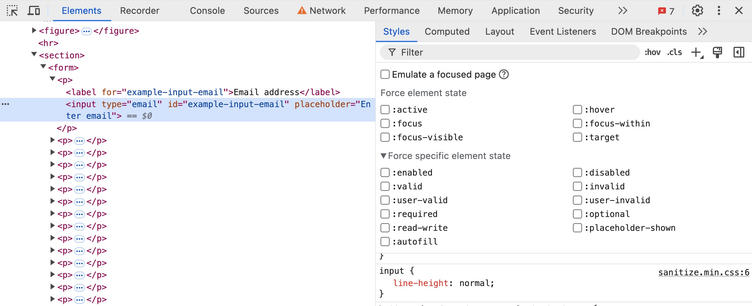
New in @ChromeDevTools (in Chrome Canary): You can now force more states – such as :active, :focus, … – onto elements.

For example, when inspecting an <input> element you can now also force states such as :enabled, :valid, etc.