entering text in the terminal is complicated https://jvns.ca/blog/2024/07/08/readline/
Entering text in the terminal is complicated

Entering text in the terminal is complicated

Julia Evans

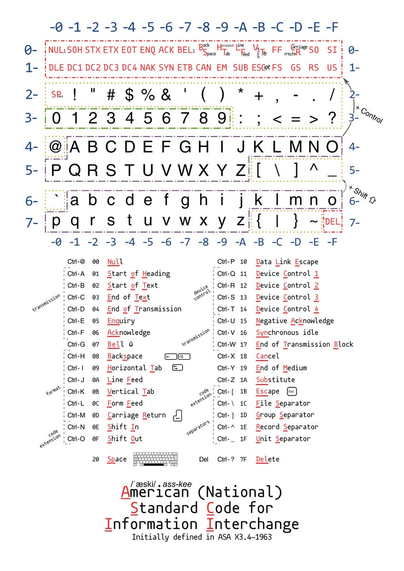
someone in the replies elsewhere pointed out that Ctrl+J = 10 in the ASCII table = LF ("line feed") = Enter (because J is the 10th letter of the alphabet)

so Ctrl+J is the same as pressing enter

which I don't have any practical use for but is kind of cool

(edit: some corrections in this reply: https://pgh.social/@ben/112752235264922484)

Ben Cox (@[email protected])

@[email protected] This isn't quite right in a few ways. LF is decimal 10, ascii 0x0a. It is 10 because it's the 10th letter of the alphabet, though. But it's not the same as pressing enter except in cooked tty modes, where the terminal driver converts the return key (^M, \r, ASCII 13 / 0x0d) to a newline (^J, LF, 10/0xa) which your program then sees as its input.

pgh.social
also someone elsewhere left a comment like "I CAN’T BELIEVE IT TOOK HER 15 YEARS TO LEARN BASIC READLINE COMMANDS". those comments are very silly and I'm going to keep writing “it took me 15 years to learn this basic thing" forever because I think it's important for people to know that it's normal to take a long time to learn “basic" things
@b0rk This is absolutely positively a true statement.
@b0rk Anyone who isn't still learning things 15 or more years into their career—even “basic” things (these are not basic)—is so deep in a rut that they can no longer see out of it.
@b0rk wow! people love to make people feel bad on purpose! thanks for doing what you do to normalize actually needing to learn :)
@b0rk I feel like it's unlikely that anyone was trying, struggling for fifteen years to learn them. It's more like they never got around to it. And very likely didn't need that specific piece of knowledge for their day to day.

@b0rk haha yeah I have been doing this a lot longer than 15 years and this is the first time I have really _thought_ about how terminals work

one thing I don't get is: If ^W isn't handled by readline (or friends), what *is* doing it? How do backspace and word-backspace work?

How... does character entry work at all??

@njvack honestly I didn't dig into that in the post largely because I don't understand it well either, I think it's the "unix terminal driver", but like what is that?? how does it work? it's a weak point for me and I'm hoping to understand it at some point
@b0rk @njvack I think "man termios" may be a good starting point. This documents the ioctl interface of the line discipline of the tty driver, which is what the tty utility uses to do its magic. It is mostly based on the POSIX standard, with some Linux extensions. Key point is that the driver can operate in different modes. Older commands run in cooked mode where the tty driver does very basic command line editing. Bash, pico, vim, etc use raw mode and handle everything themselves.

@b0rk @njvack

⌃W and ⌃U and ⌃Q and ⌃S and so on hide away deep inside: stty all

for example

$ stty -a
...
intr = ^C; quit = ^\; erase = ^?; kill = ^U; eof = ^D; eol = <undef>; eol2 = <undef>;
swtch = <undef>; start = ^Q; stop = ^S; susp = ^Z; rprnt = ^R; werase = ^W; lnext = ^V;
...
$

macOS

% stty -a
...
cchars: discard = ^O; dsusp = ^Y; eof = ^D; eol = <undef>;
eol2 = <undef>; erase = ^?; intr = ^C; kill = ^U; lnext = ^V;
min = 1; quit = ^\; reprint = ^R; start = ^Q; status = ^T;
stop = ^S; susp = ^Z; time = 0; werase = ^W;
%

part of how you can test for this is to try inside of: cat -

the ⌃W and ⌃U will work there, even when Arrow Keys etc don't work there

<=

macOS lets you spell out 'stty -a' as 'stty all', but Linux doesn't

Linux lets you abbreviate 'stty -a' as 'stty --all', but macOS doesn't

'stty -a' reports the 'stty ixon' vs 'stty -ixon' toggle in a different output line apart from these mentions of ^Q ^S, but you often need to add 'stty -ixon' to make the ⌃S forward-search-history properly undo
the ^R reverse-search-history mentioned
by Bash bind -p |grep C-[rs]
or the ^R history-incremental-search-backward
by Zsh bindkey |grep '\^[RS]'

i can't remember how often Zsh needs this workaround = maybe less often than Bash

⌃W and ⌃U are not precisely ^W and ^U, because "^" is pure Ascii and more classic, but ⌃ is the Unicode Up Arrowhead U+2303 that's part of ⌃ ⌥ ⇧ ⌘ ← ↑ → ↓ ⎋ ⏎ ⇥ ⇤
@b0rk @njvack It helps to remember that a tty used to just be an RS-232 serial line. A character would come in, an interrupt would get generated, and the tty handler would read the char from a register and put it in a buffer for the attached program to eventually read(). That's raw mode. Cooked is when the driver kept a line-buffer, and would interpret chars as they came over the wire - printable? echo and place in buffer; ^J?, send buffer on to consumer to read(), ^U, kill buffer and start over
@b0rk @njvack ^H? send back '^H ^H' to erase char on terminal, and move the head of the buffer back one. Other chars like ^C, ^Z, ^\, etc would instead send a signal to the process group attached to that tty and the signal handler would be invoked or the process killed.
@gomijacogeo @b0rk I think the thing I need to keep remembering is that at some point, ... something (I'm not 100% sure what — the tty handler? readline?) is telling _my terminal emulator_ to do something with the characters
@njvack @b0rk Yeah, it was a lot simpler 40+ years ago where each component was a separate, tangible box connected by wires. Made it easy to keep track of what was done where. A modern terminal emulator, on one side talks to the window system and sees keypress events and does advanced font rendering. On the other side, it talks to a pty which is an abstraction of that ancient RS-232 line and is mostly a serialized byte stream that the kernel then treats as input and output.
@njvack @b0rk If the tty is in cooked mode, those simple tasks - echoing, ^H, ^W, etc are done by the tty driver. In raw or cbreak (like raw, but still looks for things like ^C ^Z ^\ etc), then it is the consuming program (eg readline, vim, etc) that reads chars and then decides what to send back to the tty and then to the emulator to be displayed (usually lots of escape codes to handle positioning along with the one or two chars to actually display).
@b0rk @njvack Then X11 came along and we needed a tty-like abstraction to attach these newfangled terminal windows to processes, because all the I/O and job control was wired to talk to a tty-shaped device. And some new side channels were added (e.g. SIGWINCH). So there are a ton of ioctls() to talk to the driver and control/interrogate exactly what kind of tty it really is.
@b0rk @njvack Oh yeah, you also needed ptys for telnet/rlogin/ssh-like services. And the tty driver was already hellishly complex even before GUIs entered the picture. Tons of respect to anyone who unpeels the onion in the modern era - so many moving parts.
@b0rk @njvack One other thing that was an A-ha! moment for me back in the day was learning that stty uses an ioctl() to determine the tty behind stdin, so you can redirect from another tty (assuming you have permission) to see its settings. So, assuming /dev/ttys000 is a different window, I can 'stty -a < /dev/ttys000' and see how the flags change between cat, bash, and vim for example.
@gomijacogeo huh that stty trick is great

@njvack @b0rk In Unix there are parts of the kernel, called "device drivers", that handle device I/O. In this case it's the "terminal driver". The terminal driver gets control when a process issues a `read()` or `write()` call on a file descriptor that has been opened to a device. Also, when the hardware I/O bus signals an I/O interrupt, the kernel transfers control to the appropriate driver the handle the interrupt.

When you type a character on a terminal, there is an I/O interrupt and the kernel asks the terminal driver to handle it. Normally, the driver just copies the character into a per-device buffer, waiting for the next read() call from the user process that has the terminal open. If the character was a control-W, though, the driver instead erases characters out of that buffer back to the last whitespace. Later, when the user process does `read()` to ask the driver for the contents of the buffer, the erased characters will be gone as if they had never been typed.

The driver may also send some delete characters back to the terminal to cause it to backspace and delete the erased word. (Normally, the terminal is in "no echo" mode which means it doesn't display what you type on it, instead it only displays whatever the terminal driver sends back.) If the driver knows you're on a non-backspacing terminal it may send something else to try to indicate that the word was deleted.

This is all in what's called "cooked" mode. Unix terminal devices also have a "raw" mode where the driver just copies stuff into the buffer with no processing. Tools like readline put the terminal into raw mode.

@njvack @b0rk I think this dates back to the days of slow remote serial terminals, or even teletypes? If you put some really basic line editing into the terminal itself and only send the entered text when pressing "enter", the experience feels a lot more responsive - and every program doesn't need to independently write its own implementation of backspace.

But yeah, very interesting legacy thing at this point, even tho many tools still rely on the behaviour.

I think in Linux it's implemented in the kernel's pty layer rather than separately in each terminal app?

@njvack @b0rk I only just realized why the mode where the terminal does line editing is called "cooked" mode. It's in contrast to the mode where apps get all the key presses one by one without preprocessing - "raw" mode.

@kepstin @b0rk I do know that a lot of this dates back to teletypes and the like. "/dev/tty0" is referring to a teletype, and a pty is a pseudo-teletype, and "vt100" was a "DEC Video Terminal 100" system.

I suspect you could, today, hook a modern linux system up to a teletype over a serial line and have it work correctly with relatively little effort

Then you wouldn't have a "terminal emulator program" — you would have a literal terminal

hmm

@njvack @b0rk oh, I agree that would probably work! I don't know anyone with a teletype, but I do know that one of my friends uses a pre-ANSI (not vt100 compatible) monochrome IBM terminal connected to their Linux box with only minor issues. Issues are mostly apps that don't use terminfo or termcap and assume an ANSI terminal is in use - they often print escape codes the terminal doesn't understand. Using "screen" as a translator is the easiest workaround.

@kepstin @b0rk hmmmmm looks like you can get a DECWriter for as little as $600 plus shipping

I could spend a lot of money and learn to use `ed`

I cannot think of a worse idea, and yet

@njvack @b0rk ttys are by default in cooked/canonical mode, which does some pre-processing such as handling ^W etc.

In order for a program to do it's own processing, it switches the tty into raw mode. Most terminal applications that supply their own line editing features would be in raw mode (e.g. ncurses, readline, etc).

* This is an over-simplification as what we call "cooked mode" or "raw mode" are actually 15 or so flags that are independently set. One these flags is ICANON. ICANON defines if the tty line-editing facilities are enabled. ICANON is set for cooked mode, and is cleared for raw mode.

You can see an example of how this is implemented in the N_TTY line discipline implementation in Linux: https://github.com/torvalds/linux/blob/4376e966ecb78c520b0faf239d118ecfab42a119/drivers/tty/n_tty.c#L1269C13-L1269C37

From here you can see some basic line-editing facilities implemented, i.e.: ERASE, WERASE, KILL, LNEXT, REPRINT, newline, EOF, EOL, EOL2.

linux/drivers/tty/n_tty.c at 4376e966ecb78c520b0faf239d118ecfab42a119 · torvalds/linux

Linux kernel source tree. Contribute to torvalds/linux development by creating an account on GitHub.

GitHub
@mary @njvack @b0rk It's very weird that this processing is done in the kernel. Feels like something that should really be userspace

@dcnick3 @njvack @b0rk Historically, terminals were hardware devices. This device is handled with two things: the terminal device driver, and the line discipline. The obvious place to do line discipline was in the kernel, between the user application and the device driver.

Unfortunately, Linux is not a microkernel.

@b0rk working in software requires people to be lifelong learners. Thanks for setting a good example.
@b0rk there are literally millions of basic things no one can learn all of them no matter how many years they have

@b0rk yes, this! so so much this!

like, what is this fictitious world in which every aspect of every tool is learned right away? everybody looks at things from a perspective informed by where they are at that moment and what they want to do. sometimes, that puts the spotlight away from (otherwise) foundational tools. sometimes that puts one in positions where memorising 1–2 command variations without fully understanding the entire tool is good enough(tm).

and everybody has these ‘blind spots’ – i.e. things that were more front and centre for somebody else.

it’s silly to pretend otherwise.

@b0rk I've been using variants of the unix command line for 25 years and I'm still stumbling into new things. Nobody knows *everything*.

@b0rk right? That sort of commentary serves no purpose. And there's always new stuff to learn.

There's probably even a better way to do my go-to readline use case, one I haven't discovered yet:

```
read -s PASS
export PASS
```

@b0rk I’ve been coding for 40 years. I still learn new things every day. And forget other ones every day. We’re people, not books.
@aral @b0rk Exactly, especially the "forget other ones every day". I think by now I've learned the order of the parameters to "ln -s" about a dozen times or so. 🤷

@mmeier If it's useful to you, I did notice that ln is symmetric to cp, in that you create a new file from a source (and you can also leave out the new file's name and just specify the containing directory). One command copies the contents, the other just references the source.

But tbh, I just remembered the melody of "target link name" at some point and keep saying it inside my head.

@aral @b0rk

@b0rk There are lots of 'basic' things I will never learn. Assuming otherwise seems presumptive at best, basically!
@b0rk I just found out yesterday there are terminal extensions to get key up events in the terminal. I naively thought for the last 20 years those were already there. https://sw.kovidgoyal.net/kitty/keyboard-protocol/
Comprehensive keyboard handling in terminals

There are various problems with the current state of keyboard handling in terminals. They include: No way to use modifiers other than ctrl and alt, No way to reliably use multiple modifier keys, ot...

kitty

@b0rk there is something particularly juvenile about people assuming there is one particular order or traversal for how people should learn things – that if someone else doesn’t know a particular bit they are BEHIND or BELOW or BASIC.

it’s NORMAL that we all encounter the staggering diversity of technical details at different times and stages and it doesn’t mean something fundamental about your place in the hiearchy.

@b0rk
I remember a sysadmin at a company I worked at in 1993 used bat files to program CLIs for users. It would list options where your response would be the file name of that action's bat file, and to "secure" certain options, he would include special ASCII characters in the file name.
@b0rk Oh my! This brings memories of ‘\n’ vs. “\r\n” handling back to me, and not in a good way. https://stackoverflow.com/a/3821814/375
What's the difference between \n and \r\n?

They both mean "new line" but when is one used over the other?

Stack Overflow
@b0rk it's useful if the terminal type is wrong.
@chrisgerhard @b0rk Yes! I remember ctrl+j stty sane ctrl+j as the magic incantation on various unixes (AIX and Solaris, IIRC) when you had mistakenly piped a binary file to stdout and wrecked the terminal.

@b0rk Funny that the J character also looks a bit like the ↵ character :)

And the fact that `j` is VIM key to move the cursor down!

Coincidence? I think not!

@b0rk Also Ctrl-H is the backspace character (no matter what your backspace key enters), Ctrl-I is horizontal tab, and Ctrl-L is form feed.

That's also why Ctrl-L is so often the “clear/reset screen” command.

@b0rk yes, direct mapping from ctrl codes to characters. Many quirks in this “table” - a lot more than the original “ASCII”.

@Ange @b0rk
And a lot of those "control character quirks" have just become "how things are done" without anyone ever thinking about how it happened.

You can still use Control-D to exit a shell, Control-G sounds a bell and Control-H is either backspace or delete depending on what kind of computer you're using.

@Ange @b0rk In there also: the Escape character Ctrl-[ which we still use in ANSI escape sequences. (Might be a fun realisation: ah yes, that's why the left square bracket is there and they're called Escape sequences.)
@Ange @b0rk This explains a lot. e.g. why I see ^M in files with weird line encoding, why Ctrl-I works for tab.
A thought occurs: would I be asking too much to be able to do "Ctrl-V Ctrl-J" when entering a substitution in vim to enter a literal line feed (like I do with Ctrl-I for tabs?)?
@Ange typos
- in the list, Start of Text has the letters SOT underlined, but it should be STX
- in the list, Shift In and Shift Out are reversed. They're right in the table

@Ange @b0rk

1) excellent! Thank you for this!

2) this convinced me to start referring to ASCII as a binary file format

@b0rk Not the same combination, but I've used ^[ as escape when I couldn't quickly or easily find a way to press the key itself. You may have already come across it, but such control character combinations feel slightly more reasonable to me when looking at a 4-column ASCII table showing all of them: https://garbagecollected.org/2017/01/31/four-column-ascii/

[Edit: Ooh, this view of the table (from elsewhere in the tree of replies) looks interesting as well: https://mastodon.social/@Ange/112752251139584718]

Four Column ASCII

@b0rk You use ctrl-j in some contexts in Emacs for what I think is roughly that reason? I think it’s things like regex find/replace where you can’t hit enter or you’ll execute the command prematurely? My memory is a bit fuzzy.
@hyperpape @b0rk Yeah, you can enter a newline into the replace-string/replace-regexp minibuffer with C-q C-j. Leaving off the C-q seems to act like the enter key was pressed.
@b0rk The important corrolary: control-m is carriage return. Once in a while I encounter a situation in which hitting enter sends LF, but I'm talking to something (usually a tiny-brain embedded device) that expects CR and only CR to end an input line.
@b0rk one practical use for it is if your terminal becomes wonky. For example, characters not echoing and enter key not actually working. I've seen this when interrupting an ssh connection before being fully established. You can type 'stty sane' followed by a Ctrl+J and get it back. I do this at least four to five times a year.
@tildetodd “reset” is easier to remember & also fixes a borked terminal
@hober definitely true, and I use it quite often to fix paste issues in macOS, but "stty sane" is heavily engrained muscle memory from using it on older UNIX boxes.
@b0rk I recall that back in the day, when termcap databases were less complete or had worse defaults, there were some systems that I used to telnet/rsh/ssh into (I forget exactly what era this was) where I couldn't use the backspace key but could use Ctrl-H to backspace. Kind of a fuzzy memory, so I may be getting the exact details incorrect, but these kind random things occasionally do come in handy.
@b0rk it is just how it was designed. control plus keys of ascii lines 4x and 5x gives characters in lines 0 and 1 (block C0).And esc will gives lines 8 and 9 so block C1. But now we uses the “7 bits alias” so esc as control [. Much history but less ideal in modern world. usefulness to know c-j? imho just on binary/hex dumps