entering text in the terminal is complicated https://jvns.ca/blog/2024/07/08/readline/
Entering text in the terminal is complicated

Entering text in the terminal is complicated

Julia Evans

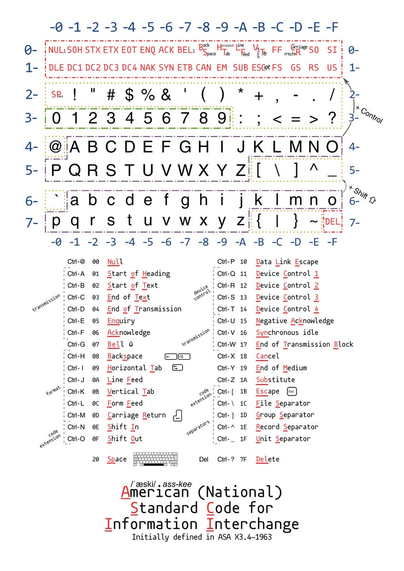
someone in the replies elsewhere pointed out that Ctrl+J = 10 in the ASCII table = LF ("line feed") = Enter (because J is the 10th letter of the alphabet)

so Ctrl+J is the same as pressing enter

which I don't have any practical use for but is kind of cool

(edit: some corrections in this reply: https://pgh.social/@ben/112752235264922484)

Ben Cox (@[email protected])

@[email protected] This isn't quite right in a few ways. LF is decimal 10, ascii 0x0a. It is 10 because it's the 10th letter of the alphabet, though. But it's not the same as pressing enter except in cooked tty modes, where the terminal driver converts the return key (^M, \r, ASCII 13 / 0x0d) to a newline (^J, LF, 10/0xa) which your program then sees as its input.

pgh.social
@b0rk yes, direct mapping from ctrl codes to characters. Many quirks in this “table” - a lot more than the original “ASCII”.
@Ange typos
- in the list, Start of Text has the letters SOT underlined, but it should be STX
- in the list, Shift In and Shift Out are reversed. They're right in the table