
The unbearable sorrow of Apple Weather

I’m being told the alignment is good when you’re using the default text size. I bumped mine up so long ago, I’d forgotten about it. Thanks for the heads-up; I’ll update the post shortly.

But I still don’t understand how alignment works. Don’t you need to account for text size when you position other items?
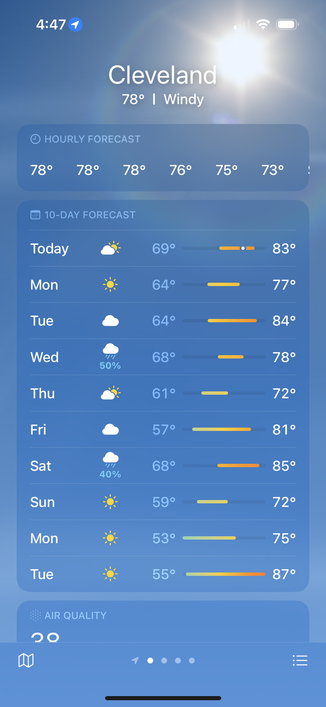
@drdrang yes but what you’re seeing is essentially a bunch of springs get compressed so the width of the weather icon/precipitation percentage affects the amount of horizontal space available for the chart. I’m not saying it’s a good design!
@nriley @drdrang One advantage of Apple's leadership being mostly in their 50s and 60s is that you'd think these layout problems with larger text sizes ought not to pass without notice.
@gruber @nriley Is the problem is that app developers *can’t* make adjustments for larger text sizes because things are set up for the system to do that automatically?
@drdrang @gruber @nriley there’s lots of tooling for adjusting layout based on font size up to and including switching interface orientation

@drdrang @gruber @nriley We developers can do what we want, and SwiftUI in particular makes this much easier than it used to be. All Dynamic Type settings can be detected and interface layout overridden as desired.

It’s just a matter of prioritization and/or sufficient Q/A testing.

@gruber @nriley @drdrang helping my mom use iOS and my apps with her large dynamic type on is how I got started getting serious about accessibility support. I have found some interesting issues with iOS and large text in the past.

Links to two examples:
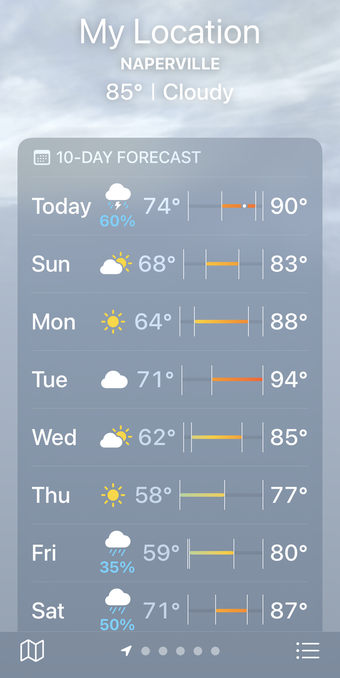
https://mastodon.social/@MuseumShuffle/111091995179538182

https://mastodon.social/@MuseumShuffle/112133690126918599

@MuseumShuffle Yikes! That’s an especially bad one.
@drdrang yeah and the one about the contact poster was so confusing. If I wasn’t on top of all the changes as a developer I wouldn’t know what that ui was indicating either.