Anyone have a recommendation for a HomeKit-compatible window AC unit? I’d like to be able to put it on a schedule that’s not horrible to program. Alexa and Google stuff not an option.

Eve Energy | evehome.com

With Eve Energy, switch your lights and appliances on and off using your voice or an app, and control them from afar. Matter-enabled to let you seamlessly control your home across smartphones and voice assistants of all major platforms.

evehome.com
@lennybacon @rmondello i used to have older a/cs behind eve energy, but scheduling that stuff in homekit is a nightmare because it’s not a real thermostat. you kinda have to program your own thermostat with a combination of eve room and eve energy. also, you can pretty much never change the temperature manually
@rmondello I use a Broadlink RM3 mini to control mine via IR signals. Not HomeKit compatible out of the box but it works okay and was much cheaper than a new AC.
@rmondello I haven't used it for a couple years but I have this https://www.amazon.com/gp/product/B07SM1RVD6 and it worked well with HomeKit natively.
Amazon.com

@rmondello I’ve had a decent experience with an LG window unit, but getting it into HomeKit required setting up https://homebridge.io
Homebridge

Homebridge adds HomeKit support to your non-HomeKit smart home devices.

@rmondello not sure if they’ve actually released anything meaningful yet in the matter/thread world (and therefore homekit), but i’m extremely satisfied with my pre-thread midea U. the app is slightly janky, but overall it’s pretty easy to program schedules. then i monitor temperature in a time series with eve room and energy usage with eve energy.
@rmondello I’d go with a Midea U-shaped window unit and use something like HomeBridge or Home Assistant to bring it into HomeKit. Costco sells them.
@covercash @rmondello I *just* bought one of these (haven't even set it up yet) and the newest model at least is Matter compatible and directly cites Homekit support on the box.
@jamie_blumberg @covercash Can you tell me exactly what you bought? Like model number and all?
@jamie_blumberg @rmondello awesome, I didn’t realize they finally shipped Matter units… I remember they had announced it but never heard anything after that.
@covercash @jamie_blumberg Jamie, I would genuinely love to get a mini review from you after you set this up. 🙏🏻

@rmondello Definitely! I'm hoping to do so this week. In my new house my bedroom is the top floor and it is getting far too warm up there for my liking.

@covercash

@jamie_blumberg @rmondello @covercash I just got one of these a couple of weeks ago. It's been great.

It's also been cool on the automation side of things! I'm struggling to get the current temperature, & then toggle it on/off, but after that, this thing is going to be *so* nice!

@rmondello @covercash My dad helped me get the window unit set up. It wasn’t *too* difficult but definitely a two person job, and if you aren’t handy you might want to hire help.

It is great at cooling the area around it, and doing so quickly. Adding it to Homekit is easy (just scan the code) which also adds it to your Wifi! You don’t have a ton of controls in Home (on/off, target temp and current temperature near the unit) but you can set up automations.

No complaints so far.

@covercash @rmondello newer model I linked to supports matter directly.

@rmondello

I just got but have not installed. My friend loves theirs. Says it’s super quiet with the U-shape design and you can still open the window. My friend does not have HomeKit model. This one just came out with Matter support.

I can attest to it being very quite in use from hanging with my friend.
https://www.homedepot.com/p/Midea-8-000-BTU-115-Volt-U-Shaped-Smart-Inverter-Window-Air-Conditioner-Wi-Fi-for-up-to-350-sq-ft-MAW08U1QWT/327511952

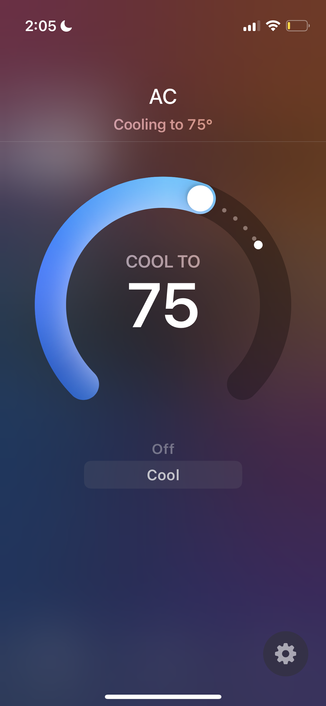
@rmondello installed. Setup in home app was very easy. Press and hold a connect button on the AC for 3s then go to home and add device. Then scan the QR code on the side. It shows up as a thermostat? Siri on HomePod had no issue turning it off and then on again while also changing the cooling temperature.
@rmondello there are no other controls available in home app though. To change modes, adjust the fan speed, and adjust vent angle you’ll need to use the Midea app.
@rmondello I’ve used a smart plug with a HomeKit temp sensor and made an automation using the Home+ app.
@rmondello Mysa makes a thing that basically can control almost any unit with a remote and I use that to HomeKit my home’s mini splits. Including turning off and on via geofencing. (Schedules are one thing, automatically turning off when I leave home and firing up as I’m heading back towards home is almost more important for me.)
@rmondello Just saw this thumbnail. Perhaps you can DIY a solution: https://youtu.be/gz7p2awDmXo?si=YXzCUbKUk1VuYINH
DIY Smart Air Conditioner Using an ESP8266, ESPHome and HomeAssistant | Step-by-Step Guide

YouTube
@rmondello not sure if you’ve bought something already, but I had a GE one that had native HomeKit support and it was great. Affordable too