 Josh
Josh BrianKrebs
TIL you can quickly find your own posts by including "from:me" in the search box and then a key word or phrase you're searching for. Yes, it took me this long to figure that out.
 Jaime Herazo
@briankrebs
I was today's years old when i learned about this 😅
@j3j5 @OkieSpaceQueen @briankrebs Well that woke me up. I’ve wanted to re-find things I’ve interacted with a lot. Looking around I see that @FediTips has a nice list of search operators and other features here:
https://fedi.tips/how-do-i-search-for-stuff-on-mastodon/
This all assumes your instance is running at least Mastodon 4.2.0 and has the ElasticSearch feature.
This is the current operator list the article provides for Mastodon 4.2.0. Read the full web page for more details.
@nazgul @j3j5 @OkieSpaceQueen @briankrebs
You can also use more than one operator in the same search, so if you combine them you can filter things quite precisely. For example use before: and after: to have posts from a very specific date range.
You can also use the minus sign before an operator to exclude those posts from results.
Now *that’s* helpful. Most of my favorites are made so I won’t lose the post, but I didn’t know I could search them
Thank you!
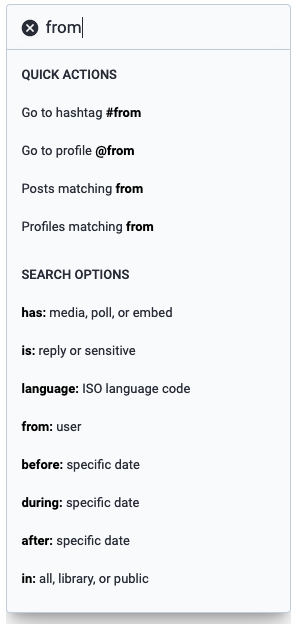
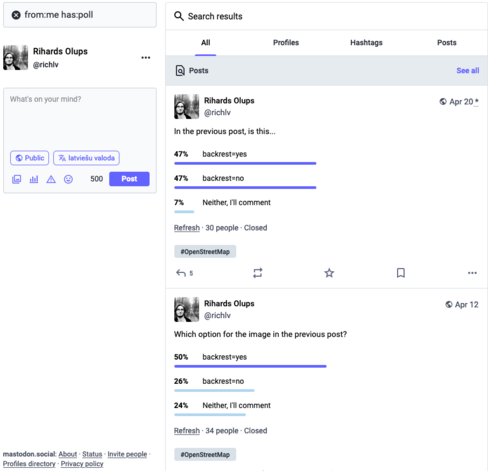
IMPORTANT @briankrebs do not use spacing around the colon. search options have to be treated as one word, as in:
in:library
from:me
the font used for the pop-out in the deck’s search form still doesnt have the kerning adjusted and it looks like there’s a space there. there should be no space.
@briankrebs OH MY GOD THIS WAS A THING?
That's such a useful macro what the fuck.
 Julio J. 🀲
 Kee Hinckley
 Fedi.Tips
 Michael
 Deb has moved! (see profile) 🇨🇦
 Peter Butler
 Mauri
Mauri 🇺🇦🇪🇺 cweickhmann
 Rihards Olups
 Flominator
 Laimis
 your auntifa liza 🇵🇷 🦛 🦦
 RadioPhobicSherkPop
 Michael Stanclift
 Steve Moore
 Brar Piening
 Seong's 🎄 Seongs
 Jan Dytrych🇨🇿🇺🇦
 Cat 🐈🥗 (D.Burch)
 Tim Bray
 💡𝚂𝗆𝖺𝗋𝗍𝗆𝖺𝗇 𝙰𝗉𝗉𝗌📱
 Saagar Jha