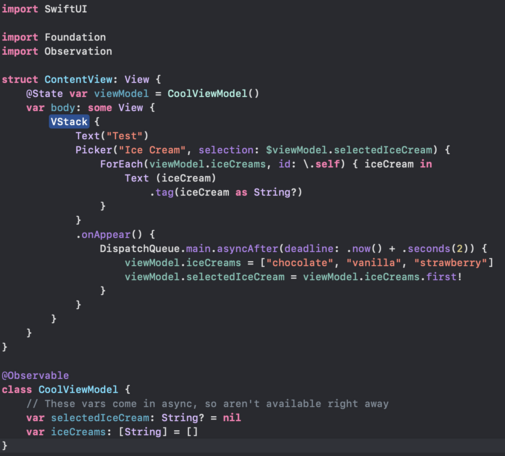
Small addendum to my previous code question, how do I use an @​Observable as a binding if the object I want to bind is optional? In this case, the object might not be immediately available as it comes in async, but once it comes in, I want it selectable

This code compiles, but the selection is never saved

There's probably a better way to structure this too, in that case I'm all ears!

Gist: https://gist.github.com/christianselig/792257d1270f0c6dd3ebd9fde062ed51
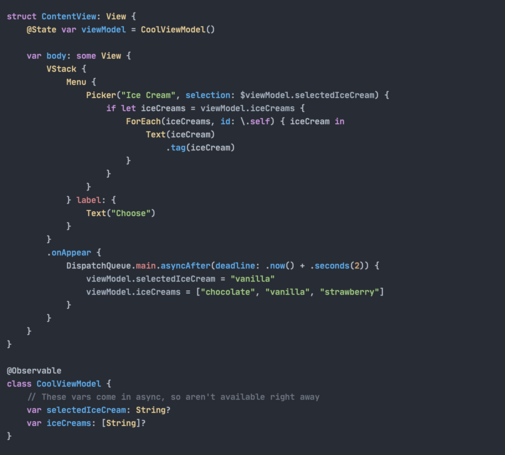
icecreamobserving.swift

GitHub Gist: instantly share code, notes, and snippets.

Gist
Bindable | Apple Developer Documentation

A property wrapper type that supports creating bindings to the mutable properties of observable objects.

Apple Developer Documentation
@bwebster @christianselig this. And I just went through this same confusion. It’s very odd declaring a bindable inside a view body as a flow but solves the problem
@bwebster I think I understand Bindable in the context of initializing a new object with the Bindable object, but how would I use it here?
@christianselig I think you should be able to just replace @State with @Bindable in that example? (not 100% sure as I've only used it a couple times myself)
@christianselig I think this may be an issue of the type of the .tag being `String` instead of `String?`, which you can fix by doing `.tag(Optional(iceCream))` or casting it to `String?`
@zachwaugh @christianselig I think this is what I had to do in a project when the picker value was optional.
@zachwaugh Aah that worked a charm, thank you!
@christianselig Are you aware of „Bindable“? You can also define a Bindable var inside your body callback to access stuff from the environment. https://developer.apple.com/documentation/swiftui/bindable
Bindable | Apple Developer Documentation

A property wrapper type that supports creating bindings to the mutable properties of observable objects.

Apple Developer Documentation
@maxmelzer How would I use it in this situation? I've tried a few different incantations to no avail
@christianselig Oooh, I think I figured it out. The problem is not about the Observable at all. The trick is that the type of your .tag must be exactly the type of your selection binding, including optionality. Try using „.tag(iceCream as String?)“, that should do the trick.
@christianselig Ah, sorry, I see you already got that info. Thanks for the small puzzle, though! :)
@christianselig Can’t you just make it non-optional and use a default instead? (I would go with “chocolate”😁)
@drewmccormack @christianselig you could also just use an empty string/array too right?
@christianselig FYI the `.tag()` modifier is superfluous here — it provides the same identity as the `ForEach()` already provides
@layoutSubviews If I drop it though, it no longer works :(
@christianselig ah, right, because of the outer `if let`. My bad.
@layoutSubviews Oh all good, I'm appreciative that I now understand why it's needed :p
@christianselig @layoutSubviews Wait, I don’t understand! Please explain. 😊
@christianselig the tag type needs to exactly match the selection binding type—there's no implicit optional promotion
@christianselig I think you need to add @Bindable
@christianselig can you if let the Binding using the unwrap initializer and only the show the Picker?
@christianselig say Christian, where can I steal your Xcode color theme from? :D
@dinesharjani It's called One Dark! I don't quite remember where I got it from but it looks like a popular one at least
@christianselig feel like UX wise you are missing a loading screen. Present that while the list loads. Then when list is loaded select the first item. No need for optionals then.